
Blog
IPTV Service Guide: 9 Simple Answers


Quick answer: an IPTV service delivers live TV channels, movies and series over the internet instead of through cable or satellite. You need three things: a device (Smart TV, Fire TV, phone or computer), a stable internet connection, and a player app. The IPTV service gives you a login (username, password and server address) that you enter in the app.
Table of Contents
What is an IPTV service?
New to IPTV? Read what IPTV is and how it works first; this guide is about choosing and using a service.
IPTV stands for “Internet Protocol Television”. Instead of an antenna, a satellite dish or a cable box, the TV picture travels through your normal internet connection, the same way a video on YouTube or Netflix does. The difference is that an IPTV service focuses on live TV channels, often grouped by country and category, plus a library of movies and series on demand.
You can read the technical background in the Wikipedia article on IPTV. For everyday use, you only need to know the few terms explained below.
How it works
- Servers receive the channels and send them as video streams over the internet.
- Your internet connection carries the stream to your home, like any other online video.
- A player app on your TV or phone shows the channel list, the TV guide and the video.
To connect the app you use one of three common methods: an Xtream Codes login (server address, username and password), an M3U playlist link, or a MAC-based app such as Hot Player, where the playlist is linked to your device’s MAC ID.
What you need
- A device: Smart TV (Samsung, LG, Android TV), Amazon Fire TV Stick, Android TV box, iPhone or iPad, Android phone or tablet, or a Windows or Mac computer.
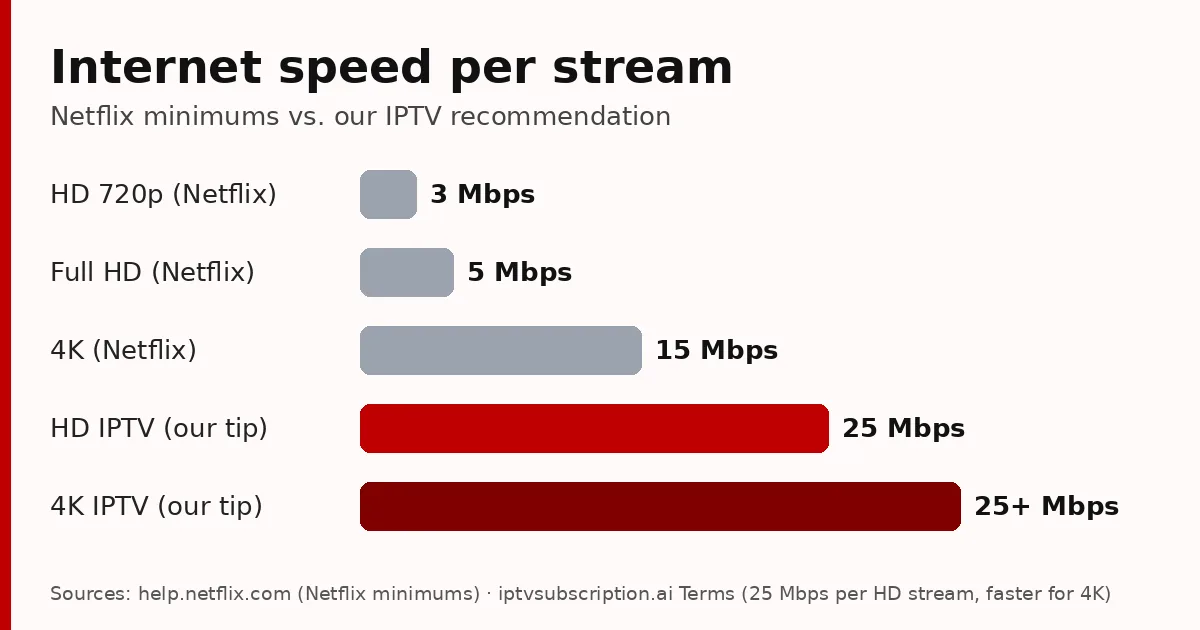
- Internet speed: we recommend at least 25 Mbps per stream for HD and a faster connection for 4K. A network cable is usually more stable than Wi-Fi in the evening.
- A player app: we recommend Hot Player, but most IPTV apps that support Xtream Codes or M3U links work.
- Your login details: sent by email after your payment is confirmed.
IPTV vs cable and streaming apps
- Cable and satellite need a box, often a contract and an installation. IPTV only needs your internet connection and an app.
- Streaming apps such as Netflix are mostly on demand: you choose a film or episode. IPTV focuses on live channels, with a TV guide, plus a movie and series library.
- Flexibility: IPTV works on the devices you already own, and you can usually watch on the TV and the phone with the same app.
- The trade-off: picture quality depends on your internet. On a slow or busy Wi-Fi connection, live channels can buffer, which is why a short trial matters.
Key terms, explained simply
- EPG: the TV guide: what is on now and next on each channel.
- VOD: video on demand: movies and series you can start whenever you like.
- Catch-up: watch programmes that were broadcast in the last few days, on channels that support it.
- Time shift: pause or rewind live TV for a while, when the app and channel support it.
- M3U: a playlist link that lists all your channels; you paste it into the app.
- Xtream Codes: a login type with a server address, username and password.
- MAC ID: your device’s unique code. MAC-based apps like Hot Player link your playlist to it.
- Anti-freeze: server and app techniques that reduce buffering when many people watch at once.
How to choose an IPTV service
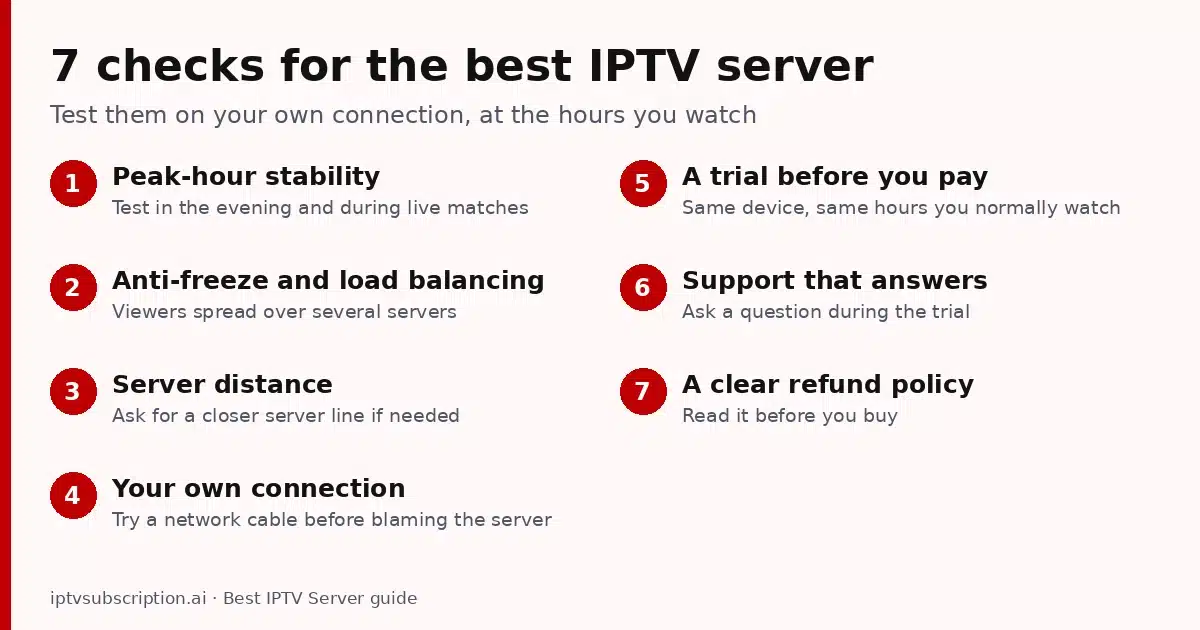
The short version is below; the full checklist, red flags and questions to ask are in our best IPTV service guide.
A good service is one that works smoothly for you. Before paying for a long plan, check these points:
- A short trial on your own device, in the evening, when networks are busiest.
- Real support that answers questions before and after you pay.
- A clear refund policy that you can read before you buy.
- Clear prices with no hidden renewals.
- Normal payment options and an order confirmation by email.
Be careful with “lifetime” offers for a small one-off price and with services that have no contact details: servers cost money every month, so those deals rarely last.
What our plans include
All our plans include the same channels and features; they only differ in how long they last. Every plan is a one-time payment, with no automatic renewal.
- 1 month + 1 month free: $13.95
- 3 months: $29.95
- 6 months + 2 months free: $45.95
- 12 months + 2 months free: $68.95
- 24-hour trial: $2, to test it first.
Features on every plan: anti-freeze technology, HD, Full HD and 4K streams, weekly content updates and human support on WhatsApp. See all details on our pricing page, and our 7-day refund policy.
Start in 3 steps
- Choose a plan in the shop or start with the 24-hour trial.
- Pay with Remitly, crypto, Revolut or a card at checkout. Paying by bank transfer? Follow our Remitly guide.
- When we confirm your payment, you receive your login by email. Follow the setup guide and start watching.
More guides: What is IPTV and how it works · How to get IPTV · IPTV setup guide · Hot Player on Firestick · Best IPTV for Firestick · Best IPTV service: 8 checks · Best IPTV player by device · Best IPTV box · IPTV not working? Quick fixes · IPTV lifetime subscription: 5 checks · Cheap IPTV subscription · IPTV Smarters Pro subscription setup · Best IPTV for TiviMate · Add IPTV to Plex · Hot Player on Samsung & LG · Best IPTV server: 7 checks · Pay with Remitly
IPTV service FAQ
What is an IPTV service?
A service that delivers live TV channels, movies and series over the internet. You watch it in a player app on your TV, phone or computer with the login the service gives you.
What do I need to use an IPTV service?
A device (Smart TV, Fire TV, phone or computer), a stable internet connection (we recommend 25 Mbps per HD stream) and a player app such as Hot Player.
Does an IPTV service renew automatically?
Not with us. Every plan is a one-time payment; when it ends, you can renew from our renewal page.
Which player app should I use?
Any app that supports Xtream Codes or M3U links works. We recommend Hot Player for its simple interface and MAC-based activation.
Already a customer and your plan is ending? Renew your IPTV subscription in about 2 minutes.