
Blog
Best IPTV for TiviMate: 5 Simple Setup Steps


Quick answer: the best IPTV for TiviMate is a subscription that gives you an Xtream Codes login (so channels, movies and the TV guide load together), stays stable at peak hours and offers a cheap trial so you can test it on your own Android TV or Fire TV. TiviMate is only the player; the subscription decides the channels and the picture quality.
Note: we are not affiliated with TiviMate or its developer. We sell IPTV subscriptions that work in TiviMate and in other players.
Table of Contents
What makes the best IPTV for TiviMate?
TiviMate is a popular IPTV player made for TV screens, known for its clean TV guide grid. It does not sell channels: you add an IPTV subscription as a “playlist”. A subscription is a good fit for TiviMate when it has:
- An Xtream Codes login. TiviMate also accepts M3U links, but Xtream Codes is quicker to enter with a remote and brings the TV guide with it.
- A complete TV guide (EPG). The grid is the main reason people choose TiviMate, so the guide data needs to cover your channels.
- Evening stability. Test live sports at peak hours during a trial; daytime tests prove little.
- Clear channel groups by country and category, so the grid stays easy to browse.
- A cheap trial and real support, so you can check all of this before a long plan.
Our best IPTV service checklist has the full list of checks and red flags.
Which devices run TiviMate?
TiviMate is designed for TV devices: Android TV and Google TV boxes and TVs, NVIDIA Shield-type boxes, and Amazon Fire TV Sticks. On a Fire TV Stick it is usually installed with the free Downloader app; our best IPTV for Firestick checklist explains how to install apps safely.
On a Samsung or LG Smart TV, TiviMate is not an option; use a TV-store app such as Hot Player instead. Our best IPTV player guide compares players for each device.
How to add an IPTV subscription to TiviMate

- Get your subscription details. After payment you receive a username, a password and a server URL by email (and an M3U link if you prefer).
- Open TiviMate and add a playlist. Choose the Xtream Codes option.
- Enter the server URL exactly as in your email, including http:// and the port number, then your username and password.
- Name the playlist (for example “Living room”) and confirm. TiviMate loads the channels and the TV guide; the first load can take a minute.
- Open the TV guide. If some channels show no programmes, update the EPG in the playlist settings and wait a moment.
Using an M3U link instead? Paste the full link, and add the EPG (XMLTV) link from your email in the playlist settings so the guide fills in.
TiviMate problems: quick fixes
- “Playlist could not be loaded”: check the server URL (http:// and port) and retype the username and password.
- Empty TV guide: update the EPG in the playlist settings; with an M3U link, make sure the EPG link was added.
- Buffering at night: use a network cable or 5 GHz Wi-Fi, and close other downloads.
- A channel plays black: try another channel; if only one fails, tell support its name and the time.
More fixes in our IPTV not working checklist.
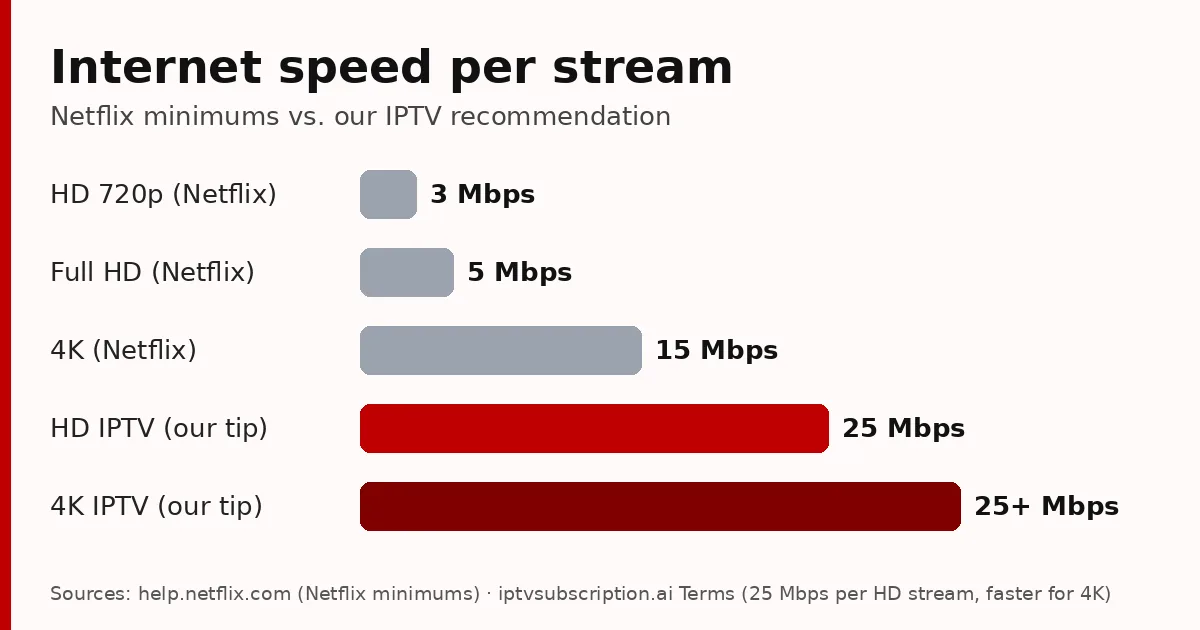
For smooth TiviMate playback we recommend at least 25 Mbps per HD stream, and more for 4K channels. Run the speed test on the TV device itself, at the time you usually watch, because a phone next to the router can show a much better result than the box behind the TV.
Tips to keep TiviMate fast
- Hide channel groups you never watch. A shorter list makes the guide grid quicker to scroll and load, especially on a Fire TV Stick.
- Add favourites for the channels you watch every day, so they open in two clicks.
- Update the TV guide once a day, not every hour; frequent updates slow small devices down.
- Restart the device once a week to free memory, and remove apps you don’t use.
- Install updates only from the official source, never from “modified” versions shared online: they can carry malware.
With a tidy playlist and a stable subscription, TiviMate feels much like a cable box, with a guide that is easy to use from the sofa.
Our IPTV subscription for TiviMate
Our subscription includes an Xtream Codes login and an M3U link, so it works in TiviMate as well as in IPTV Smarters, Hot Player and other players.
- 24-hour trial: $2, to test it in TiviMate first.
- Plans: $13.95 for 1 month + 1 free, $29.95 for 3 months, $45.95 for 6 months + 2 free, $68.95 for 12 months + 2 free (all prices).
- One-time payments, no automatic renewal.
- Help on WhatsApp: +1 917 924 8236.
Also using IPTV Smarters on your phone? See our IPTV Smarters Pro subscription guide. The XMLTV guide format used by IPTV apps is described on Wikipedia.
Best IPTV for TiviMate: FAQ
What is the best IPTV for TiviMate?
A subscription with an Xtream Codes login, a complete TV guide and stable evening streams, plus a cheap trial so you can test it in TiviMate on your own device.
Does TiviMate come with channels?
No. TiviMate is a player. You add an IPTV subscription to it as a playlist, with an Xtream Codes login or an M3U link.
Should I use Xtream Codes or M3U in TiviMate?
Xtream Codes when you can: it is quicker to type and loads the TV guide automatically. With M3U, add the EPG link separately.
Does TiviMate work on Samsung or LG TVs?
No, it is made for Android TV, Google TV and Fire TV devices. On Samsung and LG, use a TV-store app such as Hot Player.
Are you TiviMate?
No. We are an independent IPTV service, not affiliated with TiviMate. Our subscription works in TiviMate and in other players.