
Blog
Best IPTV Service: 8 Simple Checks Before You Pay


Quick answer: the best IPTV service is the one that stays stable on your internet at the hours you watch, carries the channels you actually want, works on your devices, and lets you test it with a cheap trial before you pay for months. Clear one-time prices, real support and a refund policy you can read are the other signs of a good provider.
Full disclosure: we sell an IPTV subscription, so we won’t pretend to rank our competitors. Instead, this guide gives you the checks we would use ourselves, so you can judge any provider, us included.
Table of Contents
Why there is no single “best IPTV”
Lists of the “best IPTV” services are everywhere, but the same service can be smooth in one home and buffer in another. Three things decide your experience:
- Your connection and location: the distance to the provider’s servers and how busy your internet is in the evening.
- What you watch: a sports fan, a family with kids and someone who wants channels from home need different lists.
- Your devices: a Fire TV Stick, a Samsung TV and an iPhone use different apps.
That is why the best IPTV service for you is the one that passes the checks below on your own TV, not the one with the loudest advert.
Best IPTV service: 8 checks before you pay
- Stable at peak hours. Test in the evening and during a live match, when most people watch. Daytime tests prove very little.
- Your channels are there. Ask for the channel list or check the categories during the trial. A big total means nothing if your three favourite channels are missing.
- It works on your devices. The service should give you an Xtream Codes login, an M3U link or a MAC activation that your player app accepts.
- A TV guide (EPG). “Now and next” on every channel makes hundreds of channels usable with a remote.
- A cheap trial. A short paid or free trial lets you run these checks before a long plan.
- Clear one-time prices. You should see exactly what you pay and whether anything renews automatically.
- Real support. Send a question before you buy. Fast, clear answers now usually mean help later.
- A refund policy you can read before paying, with the conditions written down.
6 red flags when choosing an IPTV provider
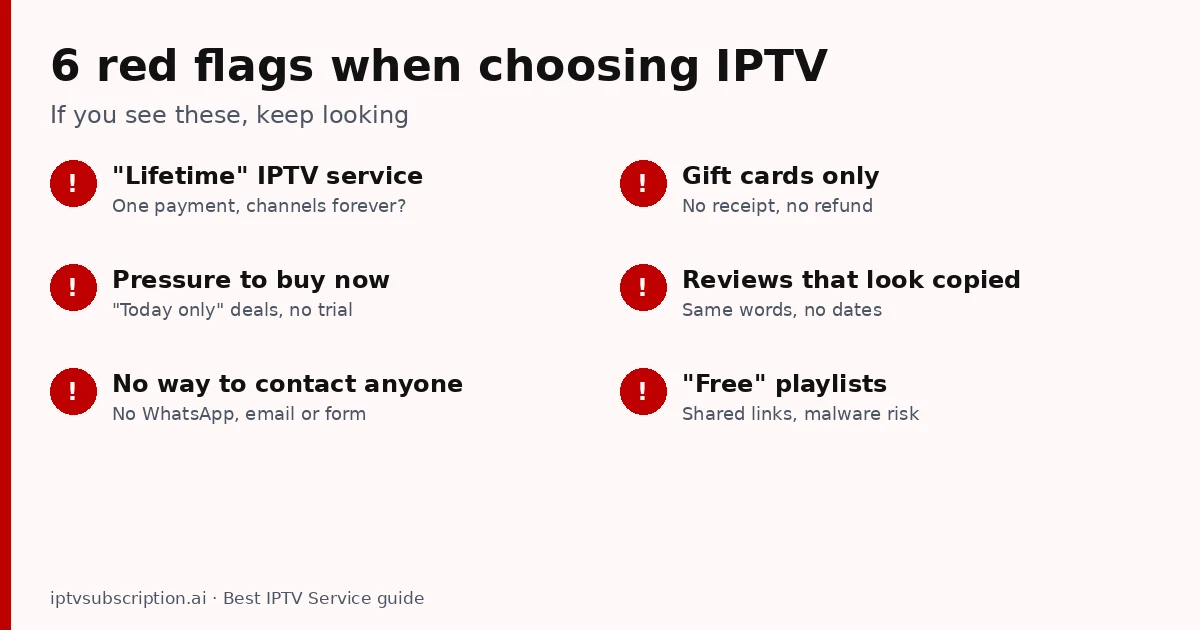
- “Lifetime” IPTV service. Running servers costs money every month, so a single payment for channels forever is hard to keep. (A lifetime app activation, like a player licence, is a different thing: see our IPTV lifetime subscription guide.)
- Pressure to buy now. “Today only” deals and no trial push you into a long plan before you can test it.
- No way to contact anyone. No WhatsApp, email or contact form means no help when something stops working.
- Gift cards only. Payments with no receipt and no buyer protection make refunds almost impossible.
- Reviews that look copied. The same sentences on many sites, with no dates or details, are a warning sign.
- “Free” playlists. Shared links stop working quickly, can carry malware and usually come from services without the rights to the content.
How to test the best IPTV provider during a trial
- Install the player app on the device you really use and follow the provider’s setup steps.
- Watch a live sports channel in the evening for 20 to 30 minutes and note any freezing.
- Open your 3 or 4 favourite channels and the TV guide.
- Try one 4K channel if your TV supports 4K.
- Send support a question and time the answer.
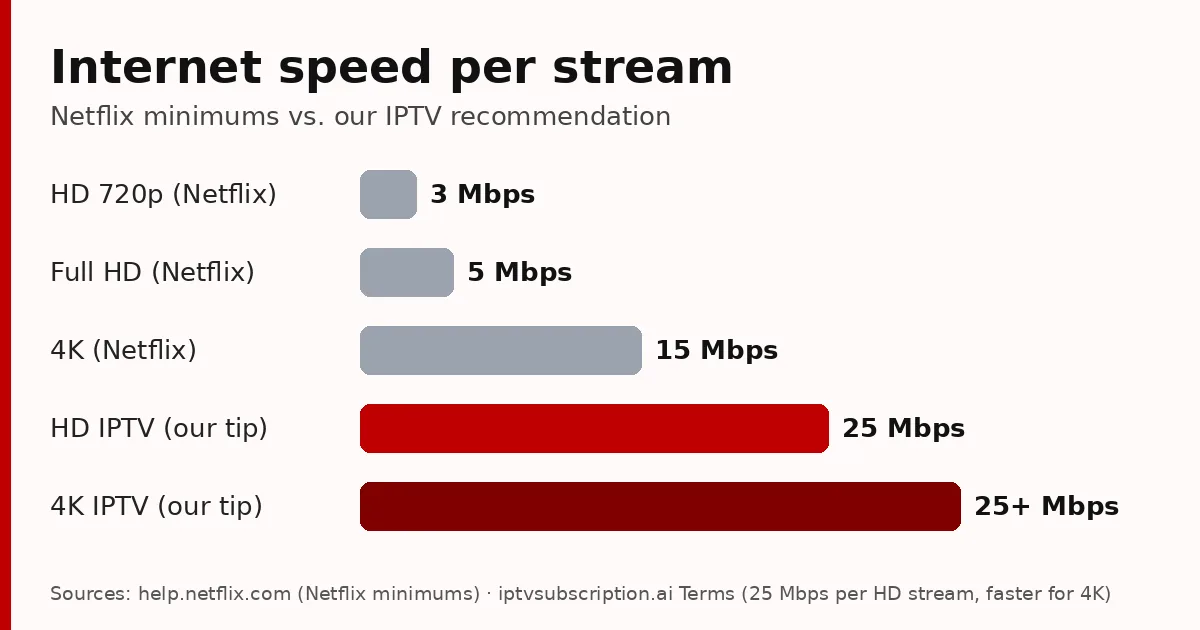
Our 7 checks for a stable IPTV server explain each step in detail, including how much internet speed you need.
5 questions to ask before you pay
- Which login types do you support for my device (Xtream Codes, M3U or MAC)?
- Do you have the channels I watch most? (Name them.)
- Does the plan renew automatically?
- How do I reach support, and how fast do you answer?
- What does your refund policy cover?
A good provider answers all five clearly. If the answers are vague, keep looking.
How we measure up
Since you are on our site, here are our own answers, so you can compare:
- Trial: a 24-hour trial for $2.
- Prices: $13.95 for 1 month + 1 month free, $29.95 for 3 months, $45.95 for 6 months + 2 free, $68.95 for 12 months + 2 free. One-time payments, no automatic renewal (all prices).
- Logins: Xtream Codes and M3U, plus Hot Player MAC activation.
- Support: WhatsApp +1 917 924 8236 and our contact page.
- Refunds: read our refund policy before you buy.
- Payment: Remitly, crypto, Revolut or a card at checkout, with an order confirmation by email.
Then test us the same way you would test anyone else. If we don’t pass the checks on your TV, don’t buy a long plan.
New to IPTV? Start with what IPTV is and how it works and how to get IPTV. On a Fire TV Stick? See the best IPTV for Firestick checklist. Background on the technology: Internet Protocol television on Wikipedia.
Best IPTV service: FAQ
What is the best IPTV service?
The one that stays stable on your internet at the hours you watch, has your channels, works on your devices and offers a cheap trial, clear prices, real support and a readable refund policy. Test it on your own TV before a long plan.
What is the best IPTV provider in the USA or UK?
It depends on your connection and what you watch. Use a short trial to test evening stability and your favourite channels where you live.
Is a more expensive IPTV service better?
Not always. Price matters less than stability at peak hours, support and clear terms. A cheap trial is the best way to find out.
Are lifetime IPTV subscriptions worth it?
Be careful: servers cost money every month, so lifetime service offers are risky. A lifetime app activation (like Hot Player) is different from lifetime channels.
How many channels do I need?
Fewer than you think. Check that the channels you watch every week are there and have a TV guide; the total count matters much less.