
Blog
What Is IPTV? How It Works in 4 Simple Steps


Quick answer: what is IPTV? IPTV means Internet Protocol Television: TV channels, movies and series delivered over an internet connection instead of a cable, satellite dish or antenna. You watch it in a player app on a Smart TV, Fire TV Stick, phone, tablet or computer.
This guide explains what IPTV is in simple words, how it works step by step, the three types of IPTV, what you need to watch it and how it compares with cable and streaming apps. If you already know the basics and want to pick a provider, read our IPTV service guide instead.
Table of Contents
What is IPTV?
IPTV stands for Internet Protocol Television. “Internet Protocol” (IP) is the set of rules every device uses to send data over the internet, the same rules that carry web pages, video calls and emails. With IPTV, the TV picture travels in that same way: as small packets of data that your device puts back together into a smooth video.
Classic TV works differently. Cable TV sends many channels down a coaxial cable at the same time, satellite TV beams them from space to a dish, and an antenna picks up radio signals from a nearby transmitter. IPTV needs none of these: if a device can go online and run a player app, it can show IPTV.
So what is IPTV in practice? For most people it is a subscription with a channel list, a TV guide and a library of movies and series, all inside one app on the screen they already own.
How does IPTV work? 4 steps
- Channel source. The provider receives the live channels and stores the movies and series it offers.
- Encoding. Each video is compressed (with codecs such as H.264 or H.265) and cut into small IP packets, so it can travel quickly over the internet. Better compression means sharper pictures with less data.
- IPTV servers. Servers send the stream to every viewer who opens that channel. Good providers spread viewers over several servers, so one busy server doesn’t make everyone buffer.
- Your player app. The app on your TV or phone receives the packets, rebuilds the video and shows the channel list and TV guide (EPG).
All of this happens in a few seconds. When you change channels, the app simply asks the server for a different stream. That is also why your own internet connection matters so much: the picture can only be as stable as the line that carries it.
The 3 types of IPTV
1. Live TV
Live channels play in real time, just like normal TV: news, sports, kids’ channels and entertainment. The EPG shows what is on now and next.
2. Video on demand (VOD)
Movies and series you can start whenever you like, pause and resume later. This part feels like a streaming app.
3. Catch-up and time shift
Catch-up lets you watch programmes that were already broadcast, usually from the last few days, on channels that support it. Time shift lets you pause or rewind a live channel for a while. Both depend on the channel and the player app.
Managed IPTV vs internet IPTV
There are two ways IPTV reaches homes, and it helps to know which one people mean:
- Managed IPTV is TV that an internet or phone company sends over its own network to a set-top box it rents to you. Because the company controls the whole line, it can reserve bandwidth for the TV picture. Many telecom TV packages work this way.
- Internet IPTV (also called OTT, “over the top”) travels over the public internet to an app. You can use any internet provider and any compatible device, which is why it is so popular on Smart TVs, Fire TV Sticks and phones. The trade-off: quality depends on your connection and the provider’s servers.
IPTV subscriptions like ours are internet IPTV: no box to rent and no installer visit, just an app and a login.
What is IPTV used for?
Knowing what IPTV is, the next question is what it is good for. People use IPTV to watch live TV on any screen in the house, to follow sports and international channels, to keep a movie and series library in the same app as their channels, and to replace an expensive cable package. Families often use it on the living-room TV and on phones while travelling.

A Smart TV, a Fire TV Stick or an Android box turns any television into an IPTV screen. Phones, tablets and computers work too, so the same subscription can follow you around the house.
What do you need to watch IPTV?
- A device: Smart TV (Samsung, LG, Android TV), Amazon Fire TV Stick, Android box, iPhone or iPad, Android phone, or a Windows computer.
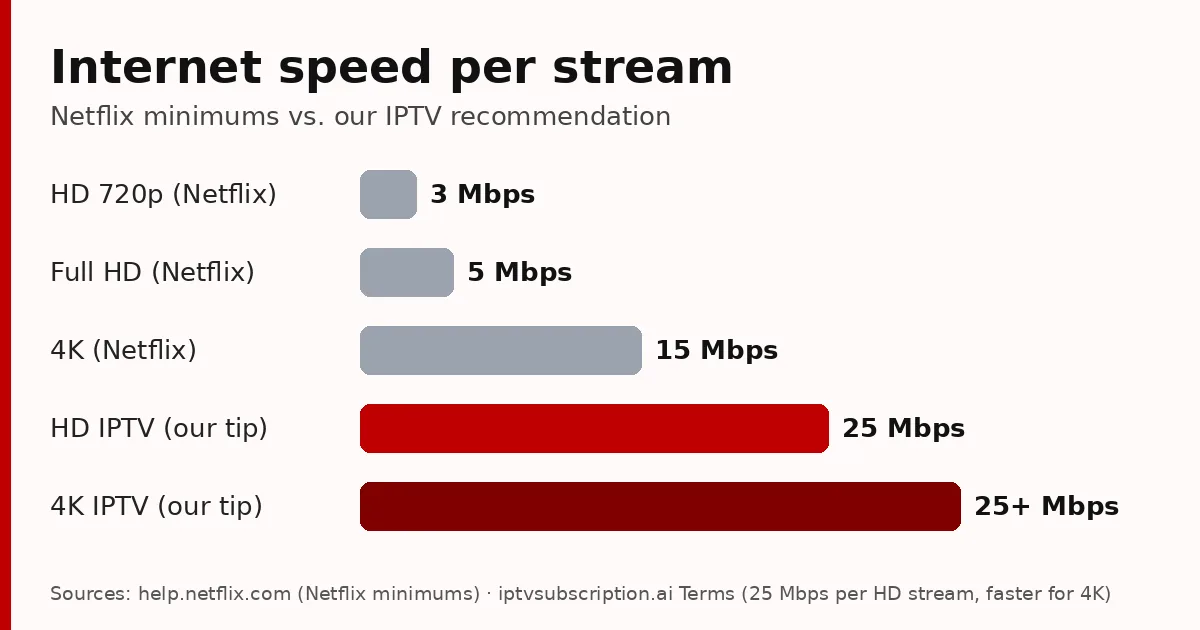
- Internet speed: we recommend at least 25 Mbps per stream for HD and more for 4K. A network cable is usually more stable than Wi-Fi in the evening.
- A player app: an app that supports Xtream Codes or M3U links (see the best IPTV player for each device), or a MAC-based app such as Hot Player.
- A subscription: the login details (or playlist) that the IPTV service sends you after payment.
Setting it up takes a few minutes. Our IPTV setup guide shows the 3 steps, and there are device guides for Hot Player on Firestick and Hot Player on Samsung and LG.
IPTV vs cable, satellite and streaming apps
| IPTV | Cable / satellite | Streaming apps | |
|---|---|---|---|
| How it arrives | Internet | Cable or dish | Internet |
| Live channels | Yes, with a TV guide | Yes | Few or none |
| Movies and series | Yes (VOD) | Some, often extra | Yes, the main focus |
| Equipment | Your own TV or phone + app | Rented box, installer | Your own devices |
| Depends on | Your internet + provider servers | Weather (satellite), contract | Your internet |
So, what is IPTV compared with the others? In short, it combines the live channels of cable with the flexibility of streaming apps. The main thing to watch is stability at busy times. Our 7 checks for a stable IPTV server explain how to test that.
Pros and cons of IPTV
Pros
- Live channels, a TV guide and a movie library in one app.
- Works on devices you already own; no dish, cable or installer.
- Watch on the TV and the phone with the same app.
- Usually cheaper than a full cable package, with short plans you can try first.
Cons
- Picture quality depends on your internet connection, especially on busy Wi-Fi.
- Quality varies a lot between providers, so a short trial before a long plan is smart.
- You need to set up an app once (it takes a few minutes).
Is IPTV legal?
IPTV is a delivery technology, and the technology itself is legal: telecom companies use it every day. What matters is the service: whether it has the rights to the channels and content it offers. Laws differ by country, so read a provider’s terms and your local rules before you subscribe, and avoid “free” playlists shared online.
Payment and support also tell you a lot. Look for clear prices, a refund policy you can read before you pay and real people who answer, as explained in our IPTV service guide and our best IPTV service checklist.
How to start with IPTV
The short version is below; the full walk-through is in our guide on how to get IPTV in 5 steps.
- Test first: our 24-hour trial costs $2.
- Pick a plan: 1 month + 1 month free $13.95, 3 months $29.95, 6 months + 2 free $45.95, 12 months + 2 free $68.95. One-time payments, no automatic renewal (see all prices).
- Install the app with the setup guide and log in with the details from your email.
Want the technical background? The Wikipedia article on Internet Protocol television covers the history and standards in more detail.
What is IPTV: FAQ
What is IPTV and how does it work?
IPTV (Internet Protocol Television) delivers TV channels, movies and series over the internet. The provider encodes the video, its servers send it as small data packets, and a player app on your TV or phone turns them back into video.
What does IPTV stand for?
Internet Protocol Television: television delivered with the same Internet Protocol that carries web pages and video calls.
What is IPTV on a Smart TV?
An app on the TV (for example Hot Player on Samsung, LG or Android TV) that plays your IPTV channels over your home internet, with no cable box or dish.
Is IPTV the same as streaming?
Both use the internet, but streaming apps focus on movies and series on demand, while IPTV also gives you live channels with a TV guide.
Do I need a box for IPTV?
No. A Smart TV, a Fire TV Stick, a phone or a computer with a player app is enough. An Android box is only useful if your TV is not smart.
How much internet speed do I need for IPTV?
We recommend at least 25 Mbps per stream for HD and a faster connection for 4K. A cable connection is more stable than Wi-Fi.