
Blog
How to Get IPTV: 5 Easy Steps for Any TV

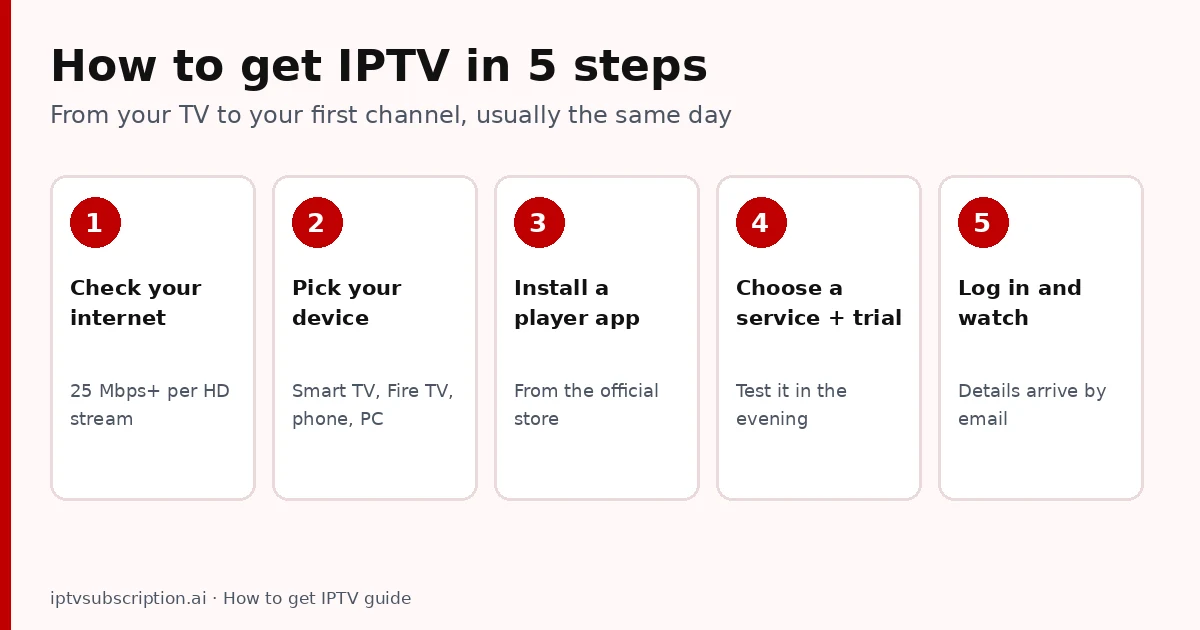
Quick answer: how to get IPTV? Check that your internet is fast enough (we recommend 25 Mbps per HD stream), pick the device you will watch on, install a player app from its official store, choose an IPTV service and test it with a short trial, then log in with the details the service emails you. You don’t need a dish, a cable box or an installer.
Table of Contents
How to get IPTV in 5 steps
Step 1: Check your internet
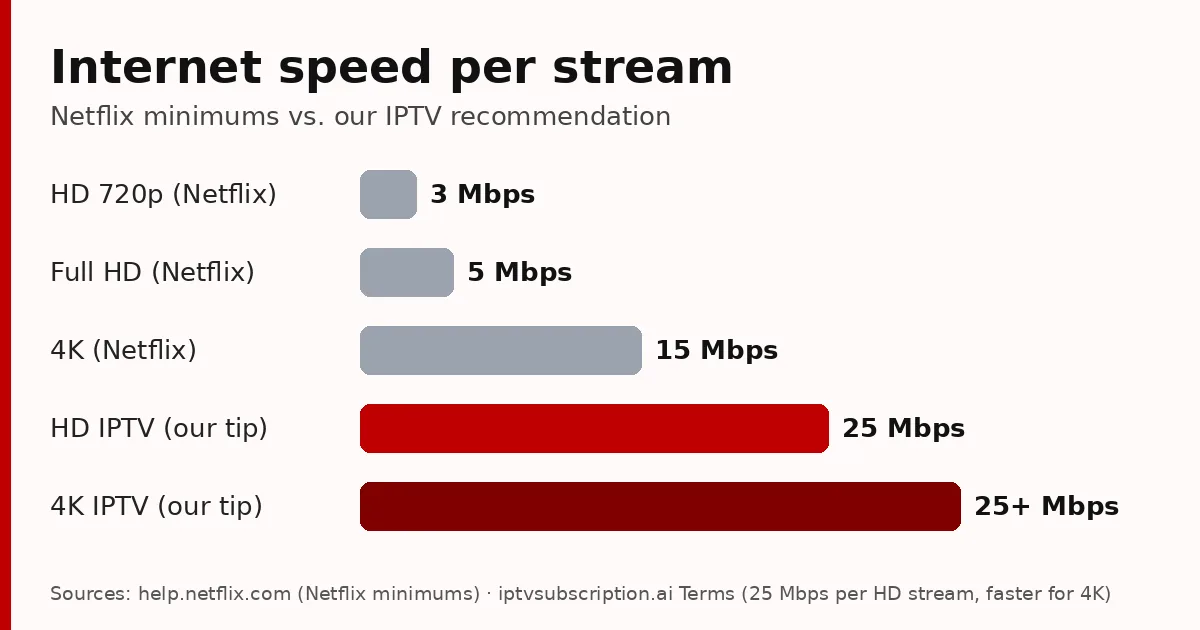
IPTV arrives over your internet connection, so start here. Run a speed test on the device you will watch on, in the evening. We recommend at least 25 Mbps per HD stream and more for 4K. If two people watch at once, add their streams together. A network cable or 5 GHz Wi-Fi is more stable than 2.4 GHz Wi-Fi far from the router.
Step 2: Pick your device
- Smart TV (Samsung, LG, Android TV, Roku): the simplest, no extra box.
- Amazon Fire TV Stick: cheap and turns any TV with HDMI into an IPTV screen.
- Android TV box: useful for older TVs (see the best IPTV box checklist).
- Phone, tablet or computer: for watching in other rooms or while travelling.
Step 3: Install a player app
The player app shows the channel list, the TV guide and the video. Install it from your device’s official store (on a Fire TV Stick, many players are installed with the free Downloader app). On Smart TVs and Fire TV we recommend Hot Player; our best IPTV player guide compares the options for each device.
Step 4: Choose an IPTV service and test it
The service provides the channels, movies and series. Before paying for months, take a short trial and test it in the evening, during a live match, on your own TV. Check that your favourite channels are there and that support answers a question. Our best IPTV service checklist lists what to look for and the red flags to avoid.
Step 5: Log in and watch
After payment, the service emails your login: usually an Xtream Codes login (username, password and server URL) or an M3U link, or for MAC-based apps an activation of your device. Enter it in the app and your channels load. Our IPTV setup guide shows this step in detail.
How do I get IPTV on my TV?
It depends on the TV:
- Samsung or LG: open the TV’s app store, install a MAC-based player such as Hot Player, then activate it. Guide: Hot Player on Samsung and LG.
- Fire TV Stick: install Downloader, then your player (Hot Player uses code 395800). Guide: Hot Player on Firestick.
- Android TV or Google TV: install a player from Google Play, such as Hot Player or TiviMate (TiviMate setup).
- An older TV without apps: plug in a Fire TV Stick or an Android TV box via HDMI.

How to use IPTV day to day
Once you are set up, using IPTV feels a lot like a cable box:
- Live TV: pick a category (country, sports, kids), then a channel. The TV guide (EPG) shows what is on now and next.
- Favourites: mark the channels you watch every day so they open in two clicks.
- Movies and series (VOD): start, pause and resume whenever you like.
- Catch-up: on channels that support it, watch programmes from the last few days.
- Several devices: use the same login on the TV and your phone, within the number of screens your plan allows.
If something stops working, our IPTV not working checklist walks you through the fixes in the right order.
How to get IPTV without common mistakes
- Paying for a year first. Take a short trial on your own TV in the evening before any long plan.
- Installing apps from unknown sites. Use the official store or the developer’s own link; “free” modified apps can carry malware.
- Testing at noon. Quality problems show up at peak hours, so test when you normally watch.
- Typing the login wrong. Copy the username, password and server URL exactly, without extra spaces.
Avoid these four and getting IPTV is usually quick and painless.
What it costs to get IPTV
You need two things: a player app and a subscription. Many players have a free trial and then a one-time activation (Hot Player: a 30-day free trial, then $19.95 per device with us, including 1 month of IPTV). Our subscriptions are one-time payments with no automatic renewal:
- 24-hour trial: $2
- 1 month + 1 month free: $13.95
- 3 months: $29.95
- 6 months + 2 months free: $45.95
- 12 months + 2 months free: $68.95
Thinking about a “lifetime” deal instead? Read our IPTV lifetime subscription checks first.
Start now
New to the idea? Read what IPTV is and how it works first. Test your speed with Speedtest on the device you will watch on.
How to get IPTV: FAQ
How do I get IPTV?
Check your internet speed, pick your device, install a player app from its official store, choose an IPTV service and test it with a trial, then log in with the details the service emails you.
Do I need a special box to get IPTV?
No. A Smart TV, a Fire TV Stick, a phone or a computer with a player app is enough. A box only helps if your TV has no apps.
How do you get IPTV on a Samsung TV?
Install a MAC-based player such as Hot Player from the Samsung app store, note the MAC ID it shows, then activate it with your IPTV service.
How long does it take to get IPTV?
Installing the app takes a few minutes. Your login arrives by email once your payment is confirmed, usually the same day.
How do I use IPTV on more than one device?
Use the same login on each device, within the number of screens your plan allows at the same time. MAC-based apps need one activation per device.