
Blog
How to Add IPTV to Plex: 6 Simple Steps


Quick answer: how to add IPTV to Plex? You need a small “tuner proxy” such as Threadfin. Plex’s Live TV & DVR feature only works with TV tuners like an HDHomeRun, and it cannot open an M3U playlist by itself. Threadfin takes your IPTV M3U link and TV guide and presents them to Plex as an HDHomeRun tuner. Plex then shows your channels in its Live TV section. Watching live is free; recording needs a Plex Pass.
Note: we are not affiliated with Plex or Threadfin. This is a do-it-yourself setup for people who already run a Plex Media Server; if you just want to watch, a simple player app is easier.
Table of Contents
Can Plex play IPTV?
Not directly. According to Plex’s Live TV & DVR support page, the feature is built for TV tuners connected to your Plex Media Server, with SiliconDust HDHomeRun devices among the supported models. There is no “add M3U playlist” button.
That is why Plex users put a tuner proxy in between. The proxy reads your IPTV playlist and pretends to be an HDHomeRun on your network. Plex scans the network, finds the “tuner” and treats your IPTV channels like any other live channels.
Do not confuse this with Plex’s own free live channels: those are a separate Plex service and have nothing to do with your IPTV subscription.
What you need to add IPTV to Plex
- A Plex Media Server running on a computer, NAS or similar device that stays on.
- Threadfin, a free, open-source M3U proxy and the successor of xTeVe (Threadfin on GitHub). Most people run it with Docker.
- An IPTV subscription with an M3U link and an XMLTV (EPG) guide link. Ours includes both.
- Optional: a Plex Pass, if you want to record (DVR). Watching live does not need it.
How to add IPTV to Plex in 6 steps
- Install Threadfin on the same network as your Plex Media Server (for example as a Docker container). Its web interface uses port 34400 by default.
- Add your playlist. In Threadfin, add your IPTV M3U link as a playlist source.
- Add the TV guide. Add the XMLTV link from your IPTV email as a guide source.
- Choose and map channels. Pick the channels you want in Plex and link each one to its guide entry. Fewer channels make Plex faster.
- Add the tuner in Plex. In Plex, open Settings → Live TV & DVR → Set up Plex DVR. Plex should find Threadfin as an HDHomeRun device; if not, enter its address manually (your Threadfin IP and port 34400).
- Add the guide in Plex. When Plex asks for guide data, use the XMLTV option and enter Threadfin’s XMLTV address, then finish the setup and open Live TV.
Menu names can change between versions, so check the Threadfin documentation and Plex’s DVR & Live TV FAQ if a screen looks different.
How to add IPTV to Plex when something fails: quick fixes
- Plex does not find the tuner: make sure Threadfin and Plex are on the same network, then enter the Threadfin address manually.
- Channels show “no guide data”: check the channel mapping in Threadfin and refresh the guide in Plex.
- Only a few channels play at once: Threadfin has a tuner count setting. Match it to the number of screens your IPTV plan allows.
- Buffering: try Threadfin’s buffer option (ffmpeg or VLC), and use a wired connection for the Plex server.
- A channel will not start: test the same channel in a normal player app. If it fails there too, the channel is the problem, not Plex.
More general fixes: our IPTV not working checklist.
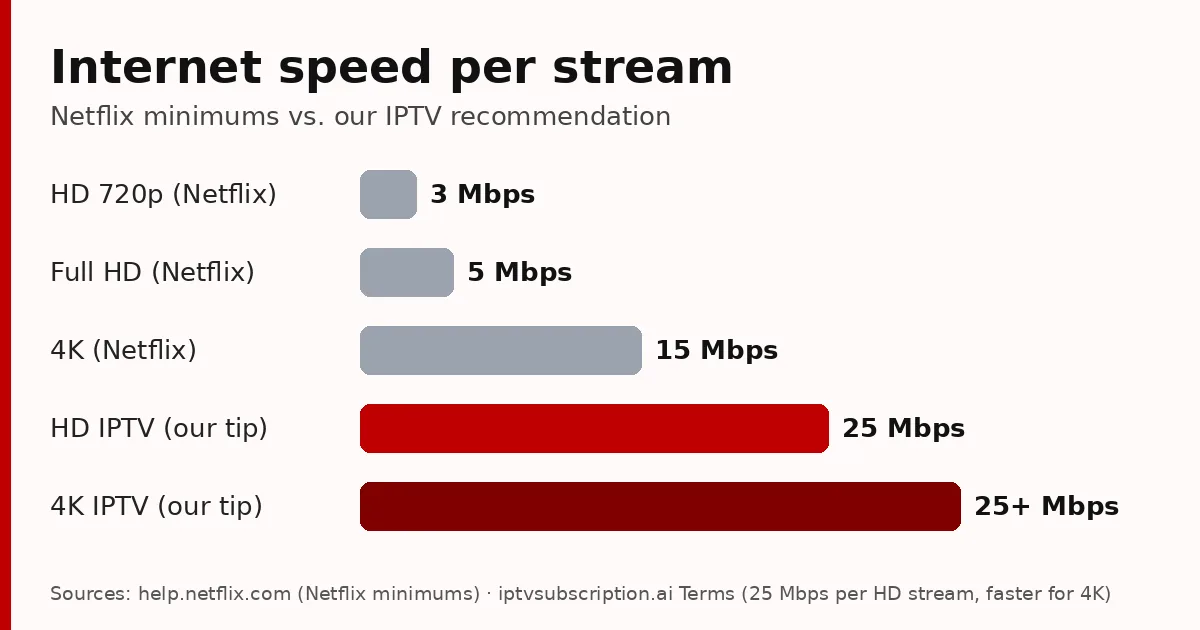
Plex adds no extra internet load for live channels, but every screen watching at the same time is one more stream. We recommend at least 25 Mbps per HD stream.
Is adding IPTV to Plex worth it?
It is worth it if you already use Plex for your films and series and want live channels in the same place, or if you want to record programmes with a Plex Pass. It takes some technical work and a server that stays on. The same Threadfin setup also works with Emby and Jellyfin, two other media servers, so you are not locked in if you change later.
If you only want to watch live TV, a player app is faster to set up: Hot Player on a Smart TV or Fire TV, or TiviMate on Android TV. See our best IPTV player guide and how to get IPTV.

Our IPTV subscription for Plex
Our subscription includes an M3U link and an XMLTV guide, so it works with Threadfin and Plex, and also with player apps. Test it first with the 24-hour trial ($2), then choose a plan from $13.95 (one-time payments, no automatic renewal).
How to add IPTV to Plex: FAQ
Can Plex play IPTV?
Not directly. Plex Live TV & DVR works with tuners such as HDHomeRun. A proxy like Threadfin presents your IPTV M3U playlist to Plex as an HDHomeRun tuner.
Do I need Plex Pass for IPTV in Plex?
Not to watch live. Plex says recording (DVR) needs a Plex Pass; in supported countries the Plex Pass also includes guide data, elsewhere you supply XMLTV.
What is Threadfin?
A free, open-source M3U proxy, the successor of xTeVe. It turns an IPTV playlist and XMLTV guide into a virtual HDHomeRun tuner for Plex, Emby or Jellyfin.
Can I add an M3U file to Plex?
Not as a playlist of live channels. Use a tuner proxy such as Threadfin, then add it in Plex as a DVR tuner.
Is there an easier way than Plex?
Yes. A player app such as Hot Player or TiviMate plays your IPTV directly, with a TV guide, in a few minutes.