
Blog
IPTV Smarters Pro Subscription: 5 Easy Steps


Quick answer: IPTV Smarters Pro is a player app, so an “IPTV Smarters Pro subscription” really means an IPTV subscription that works inside the app. Any service that gives you an Xtream Codes login (username, password and server URL) or an M3U link works. Ours does: you get the login by email after payment and enter it in 5 steps.
Note: we are not affiliated with IPTV Smarters. We sell IPTV subscriptions that work in their app and in other players.
Table of Contents
What is IPTV Smarters Pro?
IPTV Smarters Pro is a popular IPTV player app for phones, tablets, Android TV and other devices. Like every player, it does not include channels: it shows the live TV, movies, series and TV guide from the IPTV subscription you add to it. That is why people search for an IPTV Smarters Pro subscription: they have the app and need a service to put in it.
The app accepts two login types:
- Xtream Codes API: a username, a password and a server URL. This is the easiest option, and it loads channels, movies, series and the TV guide together.
- M3U playlist: one long link to your channel list. It works, but the TV guide may need a separate EPG link.
What you need for an IPTV Smarters Pro subscription
- The IPTV Smarters Pro app, installed from your device’s official app store (on a Fire TV Stick, apps like this are usually installed with Downloader from the developer’s official link).
- An IPTV subscription with an Xtream Codes login. Our plans include one; the details arrive by email after your payment is confirmed.
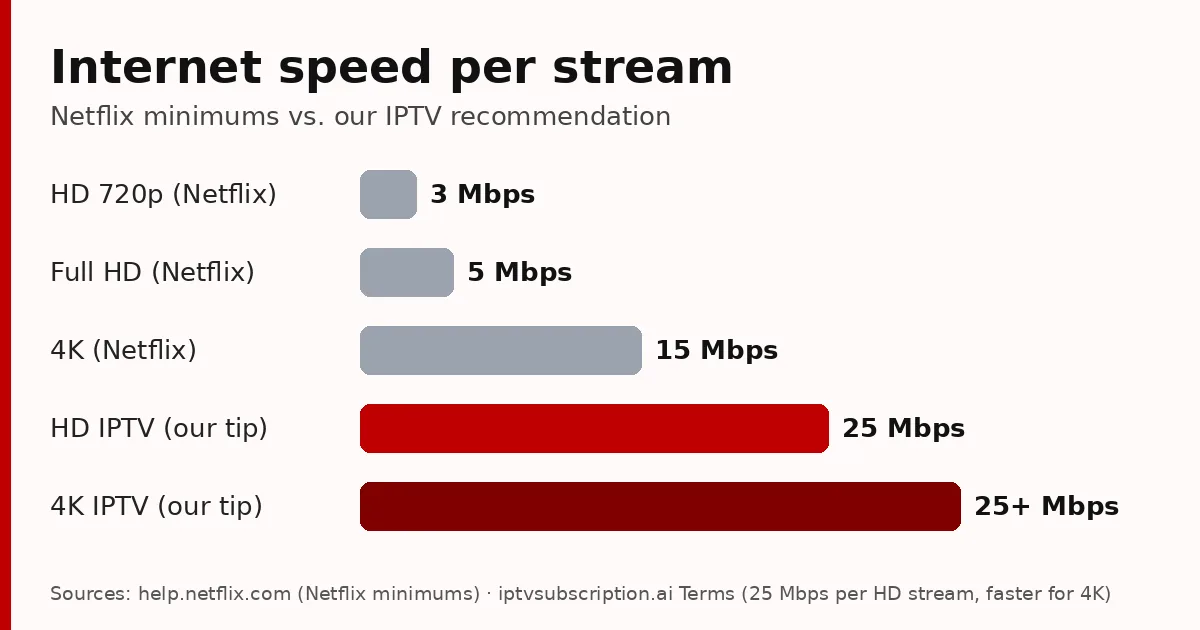
- A stable internet connection. We recommend at least 25 Mbps per stream for HD.
Set up your IPTV Smarters Pro subscription in 5 steps
- Get your subscription. Start with our 24-hour trial ($2) or a plan. Keep the email with your login details open.
- Open IPTV Smarters Pro and choose to add a new user with the Xtream Codes API option.
- Fill in the 4 fields: any name you like (for example “Living room”), then the username, password and server URL exactly as they appear in your email. Keep the “http://” and the port number at the end of the URL.
- Add the user. The app downloads your channels, movies and series; the first load can take a minute.
- Open Live TV. If the TV guide is empty, refresh or load the EPG from the app’s settings, then wait a moment.
Prefer a simpler app on a Smart TV or Fire TV? Hot Player uses MAC activation, so there is nothing to type. Our best IPTV player guide compares the options.
IPTV Smarters Pro login problems: quick fixes
- “Invalid username or password”: retype both from the email. They are case-sensitive, and an extra space at the end is enough to fail.
- “Server not reachable” or nothing loads: check the server URL. It must include http:// or https:// and the port (for example :8080) if your email shows one.
- Channels load but play black: try another channel, then switch the app’s player to another option in its settings.
- Buffering in the evening: use a network cable or 5 GHz Wi-Fi and close other downloads.
- Plan expired: the app shows an expiry date for your account. Renew on our renewal page.
More fixes: our IPTV not working checklist.
Use the same login on your other devices
The Xtream Codes login is tied to your account, not to one device. You can enter the same details in IPTV Smarters Pro on your phone and in another player on your TV, as long as you stay within the number of screens your plan allows at the same time. Watching on two screens at once and one of them stops? That limit is the usual reason. For a TV that uses a MAC-based app such as Hot Player, the TV gets its own activation and the same subscription.
How to choose an IPTV Smarters Pro subscription
Because the app works with almost any Xtream Codes service, the service is what decides your picture quality. Before buying a long plan, check:
- Evening stability: test live sports at peak hours during a trial.
- Your channels and a working TV guide.
- Connections: how many screens can use the login at the same time.
- Clear prices with no automatic renewal, and support that answers.
The full list is in our best IPTV service checklist.

Our IPTV subscription for IPTV Smarters Pro
- 24-hour trial: $2.
- Plans: $13.95 for 1 month + 1 free, $29.95 for 3 months, $45.95 for 6 months + 2 free, $68.95 for 12 months + 2 free.
- One-time payments, no automatic renewal.
- Login: Xtream Codes and M3U, sent by email after payment.
- Help: WhatsApp +1 917 924 8236.
New to IPTV? Read what IPTV is and how it works. The M3U playlist format is explained on Wikipedia.
IPTV Smarters Pro subscription: FAQ
Does IPTV Smarters Pro include a subscription?
No. IPTV Smarters Pro is a player app without channels. You add an IPTV subscription to it with an Xtream Codes login or an M3U link.
What is IPTV Smarters?
A player app that plays live TV, movies and series from the IPTV subscription you add, with a TV guide. It works with Xtream Codes and M3U logins.
Which subscription works with IPTV Smarters Pro?
Any IPTV service that provides an Xtream Codes login or an M3U link. Ours includes both, sent by email after payment.
What is an Xtream IPTV subscription?
An IPTV subscription that gives you an Xtream Codes login: a username, a password and a server URL. Most player apps accept it.
Are you IPTV Smarters?
No. We are an independent IPTV service, not affiliated with IPTV Smarters. Our subscriptions work in their app and in other players such as Hot Player and TiviMate (TiviMate setup).