
Best IPTV App for Android: 4 Players Checked (2026)


Quick answer: the best IPTV app for Android is one you get from its real developer, that accepts your login (Xtream Codes, M3U or a MAC activation) and that is easy to use on your screen. Our pick is Hot Player. It is not on Google Play, so you install the official app file from its developer’s download link. GoTo Player, free for 14 days, also installs from its own website. For a free option, VLC for Android plays an M3U link, and Kodi with the IPTV Simple Client adds a TV guide. Be careful on Google Play: when we checked on 1 November 2026, many apps there used well-known IPTV player names.
Disclosure: we sell IPTV subscriptions and Hot Player activations, so we recommend Hot Player. GoTo Player activations are sold on gotoiptv.com, where our checkout runs. VLC and Kodi are free apps we don’t sell, and they work with our logins too. We checked the apps on Google Play (US) and on the developers’ sites on 1 November 2026, the Hot Player app file on 2 November 2026 and GoTo Player on 13 November 2026. Stores change, so check again before you install. Our prices are in US dollars; the pricing page always shows the current ones.
Table of Contents
What makes the best IPTV app for Android
Android runs on phones, tablets and many TV boxes, so the right player depends on your screen. Whatever you use, check these four points before you install:
- The real developer. Popular IPTV player names are copied a lot. Compare the developer’s name in the store with the one on the app’s official website.
- Your login type. Xtream Codes (server, username and password) loads live TV, movies and series together. An M3U link works in more apps but may need a separate TV guide link. MAC-based apps such as Hot Player show a device ID instead, and the playlist is added for you.
- A TV guide. On a phone a simple channel list is often enough. On a TV, a guide grid makes daily viewing much easier.
- Where it installs from. Google Play is the easiest, but some official players are only offered on their own website as an app file (APK).
New to IPTV? What is IPTV explains the basics, and Xtream Codes vs M3U explains the two main login types.
Watch out for look-alike apps on Google Play
When we searched Google Play (US) on 1 November 2026, we found no Hot Player app from its developer, Digi Vibes. Apps with similar names, such as Hot Player Plus, Hot Player Pro and Hot Player IBO, came from other developers. Our Hot Player activation is for the official app, so it won’t work in those.
It’s the same with IPTV Smarters: the official IPTV Smarters Pro page on Google Play no longer opened in the US or UK, while many apps with “Smarters” in their names were listed by other developers. If you use IPTV Smarters Pro, read our IPTV Smarters Pro guide, and always check who made an app before you type in your login.
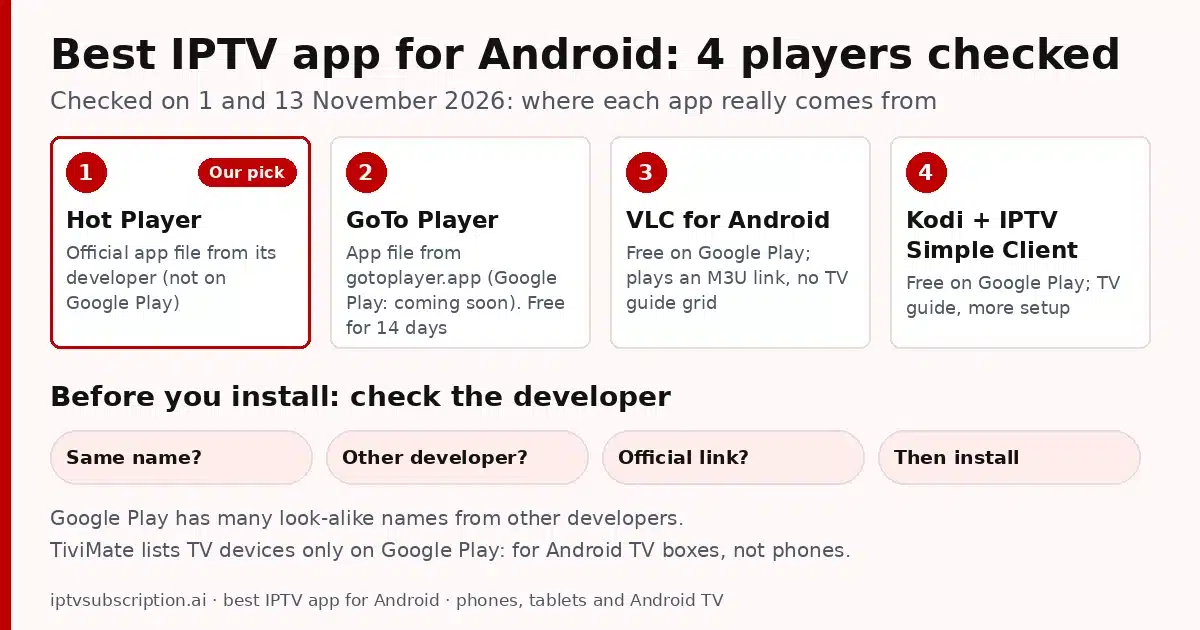
Best IPTV app for Android: 4 players we checked
For each app we checked where it comes from, what it costs to start and which logins it takes. There is no single best IPTV app for Android for everyone, so pick by how you watch.
Hot Player (our pick)
Hot Player (formerly Hot IPTV) is a MAC-based IPTV player for Android phones, tablets and TV boxes. It is not on Google Play: you download the official app file (APK) from the developer’s link, apk.hotiptv.app. On 2 November 2026 that was version 2.2.6 (about 82 MB) for Android 7.0 or newer, and the same file installs on phones, tablets and TV boxes. Its website, hotplayer.app, lists the devices it supports. The app shows your device’s MAC ID, and after activation your playlist loads by itself, so there is nothing long to type on a small screen.
The app is free to use for its first 30 days. After that, each device needs an activation. With us it costs $20 once: lifetime for one device, with 1 month of IPTV included.

GoTo Player
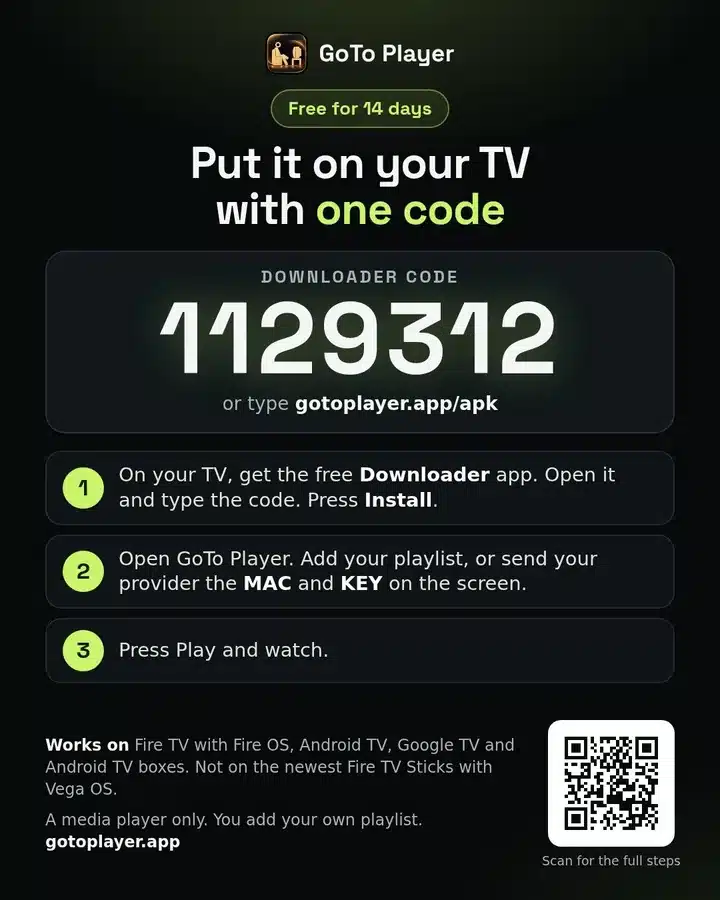
GoTo Player is an IPTV player from the GoTo Player Team for Android phones and tablets (Android 7.0 or newer), Android TV and Google TV. Like Hot Player, it isn’t on Google Play yet: its website says “coming soon”. You get the app file (APK) from gotoplayer.app: open gotoplayer.app/apk in Chrome, open the downloaded file and press Install. On 13 November 2026 it was version 1.0.12, about 71 MB.
You add your own playlist: the M3U link or the Xtream Codes login from your welcome email. Its website also lists a TV guide (EPG) from your source, movies and series with search and favorites, subtitles and audio tracks, and no ads in the app. It’s a player only, with no channels inside.
GoTo Player is free for 14 days on Android. After that, you activate the phone, tablet or TV box at gotoplayer.app/activate for $7 a year or $20 lifetime. On a TV box, or a Fire TV with Fire OS, the Downloader app with code 1129312 gets the same app, and its Will it work on my TV? page checks your TV in one tap.
VLC for Android
VLC for Android is free and open source, listed by Videolabs on Google Play for phones, tablets and TV. It plays an M3U link: use its network stream option and paste the M3U link from your welcome email. It has no TV guide grid and no channel categories made for TV, so it’s best for testing a playlist or for watching now and then.
Kodi with the IPTV Simple Client
Kodi is a free, open-source media center from the Kodi Foundation, also on Google Play. Add the free PVR IPTV Simple Client add-on (Add-ons > Install from repository > PVR clients), then paste your M3U link and, if you have one, a TV guide link. It takes longer to set up, but you get a TV guide grid for free. On a phone, Kodi’s big-screen menus can feel small.
What about TiviMate? On Google Play it lists TV devices only, so it’s made for Android TV boxes and similar devices, not phones. On a TV box it’s a strong choice: see our TiviMate guide and the best IPTV box checklist.
Best IPTV app for Android: quick comparison
| App | Get it from | Cost to start | Login | TV guide | Best for |
|---|---|---|---|---|---|
| Hot Player | Official app file (apk.hotiptv.app) | Free for 30 days, then $20 once with us (1 month of IPTV included) | MAC activation: the playlist is added for you | Yes | Everyday viewing on a phone, tablet or TV box |
| GoTo Player | App file from gotoplayer.app (Google Play: coming soon) | Free for 14 days, then $7 a year or $20 lifetime | M3U link or Xtream Codes login | Yes, from your source | A 14-day free start on a phone, tablet or TV box |
| VLC for Android | Google Play (Videolabs) | Free | M3U link | No guide grid | Testing a link |
| Kodi + IPTV Simple Client | Google Play (Kodi Foundation) | Free | M3U link, plus a TV guide link | Yes | A free TV guide, if you don’t mind the setup |
How to install Hot Player on an Android phone
- On your phone, open the official download link, apk.hotiptv.app, in your browser. The Hot Player file (about 82 MB) downloads. If your browser warns you about app files, continue only because this is the official link.
- The first time, Android asks you to allow installs from your browser. Allow it, install Hot Player, then you can switch that setting off again.
- Open Hot Player (it opens sideways, like a TV screen) and write down the MAC ID shown on its home screen.
- Open our Hot Player activation form, enter the MAC ID, your IPTV username (or the one you would like) and your email, then pay $20 once on the secure checkout at gotoiptv.com.
- The activation is usually done within minutes after payment is confirmed. Then press Refresh on the app’s home screen.
On an Android TV box or a Fire TV Stick, typing a link with the remote is slow, so use the Downloader app with code 395800: it opens the same official file. Our Hot Player Firestick guide shows each step.
Tips for IPTV on an Android phone
- Wi-Fi first. On mobile data, check that the app is allowed to use it and turn off Data Saver. Many mobile plans also limit video quality.
- Update from the same place. Keep the app updated, and for Hot Player download new versions from the official link only.
- Free up space. A nearly full phone can make video apps slow, so remove apps you don’t use.
- Stuck? Our IPTV not working guide has quick fixes by device, phones included.
On an iPhone or iPad instead? See our guide to the best IPTV app for iPhone.
Start with Hot Player on your Android
Still choosing the best IPTV app for Android? Start with Hot Player from its official download link and activate it with our form: $20 once, lifetime for that device, with 1 month of IPTV included. After that month, plans cost $14 (1 month + 1 free), $30 (3 months), $50 (6 months + 2 free) or $70 (12 months + 2 free), all one-time payments with no automatic renewal. Read how much IPTV costs for the full picture.
Prefer VLC or Kodi? Our plans give you an M3U link too, so you can use them with the same subscription. Questions before you buy? Ask us on WhatsApp.
More guides on choosing, setting up and fixing IPTV are in our IPTV service guide, and players for every device are compared in our best IPTV player guide.
Best IPTV app for Android: FAQ
What is the best IPTV app for Android?
The one from a real developer that accepts your login and suits your screen. We recommend Hot Player, installed from its official download link, for everyday viewing. GoTo Player is free for 14 days from its own website, and VLC for Android and Kodi with the IPTV Simple Client are free alternatives from Google Play.
Is Hot Player on Google Play?
When we checked Google Play (US) on 1 November 2026, there was no Hot Player app from its developer. Install the official app file from the developer’s link, apk.hotiptv.app (on a TV box or Fire TV Stick, the Downloader app with code 395800 opens the same file). Apps with similar names on Google Play come from other developers.
Is GoTo Player on Google Play?
Not yet. On 13 November 2026 its website said Google Play is coming soon. Until then, get the app file only from gotoplayer.app/apk (Android 7.0 or newer).
Is IPTV Smarters Pro still on Google Play?
The official IPTV Smarters Pro page on Google Play no longer opened in the US or UK when we checked on 1 November 2026. Many apps with similar names are listed by other developers, so check who made an app before you type in your login.
Does Hot Player work on an Android phone?
Yes. The official Hot Player app file installs on Android phones and tablets (Android 7.0 or newer) as well as on TV boxes, and our $20 activation works on phones too.
Can I use TiviMate on my Android phone?
TiviMate’s Google Play listing shows TV devices only, so it is made for Android TV boxes and similar devices, not phones. On a phone, use Hot Player, VLC or Kodi.
Is VLC good for IPTV on Android?
For testing an M3U link, yes: it is free and plays most streams. For daily TV it has no guide grid or channel categories, so a dedicated IPTV player is easier.