
Best IPTV App for iPhone and iPad: 4 Players Checked (2026)

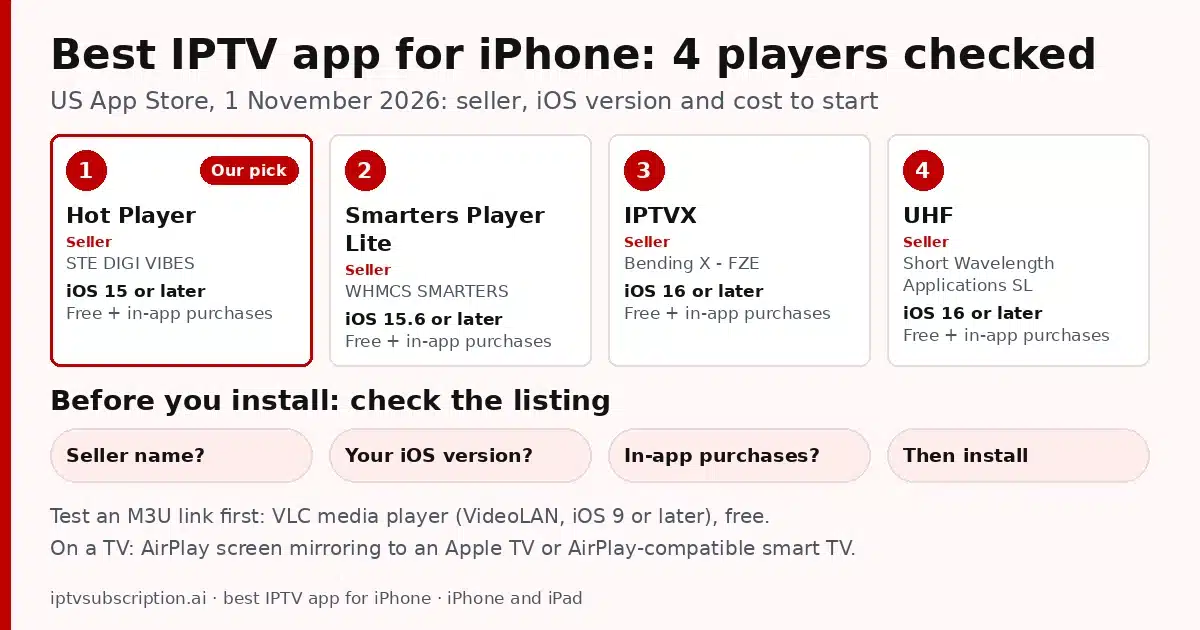
Quick answer: the best IPTV app for iPhone is one from its real seller in the App Store, that runs on your iOS version and that accepts your login. Our pick is Hot Player, a free download for iPhone and iPad (iOS 15 or later) that we activate for you, so your playlist loads by itself. Smarters Player Lite, IPTVX and UHF are other App Store players to consider, and the free VLC app is handy for testing an M3U link. We checked them all in the US App Store on 1 November 2026.
Disclosure: we sell IPTV subscriptions and Hot Player activations, so we recommend Hot Player. We don’t sell the other apps, and they work with our logins too. Listings change, so check before you install. Current prices are on our pricing page.
Table of Contents
What makes the best IPTV app for iPhone and iPad
On a small touch screen, a good player lets you find channels with your thumb and doesn’t make you type long links. Before you pick the best IPTV app for iPhone, check four things on its App Store page:
- The seller. Under Information, compare Seller with the developer named on the app’s own website.
- Your iOS version. Compatibility shows the oldest iOS the app accepts. To see yours, open Settings > General > About and look at iOS Version (iPadOS Version on an iPad).
- Your login type. Xtream Codes (server, username and password) loads live TV, movies and series together; an M3U link works in more apps. With Hot Player and our activation, the playlist is added for you.
- The cost. Most players are free to download and show “In-App Purchases” by the price. Open that list so you know what the app sells later.
Not sure which login you have? Our Xtream Codes vs M3U guide explains both, and What is IPTV covers the basics.
Look-alike app names in the App Store
Copied names are not only a Google Play problem (our best IPTV app for Android guide shows it there). On 2 November 2026, the Smarters Player Lite page in the App Store suggested apps called Smarters Pro, IPTV Smarters Player Expert and IPTV Smarters Plus Player. Each came from a different seller, and none from WHMCS SMARTERS, the company behind IPTV Smarters.
If an older guide names GSE SMART IPTV PRO as the best IPTV app for iPhone, note that its US App Store page no longer opened when we checked on 1 and 2 November 2026. Other apps with GSE in their names are still listed, so check the seller before you type your login into any IPTV iPhone app. More about Smarters apps: our IPTV Smarters Pro guide.
Best IPTV app for iPhone: 4 players we checked
We noted each app’s seller, oldest iOS version and cost to start. All four run on iPhone and iPad, and there is no single best IPTV app for iPhone for everyone, so pick by how you watch.
Hot Player (our pick)
Hot Player is sold by STE DIGI VIBES and needs iOS 15 or later (iPadOS 15 on an iPad). Its listing says it plays M3U and Xtream Codes playlists with a TV guide. With our activation you type none of that: you send us the MAC ID the app shows, and your playlist loads by itself. That’s why it’s our pick for the best IPTV app for iPhone and iPad.
About the cost: Hot Player is a free download, and the App Store version also offers in-app purchases from the developer, including a yearly plan that renews through your Apple ID (the listing shows its price). Our $20 activation is a separate way to unlock the app: you pay once, it’s lifetime for that one device, and it includes 1 month of IPTV.

Smarters Player Lite
Smarters Player Lite is the App Store app from WHMCS SMARTERS, the developer of IPTV Smarters. It needs iOS 15.6 or later and is free to download with in-app purchases. Its listing names M3U and JSON playlists, so you add the M3U link from your welcome email.
IPTVX
IPTVX, from Bending X – FZE, needs iOS 16 or later and is free to download with in-app purchases. Its listing names Xtream API and M3U logins and a TV guide grid, which is easiest to read on an iPad.
UHF – Love your IPTV
UHF, from Short Wavelength Applications SL, also needs iOS 16 or later and is free to download with in-app purchases. Its listing names M3U8 and Xtream playlists and a TV guide built for touch screens, a nice fit for a phone.
Want to test a link first? VLC media player from VideoLAN is free, has no in-app purchases and runs on iOS 9 or later, so it suits older iPhones too. Paste the M3U link from your email into its network stream option. It has no TV guide grid, so it isn’t one of our four players for daily viewing.
Best IPTV app for iPhone and iPad: quick comparison
| App | Seller in the App Store | Needs | Cost to start | Login | Best for |
|---|---|---|---|---|---|
| Hot Player | STE DIGI VIBES | iOS 15 or later | Free download; $20 once with us (1 month of IPTV included), or the developer’s in-app purchases | MAC activation with us; also M3U or Xtream Codes | Everyday viewing with nothing to type |
| Smarters Player Lite | WHMCS SMARTERS | iOS 15.6 or later | Free download, in-app purchases | M3U link | People who know Smarters from another device |
| IPTVX | Bending X – FZE | iOS 16 or later | Free download, in-app purchases | Xtream API or M3U | A TV guide grid on an iPad |
| UHF | Short Wavelength Applications SL | iOS 16 or later | Free download, in-app purchases | Xtream or M3U8 | A TV guide made for touch screens |
Looking for the best iOS IPTV app for an iPad? The same four players run there, so your pick for the best IPTV app for iPhone works on your iPad too. All details are as listed in the US App Store on 1 November 2026.
How to set up Hot Player on an iPhone or iPad
Setting up our pick for the best IPTV app for iPhone takes four steps:
- Open the App Store, search for Hot Player and check that the seller is STE DIGI VIBES (or use this App Store link). Tap Get to install it.
- Open Hot Player and write down the MAC ID shown on its home screen. Can’t find it? Send us a screenshot on WhatsApp.
- Open our Hot Player activation form, enter the MAC ID, your IPTV username (or the one you would like) and your email, then pay $20 once on the secure checkout at gotoiptv.com.
- The activation is usually done within minutes after payment is confirmed. Then press Refresh on the app’s home screen, and your playlist loads.
An iPad counts as its own device, so an iPhone and an iPad need one activation each. Each plan includes 1 connection; to watch on both at the same time, ask us on WhatsApp first. For the big screen, see our best IPTV app for Apple TV guide.
Watch IPTV from your iPhone on a TV
Even the best IPTV app for iPhone is small for a family movie night. AirPlay screen mirroring shows your iPhone or iPad screen on an Apple TV or an AirPlay-compatible smart TV:
- Connect the iPhone and the Apple TV (or smart TV) to the same Wi-Fi network.
- Open Control Center: swipe down from the top-right corner of the screen (on an iPhone 8 or older, swipe up from the bottom edge).
- Tap Screen Mirroring and pick your TV. If a code appears on the TV, type it on your iPhone.
- Start a channel in your IPTV app. To stop, open Control Center, tap Screen Mirroring, then Stop Mirroring.
Apple’s own AirPlay and screen mirroring guide shows each step and notes that some video apps might not support AirPlay. For everyday TV viewing, a player on the Apple TV itself is simpler: our Apple TV guide lists players that run there.
Tips for IPTV on iPhone and iPad
The best IPTV app for iPhone still needs a steady connection and some free space:
- Wi-Fi at home, data with care. On mobile data, open Settings > Cellular and check that your IPTV app is switched on. Live video uses a lot of data, so know your plan’s limit.
- Update iOS and the app. Settings > General > Software Update shows iOS updates. New app versions sometimes need a newer iOS.
- Free up space. An almost full iPhone can slow apps down. Settings > General > iPhone Storage shows what takes the most room.
- Stuck? Our IPTV not working guide has quick fixes by device, iPhone and iPad included.
Start with Hot Player on your iPhone
Still choosing the best IPTV app for iPhone? Install Hot Player from the App Store and activate it with our form: $20 once, lifetime for that device, with 1 month of IPTV included. After that month, plans cost $14 (1 month + 1 free), $30 (3 months), $50 (6 months + 2 free) or $70 (12 months + 2 free), all one-time payments with no automatic renewal. See how much IPTV costs for the full picture.
Prefer Smarters Player Lite, IPTVX, UHF or VLC? Our plans include Xtream Codes details and an M3U link, so the same login works there. Questions first? Ask us on WhatsApp.
More guides on choosing, setting up and fixing IPTV are in our IPTV service guide, and players for other screens are compared in our best IPTV player guide.
Best IPTV app for iPhone: FAQ
What is the best IPTV app for iPhone?
The best IPTV app for iPhone is one from its real seller that runs on your iOS version and accepts your login. We recommend Hot Player (STE DIGI VIBES, iOS 15 or later), activated with us for $20 once. Smarters Player Lite, IPTVX and UHF are other options.
Is Hot Player free on iPhone?
It’s a free download, and the developer also sells in-app purchases. With us you can activate it instead for $20 once: lifetime for that iPhone or iPad, with 1 month of IPTV included.
Does one Hot Player activation cover my iPhone and my iPad?
No. Each activation is linked to one device, so an iPhone and an iPad need one each. Our activation works on iPhone, iPad and Apple TV.
Is GSE SMART IPTV PRO still on the App Store?
Its US App Store page no longer opened when we checked on 1 and 2 November 2026. Other apps with GSE in their names are listed, so check the seller before you type in your login.
Can I watch IPTV from my iPhone on my TV?
Yes, with AirPlay screen mirroring from Control Center to an Apple TV or an AirPlay-compatible smart TV.
Is VLC a good IPTV app for iOS?
For testing an M3U link, yes: it’s free, has no in-app purchases and runs on iOS 9 or later. For daily TV it has no guide grid, so a dedicated IPTV player is easier.