
IPTV Cost: How Much Is IPTV per Month? A Simple 2026 Guide


Quick answer: with us, the IPTV cost is between $5.00 and $10.00 a month, depending on how long a plan you buy: $14 for 1 month + 1 free month, $30 for 3 months, $50 for 6 months + 2 free, or $70 for 12 months + 2 free. Each plan is a one-time payment with no auto-renewal, and all of them have the same channels and features. Around that, count a player app (many are free) and a streaming device only if your TV can’t install a player app.
Disclosure: we sell IPTV subscriptions and Hot Player activations, so every price on this page is our own, checked on 28 October 2026. Prices are in US dollars and can change; the pricing page always shows the current ones.
Table of Contents
IPTV cost per month: our four plans
The fair way to compare an IPTV cost is per month: the price divided by the months you actually get, bonus months included. Here is that math for our four plans:
| Plan | You pay | Months you get | Cost per month |
|---|---|---|---|
| 1 Month + 1 Free | $14 | 2 | $7.00 |
| 3 Months | $30 | 3 | $10.00 |
| 6 Months + 2 Free | $50 | 8 | $6.25 |
| 12 Months + 2 Free | $70 | 14 | $5.00 |
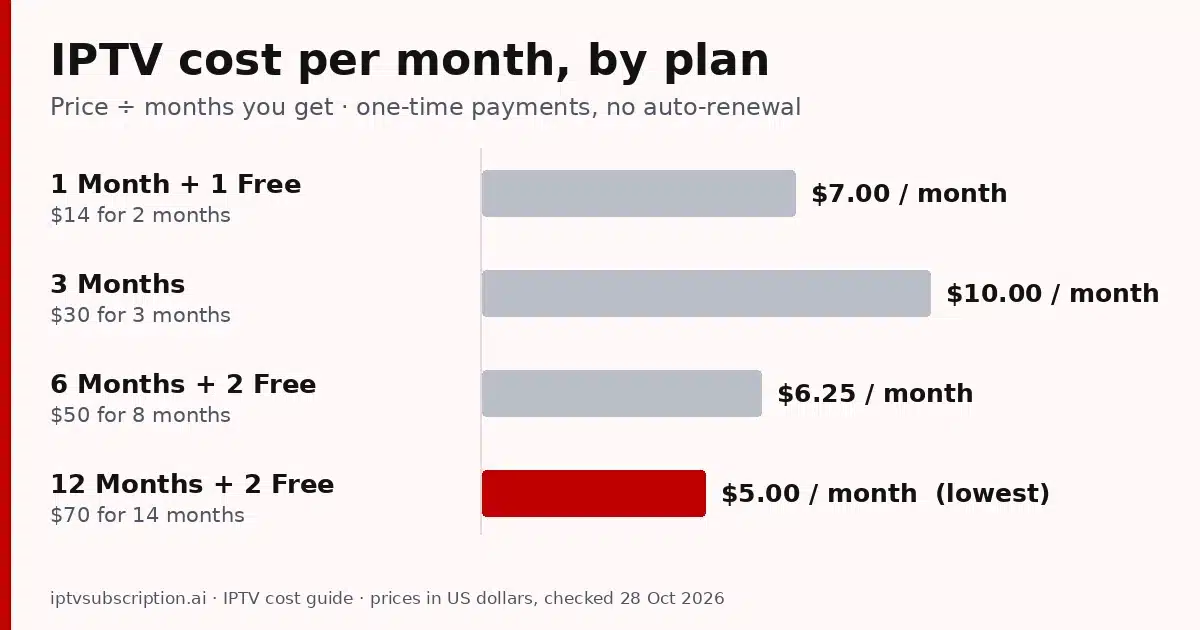
Two things stand out. The 12 Months + 2 Free plan has the lowest IPTV cost per month, $5.00. The 3 Months plan is the highest per month, $10.00, because it has no bonus months. If you want more than two months but less than a year, 6 Months + 2 Free gives you eight months for $50.
These four plans are our IPTV packages, and only the length changes between them: every plan gets the same channel list, works in the same apps and includes 1 connection. To see and buy them side by side, open the IPTV subscription pricing page.
How much is IPTV for a whole year?
A monthly figure is handy, but most people watch for longer than one plan. Here is your IPTV cost for about a year, depending on how you buy it, at today’s prices:
| How you buy | You pay | Months covered | Per month |
|---|---|---|---|
| Six 1 Month + 1 Free plans, one after another | $84 | 12 | $7.00 |
| Four 3 Months plans | $120 | 12 | $10.00 |
| Two 6 Months + 2 Free plans | $100 | 16 | $6.25 |
| One 12 Months + 2 Free plan | $70 | 14 | $5.00 |
| 1 Month + 1 Free first, then 12 Months + 2 Free | $84 | 16 | $5.25 |
The last row is a sensible way to start. You pay $14 to test the service on your own TV and internet for two months, then $70 for the next fourteen. That is sixteen months for $84, or $5.25 a month, and you never pay for a long plan before you know it works for you.
The highest IPTV cost comes from buying short plans without bonus months, again and again. Same channels, same apps, and $120 for 12 months instead of $70 for 14.
What changes the price of IPTV (and what doesn’t)
Only three things change the price of IPTV with us:
- Plan length. Longer plans cost more up front and less per month.
- Bonus months. 1 Month + 1 Free, 6 Months + 2 Free and 12 Months + 2 Free include extra months at no charge. The 3 Months plan has none.
- Screens at the same time. Every plan includes 1 connection, so one screen plays at a time. For two or more screens at once, ask us on WhatsApp. There is no published price for that.
And a few things people often expect to add to the IPTV cost, but don’t:
- 4K. There is no 4K add-on. The 4K entries are part of the same list on every plan; what you need on your side is in our IPTV 4K guide.
- Your login type. The same plan works in Xtream Codes, M3U and MAC-based apps. Not sure which one to use? Read Xtream vs M3U.
- Your device. Smart TV, Firestick, Android box, phone or computer: the price of the plan is the same.
One small thing to check yourself: our prices are in US dollars. If your card is in another currency, your bank converts the amount and may add a fee, so look at your card’s terms if you pay from outside the US.
The full IPTV cost: device, player app and internet
The subscription is the main IPTV cost, but it is not always the only one. Count these three before you compare offers.
A streaming device (often nothing to buy)
If your smart TV can install a player app, you don’t need extra hardware, and this part of the IPTV cost is zero. Hot Player, for example, is in the Samsung and LG TV app stores: see Hot Player on Samsung and LG. If your TV has no app store, or it runs slowly, a streaming stick or an Android TV box is a one-time purchase. Prices depend on the model, so compare them on the maker’s own store.
Before you buy hardware, read our guides for Firestick, Android TV boxes and Apple TV. They list what each device needs, so you don’t pay for features you won’t use.
A player app (free or a one-time fee)
The player is the app that opens your login and shows the channels. Many cost nothing: VLC is free and open source, for example, and it plays M3U links on computers and phones. Some popular players have a free version and charge for extra features; app stores show the current price, so check it there before you count on it.

Hot Player is the paid option we sell: $20 once for a lifetime activation on one device, with 1 month of IPTV included. Each extra device needs its own activation. Because the activation is lifetime for that device, your next renewal is only the plan price. Details are on the Hot Player page, and other players are compared in our best IPTV player guide.
Internet you already pay for
IPTV streams over the home internet you already have, so there is no separate line to buy and nothing new to add to your IPTV cost. What matters is a steady connection in the evening, not the biggest package. For 4K, Apple recommends at least 25 Mbps for streaming, which is a good floor for one 4K stream. If your internet plan has a monthly data cap, remember that long evenings of streaming use a lot of data.
Renew or extend without paying for overlap
Our plans never renew on their own, so you decide when to pay again. The good news: you don’t have to wait for the last day to extend. The months you buy are added after your current end date, so extending early never costs you days.
- Check your end date on check my IPTV account. Type the username and password from your welcome email and see the days you have left.
- Extend the same account on extend your IPTV subscription. Pick a plan and see your new end date before you pay.
- Prefer username and email? Use the renewal page instead.
Your username, apps and channels stay the same, and the new months are usually added within minutes after payment is confirmed. This is also where the year math above pays off: extend with a long plan with bonus months, and your IPTV cost per month drops for every month after.
A low cost IPTV service: what to check before you pay
A low IPTV cost is a good thing, as long as you know what you are paying for. Before you pay any seller, us included, run these checks:
- Do the per-month math yourself. Divide the price by the months you really get. A low monthly figure that only applies to a long plan is not the price of one month.
- Look for auto-renewal. Is it a one-time payment, or will it charge you again? Ours are one-time.
- Count the screens. A price for one screen is not a price for a family with three TVs.
- Ask a question first. Message the seller before you pay and see how fast and how clearly they answer. You can message us on WhatsApp.
- Read the refund policy. It should be written down before you pay. Ours is here: refund and returns policy.
- Be careful with “lifetime” for one small payment. Servers cost money every month; our IPTV lifetime subscription guide explains what to check.
For more on judging very cheap offers, read our cheap IPTV subscription checks and how to choose the best IPTV service. If you are still deciding whether IPTV fits your home at all, start with is IPTV worth it.
How to pay for your plan
When you click Buy on a plan, you pay on the secure checkout at gotoiptv.com. You can pay with Cash App, Apple Pay, Google Pay, PayPal, Chime or crypto, and with Interac e-Transfer in Canada. Check the total before you confirm: the IPTV cost of your plan is a one-time payment, with nothing charged again later.
After payment is confirmed, your username, password, server URL and M3U link arrive by email, usually within minutes. They work in Xtream Codes, M3U and MAC-based apps. Want two screens at the same time, or a question about a channel? Ask us before you buy.
IPTV cost FAQ
How much is IPTV per month?
With us, $5.00 to $10.00 a month, depending on the plan: $7.00 with 1 Month + 1 Free ($14), $10.00 with 3 Months ($30), $6.25 with 6 Months + 2 Free ($50) and $5.00 with 12 Months + 2 Free ($70).
What is the cheapest way to pay for IPTV?
The lowest IPTV cost per month is the 12 Months + 2 Free plan: $70 for 14 months, which is $5.00 a month. If you want to test first, start with 1 Month + 1 Free for $14, then extend with the long plan.
Does the IPTV cost renew automatically?
No. Every plan is a one-time payment with no auto-renewal. You choose when to extend, and the new months start after your current end date.
Do 4K or my app change the price?
No. The 4K entries are in the same list on every plan, and every plan works with Xtream Codes, M3U and MAC-based apps. A paid player such as Hot Player ($20 once per device) is a separate, optional cost.
How much does IPTV cost for two TVs at the same time?
Every plan includes 1 connection, so one screen at a time. For two or more screens at the same time, ask us on WhatsApp; there is no published price for that.
Are there other costs besides the plan?
Only what you may need around it: a player app (many are free, some charge once), a streaming device if your TV can’t install a player app, and the home internet you already have.