
IPTV 4K: What You Really Need (Simple Checklist)


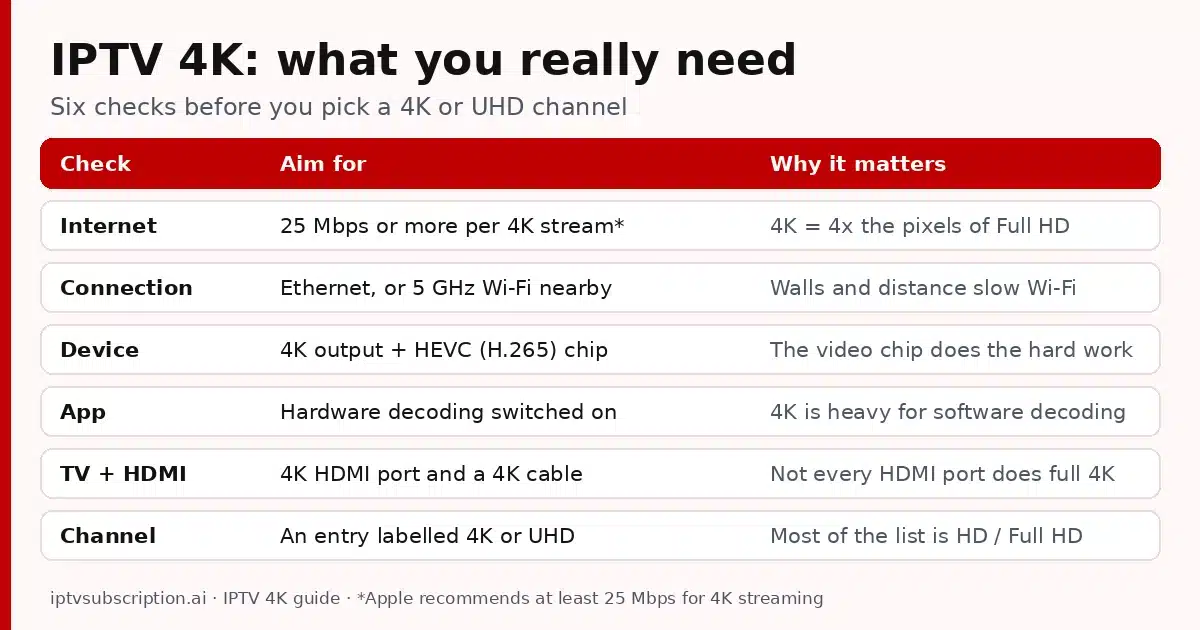
Quick answer: IPTV 4K works when four things line up: a channel that is really in 4K, a steady internet connection (Apple recommends at least 25 Mbps for 4K streaming), a device that decodes HEVC (H.265) in hardware, and a 4K TV on an HDMI port that supports 4K. A cable to the router helps more than anything else. Be realistic, too: in our list, most channels are HD or Full HD, and 4K is a smaller set of entries.
Disclosure: we sell IPTV subscriptions and Hot Player activations. The device facts below come from the makers’ own spec and help pages, opened on 28 October 2026; we are not linked to those companies.
Table of Contents
IPTV 4K channels: how much of our list is 4K?
Short version: some, not all. We counted the channel list of our provider (the same list every plan gets) on 28 October 2026. As of 28 Oct 2026 it has:
- A dedicated 4K section with about 100 entries.
- More than 100 groups inside the country sections with 4K or UHD in their name.
- About 38,100 live entries in total, so 4K is a small share of the whole list.
Most of the list is HD or Full HD. The list changes often, so the number of IPTV 4K entries goes up and down over time. We don’t promise 4K for any particular channel or event. If one channel in 4K matters to you, ask us on WhatsApp before you buy.
To find the 4K entries, open the group list in your player and look for groups with 4K or UHD in the name, or type 4K in the search box if your app has one. See how the sections are organised on our IPTV channel list page; for the US sections, read IPTV USA.
Internet speed for IPTV 4K
A 4K picture has four times the pixels of Full HD (3840 x 2160 against 1920 x 1080), so it carries much more data every second. For 4K streaming in general, Apple recommends a minimum speed of 25 Mbps. Use that as the floor for one IPTV 4K stream, not as a target.
- Steady beats fast. A speed test shows one good moment. Live TV needs the speed to hold all evening, when everyone at home and in your area is online.
- Count every screen. Another TV, a game download or a video call shares the same connection while you watch.
- Test where you watch. Run the speed test next to the TV, on the same network the streaming device uses, not next to the router.
Far below 25 Mbps? Pick the HD or Full HD entry of the channel instead. A 4K TV scales HD up to fill the screen, and a smooth HD picture looks better than a 4K one that keeps stopping.
Wired or Wi-Fi: the biggest IPTV 4K upgrade
An Ethernet cable from the router to the streaming device gives the steadiest speed. Wi-Fi gets slower with distance and walls, and it competes with your neighbours’ networks. For 4K, that difference shows up as buffering.
- Apple TV 4K (current 4th generation) and NVIDIA SHIELD TV have a Gigabit Ethernet port on the back.
- Fire TV Stick 4K and 4K Max have no Ethernet port of their own. Amazon’s device specifications list 10/100 Mbps Ethernet with an external adapter, which is still far above 25 Mbps.
- Smart TVs usually have an Ethernet port too. Look on the back panel next to the HDMI ports.
If a cable is not possible, use the 5 GHz band of your router (or 6 GHz on Wi-Fi 6E devices such as the Fire TV Stick 4K Max 2nd Gen, if your router has it) and keep the router close to the TV. A mesh point in the TV room also helps.
Devices that play 4K IPTV well
A good device for IPTV 4K does three things: it outputs 4K at 60 frames per second, it decodes HEVC (H.265) with its own video chip, and it runs the IPTV app you want. These four are easy picks; the facts come from each maker’s spec page.
| Device | 4K output | HEVC (H.265) | Ethernet | Wi-Fi |
|---|---|---|---|---|
| Fire TV Stick 4K (2nd Gen) | Up to 4K, 60 fps | Yes | Adapter (10/100) | Wi-Fi 6 |
| Fire TV Stick 4K Max (2nd Gen) | Up to 4K, 60 fps | Yes | Adapter (10/100) | Wi-Fi 6E |
| Apple TV 4K (4th generation) | Up to 2160p, 60 fps | Yes | Gigabit | Wi-Fi 7 |
| NVIDIA SHIELD TV | Up to 4K HDR, 60 fps | Yes | Gigabit | 802.11ac (2.4 + 5 GHz) |
- Fire TV Stick 4K / 4K Max: Amazon lists hardware-accelerated 4K at 60 fps with H.265. Setup tips: best IPTV for Firestick.
- Apple TV 4K: Apple’s spec page lists HEVC and H.264 up to 2160p at 60 fps. Which player to install: best IPTV app for Apple TV.
- NVIDIA SHIELD TV: NVIDIA lists 4K HDR playback at 60 fps (H.265) and AI-enhanced upscaling for up to 4K at 30 fps.
- Android TV boxes: quality varies a lot. Check the spec sheet for 4K at 60 fps, HEVC hardware decoding and an Ethernet port. More in our IPTV box guide.
- Samsung and LG smart TVs: a 4K TV app skips the HDMI step. Check that your player is in the TV’s app store; Hot Player is, see Hot Player on Samsung and LG. If an older TV runs slowly, a separate 4K streaming device is often smoother.
IPTV 4K settings: app, device and TV
Most 4K problems that are not about speed come from one setting in the app, the device or the TV. Check all three once.
HEVC and hardware decoding in your app
4K streams commonly use HEVC, also called H.265. It packs a 4K picture into much less data than the older H.264 format, but it is hard work to unpack. With hardware decoding, the device’s video chip does that work. With software decoding, the main processor does it, and on a TV stick 4K can stutter or drop frames.
- TiviMate and IPTV Smarters: look in the playback or player settings for a decoder choice (hardware or software), if your version has one. Keep hardware for 4K. If one channel shows a black screen or no sound, try the other option. Guides: TiviMate and IPTV Smarters.
- VLC on a computer: Tools > Preferences > Input & Codecs, then set Hardware-accelerated decoding (under Codecs) to Automatic. Press Save, then restart VLC. On Windows, compare players in best IPTV player for Windows.
- Any app: keep the app and the device software up to date. Updates often fix playback problems.
Not sure which player suits your device? Our best IPTV player guide compares them by device and login type.
TV and HDMI settings for 4K
Even with a fast connection and a good device, the TV side can quietly limit your IPTV 4K picture to HD:
- The right HDMI port. On some TVs only certain HDMI ports carry full 4K. Check the labels next to the ports or the TV manual.
- The TV’s enhanced HDMI mode. Samsung calls it Input Signal Plus (HDMI UHD Color on older models), under External Device Manager. LG calls it HDMI ULTRA HD Deep Colour. Turn it on for the port your device uses. Names and menus differ by model and year.
- A cable made for 4K. Use the cable that came with the device or an HDMI 2.0 or newer cable. For 4K HDR, Apple asks for an Ultra High Speed HDMI cable with Apple TV 4K.
- The device output. On Fire TV: Settings > Display & Sounds > Display > Video Resolution, set to Auto. On Apple TV: Settings > Video and Audio, then check Format and Match Content (Match Dynamic Range and Match Frame Rate).
IPTV 4K buffering? Quick fixes
- Switch to the HD or Full HD entry of the same channel, if the list has one. It is the fastest fix when your speed drops.
- Go wired, or move the device closer to the router and use 5 GHz Wi-Fi.
- Pause other downloads and streams in the house while you watch in 4K.
- Restart the streaming device and the router. Unplug both for 30 seconds.
- Check the decoder setting in your app: hardware decoding on.
- Clear the app’s cache in the device’s app settings if the app has become slow.
If every channel buffers, not only 4K, the cause is usually elsewhere: follow our IPTV not working guide, or message us on WhatsApp with the channel name and your speed test result.
IPTV 4K plans: the same list on every plan
There is no IPTV 4K add-on and no 4K price. The 4K entries are part of the same channel list on every plan, so a short plan is a cheap way to test 4K on your own TV and connection. All plans are one-time payments with no auto-renewal and include 1 connection.
| Plan | Price | Total time | 4K entries |
|---|---|---|---|
| 1 Month + 1 Free | $14 | 2 months | Yes, same list |
| 3 Months | $30 | 3 months | Yes, same list |
| 6 Months + 2 Free | $50 | 8 months | Yes, same list |
| 12 Months + 2 Free | $70 | 14 months | Yes, same list |
Your username, password, server URL and M3U link arrive by email, usually within minutes after payment is confirmed. They work in Xtream Codes, M3U and MAC-based apps. Prefer Hot Player? Lifetime activation is $20 once for one device and includes 1 month of IPTV: see the Hot Player page. Want 4K on two TVs at the same time? Ask us on WhatsApp. Compare everything on the pricing page.

IPTV 4K FAQ
What internet speed do I need for IPTV 4K?
Apple recommends at least 25 Mbps for 4K streaming, so treat that as the minimum for one 4K stream, with more room if others use the connection at the same time. A steady evening speed matters more than one fast test.
Are all channels available in 4K?
No. As of 28 Oct 2026, our list has a dedicated 4K section with about 100 entries, plus more than 100 groups in the country sections labelled 4K or UHD. Most channels are HD or Full HD, and the list changes often.
Does IPTV with 4K cost more?
No. The 4K entries are in the same list on every plan, from $14 for 1 month + 1 free month to $70 for 12 months + 2 free months.
Can I watch IPTV 4K on a Firestick?
Yes, on a Fire TV Stick 4K or 4K Max. Amazon lists hardware-accelerated 4K at 60 fps with H.265 (HEVC) for these models. Use 5 GHz Wi-Fi or an Ethernet adapter for the steadiest picture.
Why does a 4K channel buffer when HD plays fine?
4K needs much more data and a device that decodes HEVC in hardware. Try a cable to the router, check the decoder setting in your app, or switch to the HD entry of that channel.
Can you tell me if a specific channel is in 4K?
Yes. Ask us on WhatsApp before you buy, and we will check the current list for you.