
Best IPTV App for Apple TV: 6 Picks + Easy Setup

Quick answer: yes, you can watch IPTV on Apple TV. Install an IPTV player from the App Store on the Apple TV itself, then log in with the details from your provider. The best IPTV app for Apple TV is a real tvOS app that accepts your login type (Xtream Codes or M3U), shows a TV guide you can use with the Siri Remote, and runs on your tvOS version. IPTVX, UHF, iPlayTV, Smarters Player Lite, VLC and Hot Player all list Apple TV support in the App Store.
Disclosure: we sell IPTV subscriptions and Hot Player activations, so we recommend Hot Player. We are not linked to the other apps below; we list them because they work with any standard IPTV login.
Table of Contents
Can you watch IPTV on Apple TV?
Yes. Apple TV HD and Apple TV 4K run tvOS, and the tvOS App Store has many IPTV players. So if you are asking “can I install IPTV on Apple TV?”, the answer is: you install a player app, not the channels. The player opens the subscription you buy from an IPTV service and turns it into a channel list, a TV guide and a video screen.
Two things to know before you start:
- The app must be a tvOS app. Many IPTV apps exist only for iPhone and iPad. They will not appear when you search the App Store on your Apple TV.
- The player has no channels of its own. You need a subscription with a login (Xtream Codes or an M3U link). New to this? Read what IPTV is and how it works.
You can also watch on your iPhone or iPad and send the picture to a TV with AirPlay (see below).
How to choose the best IPTV app for Apple TV
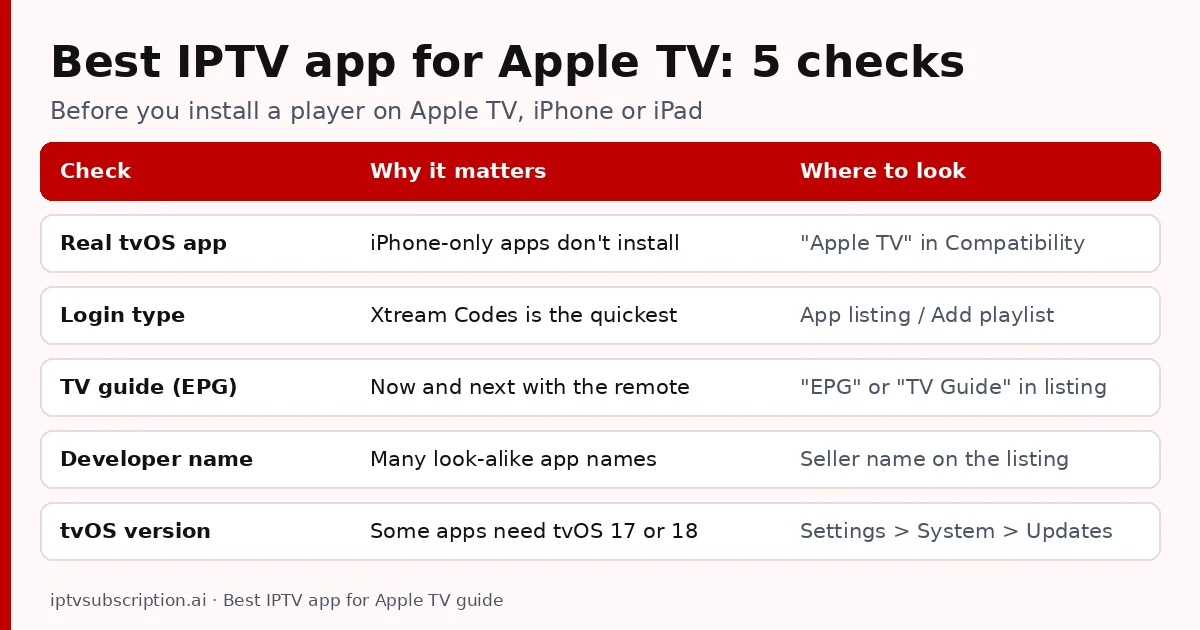
The best Apple TV IPTV app for you depends on how you log in and how you like to browse. Check these five points on the App Store listing before you install:
- Apple TV in the Compatibility list. Open the listing and look for “Apple TV” with a tvOS version. If it only says iPhone and iPad, it is a phone app.
- Your login type. Xtream Codes (server, username, password) is the quickest: channels, movies, series and the guide load together. M3U links work too, but you may need to add a separate guide (EPG) link.
- A TV guide (EPG). A “now and next” grid makes daily TV much easier with a remote.
- The developer name. Popular names are copied a lot. Check that the seller is the real developer before you pay for anything.
- Your tvOS version. Some players need a recent tvOS. Update in Settings > System > Software Updates.
Nice extras: favorites, search, catch-up (if your service has it), a parental PIN and iCloud sync between iPhone and Apple TV.
Best IPTV app for Apple TV: 6 players we checked
We opened each listing in the US App Store on 25 October 2026 and checked that it lists Apple TV. There is no single best IPTV app for Apple TV for everyone, so compare login type and guide. Listings change, so check the store before you buy.
Hot Player (our pick)
Hot Player lists Apple TV (tvOS 15 or later), iPhone, iPad and Mac. It plays M3U and M3U8 playlists, with favorites and search. With us, it works by device activation: on most devices the app shows a device ID (MAC), you send it with your IPTV username, and your playlist loads by itself. The app has a 30-day free trial; with us, lifetime activation is $20 once for one device and includes 1 month of IPTV. Details: Hot Player price and activation.

IPTVX
IPTVX (Bending X) supports Apple TV (tvOS 16+), iPhone and iPad. Its listing names Xtream API, M3U and M3U8, a TV Guide tab with an EPG grid, catch-up, AirPlay 2 and iCloud sync between your devices. A good fit if you want a full TV-style app.
UHF – Love your IPTV
UHF supports Apple TV (tvOS 17+), iPhone and iPad. The listing names M3U8 and Xtream playlists, an EPG, catch-up, favorites and a PIN lock for folders. Core features are free; extras are in-app purchases.
iPlayTV
iPlayTV is made for Apple TV only and needs tvOS 18.6 or later. It accepts remote playlists, Xtream Codes (with catch-up) and file uploads, and has full EPG support. It is a paid download rather than a free app.
Smarters Player Lite
Smarters Player Lite is the App Store app from WHMCS Smarters, the IPTV Smarters developer. It lists Apple TV (tvOS 12+), iPhone and iPad and names M3U and JSON playlists. Many look-alike “Smarters” apps exist, so check the seller name. More about this family of apps: IPTV Smarters Pro subscription guide.
VLC media player
VLC from VideoLAN is free and open source and runs on Apple TV (tvOS 11+). It can open a stream or playlist link, but it has no TV guide grid, so it suits a quick test more than daily TV. Get it only from the App Store or the official VideoLAN site.
TiviMate, popular on Fire TV, is an Android app; on Apple TV use a tvOS app above. Android user? See the TiviMate guide.
Best Apple TV IPTV app: quick comparison
| App | tvOS | iPhone/iPad | Login | Cost model |
|---|---|---|---|---|
| Hot Player | 15+ | Yes | Device activation, M3U | Free trial, then activation |
| IPTVX | 16+ | Yes | Xtream, M3U | Free + in-app |
| UHF | 17+ | Yes | Xtream, M3U8 | Free + in-app |
| iPlayTV | 18.6+ | No (Apple TV only) | Xtream, M3U | Paid |
| Smarters Player Lite | 12+ | Yes | M3U, JSON | Free + in-app |
| VLC | 11+ | Yes | Stream/playlist link | Free |
Our pick for the best IPTV app for Apple TV is Hot Player if you want no typing at all; IPTVX or UHF suit people who prefer Xtream Codes with a full guide. Need a player for another screen? Our best IPTV player guide compares apps for Smart TVs, Fire TV, Android, Windows and Mac.
How to set up IPTV on Apple TV
These steps work for most players. Keep the email with your login details open on your phone.
- On the Apple TV, open the App Store, search the app name and check the developer. Select Get.
- Open the app and choose the option to add a playlist or user. Pick Xtream Codes if it is offered.
- Enter the server URL, username and password exactly as they appear in your email. With an M3U link, paste the full link and add the EPG link if the app asks for one.
- Wait while the app loads the channels and the guide. The first load can take a minute with a large list.
- Add your favorite channels so you can find them fast with the remote.
Typing with the Siri Remote is slow. When a text field is open on the Apple TV, a nearby iPhone usually shows a keyboard notification, so you can type or paste from the phone. More help: the Apple TV User Guide.
Hot Player on Apple TV: install it, open it and note the device ID it shows (can’t find it? Message us on WhatsApp). Then fill in the activation form on our Hot Player page. Nothing to type on the TV. For login help with any app, see the IPTV setup guide.
Getting an Apple TV IPTV subscription
There is no special Apple TV IPTV subscription: the same login works in every player. Ours has 38,000+ live channels and 150,000+ movies and series in HD, Full HD and 4K. Your Xtream Codes and M3U details arrive by email, usually within minutes after payment is confirmed.
Plans are one-time payments with no auto-renewal: 1 month + 1 free for $14, 3 months for $30, 6 months + 2 free for $50 or 12 months + 2 free for $70. Compare them on the pricing page. Each plan includes 1 connection; for Apple TV and iPhone at the same time, ask us on WhatsApp.
IPTV on iPhone and iPad (and AirPlay to your TV)
Can I watch IPTV on my iPhone? Yes, and the best IPTV app for Apple TV often has an iPhone and iPad version too: Hot Player, IPTVX, UHF, Smarters Player Lite and VLC all do, with the same setup. Some apps are phone-only: the GSE SMART IPTV PRO listing names Xtream Codes, an EPG timeline and AirPlay, but lists only iPhone, iPad and iPod touch.
Checked on 2 November 2026: the GSE SMART IPTV PRO page in the US App Store no longer opens. For a full comparison of iPhone and iPad players, with the Hot Player setup step by step, see our guide to the best IPTV app for iPhone.

To watch on a big screen without an Apple TV app, use AirPlay:
- Connect the iPhone or iPad and the Apple TV (or an AirPlay-compatible smart TV) to the same Wi-Fi.
- Start a channel in your IPTV app and tap the AirPlay icon in the player, then pick your TV.
- If the app has no AirPlay button, open Control Center and use Screen Mirroring.
Apple has the full steps in Use AirPlay to stream video or mirror the screen. AirPlay is handy for a quick watch, but the phone stays busy. For daily TV, an app on the Apple TV itself is smoother.
Apple TV IPTV not working? 5 quick fixes
- App not found on Apple TV: it is probably an iPhone-only app. Choose one that lists Apple TV in its Compatibility section.
- Login not accepted: look for extra spaces, and copy the server URL exactly as written, including http:// and the port number if there is one.
- No TV guide: use the Xtream Codes login, or add the EPG link from your email, then refresh the guide in the app settings.
- Buffering: use an Ethernet cable if your Apple TV model has a port, or 5 GHz Wi-Fi close to the router. Restart the router at busy times.
- App crashes or will not install: update tvOS, then restart the Apple TV in Settings > System > Restart.
Still stuck? Our IPTV not working guide goes step by step, or message us on WhatsApp with the app name and a photo of the error.
Best IPTV app for Apple TV: FAQ
What is the best IPTV app for Apple TV?
A real tvOS app that accepts your login type and has a TV guide you can use with the remote. IPTVX, UHF, iPlayTV, Smarters Player Lite, VLC and Hot Player all list Apple TV in the App Store. We recommend Hot Player because we sell its activation and support it.
Can you use IPTV on Apple TV?
Yes. Install an IPTV player from the App Store on your Apple TV HD or Apple TV 4K, then add your subscription with Xtream Codes, an M3U link or device activation.
Can I watch IPTV on my iPhone?
Yes. Most Apple TV IPTV apps also have iPhone and iPad versions. You can also send the picture to your TV with AirPlay.
Why can’t I find an IPTV app on my Apple TV App Store?
Many IPTV apps are made only for iPhone and iPad. Check the Compatibility section of the listing for Apple TV, and update tvOS if the app needs a newer version.
Do I need a special subscription for Apple TV?
No. A standard IPTV subscription with Xtream Codes or M3U works in any player. Our plans start at $14 for 1 month + 1 free month.