
Xtream IPTV Subscription vs M3U: 3 Easy Login Types

Quick answer: with an Xtream IPTV subscription you get three details (a server URL, a username and a password), and most IPTV apps use them to load live TV, movies, series and the TV guide in one go. An M3U link is one long playlist address; it works in more places (even VLC and Kodi), but the TV guide usually needs a separate EPG link. Use Xtream Codes whenever your app offers it, M3U when it doesn’t, and MAC activation on Smart TV apps that show a MAC address.
Disclosure: we sell IPTV subscriptions and Hot Player activations. Our logins work with Xtream Codes, M3U and MAC-based apps, so we have no reason to push one format over another.
This guide explains each login type in plain words, shows which popular apps accept which, and lists the typing mistakes that cause most failed logins. It is about the login format that apps use, not about any one company.
Table of Contents
What is an Xtream Codes login?
“Xtream Codes” is the name most apps use for a login made of three fields: the server URL (also called host or portal, for example http://server.example:8080), your username and your password. Some apps add a fourth field, a name you choose, such as “Living room”. An Xtream IPTV subscription is simply a service that hands you these details.
When you log in this way, the app talks to the server and downloads everything that belongs to your account: live channel groups, the movie and series libraries, and the TV guide (EPG). You don’t paste any extra links. That is why an Xtream IPTV subscription is the easiest to set up in apps like TiviMate or IPTV Smarters, and why we suggest it first.
It also refreshes itself. If channels are added or moved, the app picks up the change the next time it updates the playlist, without you changing anything.
What is an M3U playlist link (and the EPG link)?
An M3U link is a web address that points to a text playlist: a list of channel names, logos and stream addresses. It is an old, simple format, which is why almost every player can open it, including media players that are not made for IPTV.
Many IPTV M3U links look like this: http://server.example:8080/get.php?username=YOUR_USER&password=YOUR_PASS&type=m3u_plus&output=ts. Notice that your username and password are inside the link. We come back to that in the security part below.
The TV guide is usually a second link, the EPG link (also called XMLTV link), which often ends in xmltv.php with the same username and password. Apps that read M3U files need it to show “now and next”. If your app has a field called “EPG URL” or “XMLTV”, paste that second link there.
Tip: if your app supports Xtream Codes but your Xtream IPTV subscription email only shows an M3U link of the shape above, the part before /get.php is your server URL, and the username and password are written in the link.
What is MAC activation?
Some apps, especially on Samsung, LG and Roku TVs, use the device’s MAC address instead of a typed login. The app shows a MAC address on its start screen (six pairs of letters and numbers, like 00:1A:2B:3C:4D:5E). The playlist is then linked to that MAC on the app’s website, so nothing has to be typed with the TV remote.
Hot Player works this way. Its official site describes activation by MAC address, up to 3 lists per device and a “Lock MAC” option so nobody else can reset your playlist. With us, a Hot Player activation costs $20 once, is lifetime for one device and includes 1 month of IPTV; each extra device needs its own activation. The app itself has a 30-day free trial. Setup on TVs: Hot Player on Samsung and LG.

Your Xtream IPTV subscription stays the same, but MAC activation is tied to one device. Move to a new TV and that TV has a new MAC, so it needs its own activation.
Xtream Codes vs M3U vs MAC: comparison table
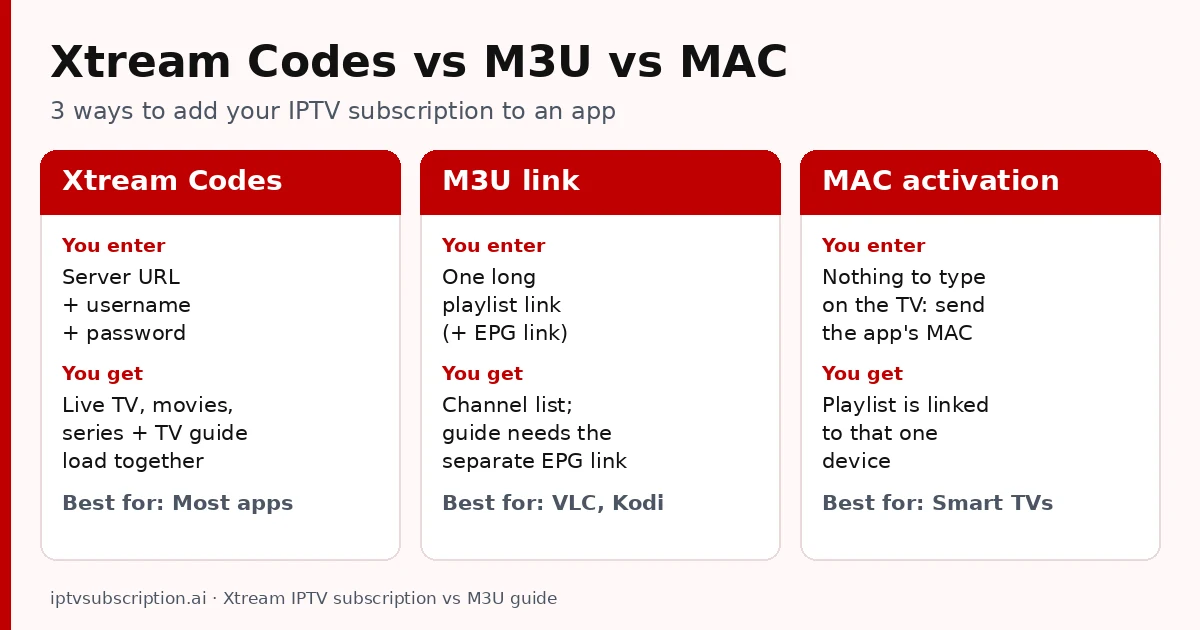
| Xtream Codes | M3U link | MAC activation | |
|---|---|---|---|
| What you enter | Server URL, username, password | One playlist link (+ EPG link) | Nothing on the TV; the app shows its MAC |
| Live TV | Yes | Yes | Yes |
| Movies and series | Yes, in separate menus | Often mixed into the list, or missing | Depends on the app |
| TV guide (EPG) | Loads automatically | Needs the separate EPG link | Usually set up for you |
| Updates | Automatic | When the app reloads the link | Automatic |
| Typing effort | Medium (3 short fields) | High (one long link) | Lowest |
| Best for | Phones, Fire TV, Android TV | VLC, Kodi, simple players | Samsung, LG, Roku TVs |
Which apps accept which login?
Every app has its own add-playlist screen. This is what we could check on each app’s official page or store listing in October and November 2026; options can change between versions, so trust what your app shows.
| App | Xtream Codes | M3U | MAC / portal |
|---|---|---|---|
| TiviMate (Android TV, Fire TV) | Yes | Yes | Stalker Portal |
| IPTV Smarters | Yes | Yes | — |
| Hot Player | — | Yes (lists added to your MAC) | MAC activation |
| GoTo Player (TV, Android, iPhone, Windows) | Yes | Yes | MAC and KEY on a TV (a provider can add the playlist) |
| Kodi + PVR IPTV Simple Client | No | Yes, with an XMLTV guide | No |
| VLC media player | No | Yes (Open Network Stream) | No |
VLC is a free, open-source media player: in VLC’s official guide you open a link with Media → Open Network Stream. It has no TV guide grid. Kodi’s official PVR IPTV Simple Client reads an M3U playlist plus an XMLTV guide, so it needs both links. More app advice: best IPTV player by device.
GoTo Player, a newer player, takes both an Xtream Codes login and an M3U link. On a TV it also shows a MAC and KEY, which a provider can use to add the playlist for you. It is free for 14 days, then $7 a year or $20 lifetime on a TV (gotoplayer.app).
Your Xtream IPTV subscription can also play in Plex: its M3U link goes through a free M3U proxy such as Threadfin, as shown in how to add IPTV to Plex. For VLC on a Mac, Android phone or iPhone, see our VLC steps for every device.
Good to know: one Xtream IPTV subscription can usually be used in all three ways. With ours, you can use the Xtream Codes details on your phone today and the M3U link in VLC on your laptop tomorrow, as long as only one screen plays at a time.
How to type your login correctly

Most “login failed” messages come from a small typo. Copy the details of your Xtream IPTV subscription from your email instead of retyping them, and check these points:
- http or https: use exactly what your email says. Changing
http://tohttps://(or the other way round) usually breaks the login. - The port: keep the number after the colon, such as
:8080. Without it the app looks in the wrong place. - No slash at the end: type
http://server.example:8080, nothttp://server.example:8080/, unless your email shows the slash. - No spaces: copying from an email can add a space before or after the text. Delete it.
- Upper and lower case: usernames and passwords are case-sensitive. Phone keyboards like to capitalize the first letter, so check it.
- Look-alike characters: 0 and O, 1 and l. Copy and paste avoids this.
- Whole M3U link: long links get cut when they are copied. The link must end with the last part from your email.
Is your Xtream IPTV subscription login still refused after a careful retype? Restart the app and your device, then follow our IPTV not working checklist. It covers buffering, missing guides and “account expired” messages step by step. The full first-time setup is in the IPTV setup guide.
Keep your Xtream IPTV subscription login private
The login of an Xtream IPTV subscription and its M3U link are the keys to your account. The M3U link even has your password written inside it, so treat both like a password:
- Don’t post your link or a screenshot of your login in forums, groups or reviews.
- Don’t give it to friends “just to try”. Plans include 1 connection by default, so a second person watching at the same time can stop your stream.
- Use only official app sources, such as the TV’s own app store, Google Play, the App Store, the Microsoft Store or the app maker’s website.
- On MAC-based apps, use the app’s lock option (Hot Player calls it “Lock MAC”) so nobody can change your playlist.
Think your login was shared or leaked? Message us on WhatsApp and we’ll help you sort it out. Need more than one screen at the same time? Ask us there too.
How to get an Xtream IPTV subscription login
Every plan we sell includes all three ways in: after payment you receive your username, password, server URL and M3U link by email, usually within minutes after payment is confirmed. Plans are one-time payments with no automatic renewal and the same 38,000+ live channels and 150,000+ movies and series in HD, Full HD and 4K:
- 1 month + 1 free: $14
- 3 months: $30
- 6 months + 2 free: $50
- 12 months + 2 free: $70
Payment is on a secure checkout (Cash App, Apple Pay, Google Pay, PayPal, Chime or crypto; Interac e-Transfer in Canada). Compare all plans on the pricing page, or read what IPTV is if you are new to it.
Customers in Canada: our Canada IPTV guide explains the English and French groups and paying with Interac e-Transfer.
Xtream Codes vs M3U: FAQ
What is an Xtream IPTV subscription?
An IPTV subscription that gives you an Xtream Codes login: a server URL, a username and a password. Most IPTV apps accept it and load live TV, movies, series and the TV guide from it.
Is Xtream Codes better than M3U?
For most people, yes, so pick an Xtream IPTV subscription if you can. It is shorter to type, loads movies and series in their own menus and brings the TV guide automatically. M3U is better only when your app does not support Xtream Codes, such as VLC or Kodi’s PVR IPTV Simple Client.
Can I turn an M3U link into an Xtream Codes login?
Often, yes. If your link contains get.php, the part before /get.php is the server URL, and the username and password are written in the link after username= and password=.
Why does my app ask for an EPG link?
Because an M3U playlist only lists channels. The TV guide comes from a second link (EPG or XMLTV). Paste it in the app’s EPG field, or use an Xtream Codes login, which loads the guide for you.
Does VLC support Xtream Codes?
No. VLC opens M3U playlist links (Media, then Open Network Stream) but has no Xtream Codes login and no TV guide grid.
Can I use the same login on two devices?
You can enter it on several devices, but plans include 1 connection by default, so only one can watch at a time. For more screens at the same time, ask us on WhatsApp.