
Stable IPTV: What Keeps a Stream Steady and How to Test It (2026)


Quick answer: stable IPTV is a stream that keeps playing at the busiest hours of the evening, opens channels without long waits and holds its picture through a long live program. It depends on three links: the service’s servers at busy times, your internet and home network, and your device and player app. No seller can control all three in your home, so the honest way to find stable IPTV is to test it yourself in your first month, at the hours and on the screen you really watch.
Disclosure: we sell IPTV subscriptions and Hot Player activations, so the plans and prices on this page are our own, checked on 30 October 2026. Prices are in US dollars and can change; the pricing page always shows the current ones.
Table of Contents
What stable IPTV really means
IPTV sends live channels over the internet instead of a cable or satellite line. Each channel reaches your screen as a steady flow of data. When that data arrives on time, the picture plays smoothly. When it arrives late, the player runs out of video, and you see a spinning circle, a frozen frame or a sudden drop in quality.
So stable IPTV is not one magic feature. It means the stream keeps up in real life: on a busy evening, on your own Wi-Fi, on the TV in your living room. A short hiccup can happen on any internet stream. What matters is whether it is rare and whether the stream recovers by itself.
This guide explains what makes a stream steady and how to check IPTV stability yourself. If a stream already fails, follow the fixes in IPTV not working. To compare services overall, read best IPTV service, and for what to look for in a server, see best IPTV server.
The 3 links in the chain behind stable IPTV
Think of every stream as a chain with three links. The picture is only as steady as the weakest one, and a problem in any link looks the same on screen: buffering. That is why a fix that works for a friend may do nothing for you.
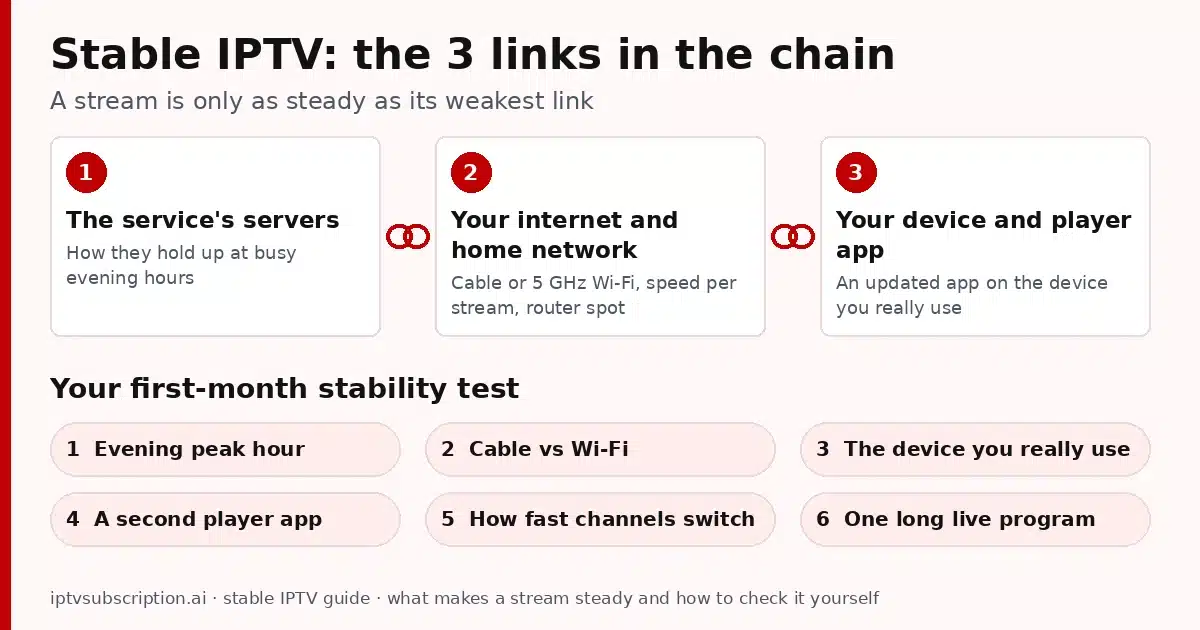
1. The service’s servers at busy times
The service’s servers send each channel to everyone who is watching it. In the morning, few people watch. In the evening and during big live events, many people watch the same channels at once. A service that plays well at 10 a.m. can still struggle at 9 p.m. if it has too little room for its busiest hours.
You can’t see a service’s servers, and an ad can’t show how they behave on your connection. So watch at the hours that matter to you: that is the first test in the plan below. To compare servers, read our best IPTV server guide.
2. Your internet and home network
Your internet plan is the next link, and everyone at home shares it. Streaming, gaming, downloads and video calls all take a slice of the same connection. Evenings are often busy on your internet provider’s network too, so the speed you get at night can be lower than the speed you see at lunch.
Inside your home, Wi-Fi is often the weakest point. Walls, floors, distance and your neighbors’ networks all slow it down, and a TV in a far room may get a much weaker signal than a phone next to the router.
3. Your device and player app
The last link is the screen itself. A streaming stick or an older smart TV has to decode the video, run the app and handle Wi-Fi at the same time. If it is short on memory, it can stutter even when the internet is fine. An out-of-date player app can do the same.
Player apps also handle buffering in different ways, so the same channel can play better in one app than in another. Our logins work in Xtream Codes, M3U and MAC-based apps, so you can try more than one player. Our best IPTV player guide and best IPTV box guide cover the device side.
A simple stability test plan for your first month
The best time to judge IPTV stability is your first month, before you pay for a long plan. This plan works for any stable IPTV service you are considering, including ours. Run the six tests below and note the date, time, device, cable or Wi-Fi, and what happened. A few lines in your phone’s notes are enough, and they make any chat with support faster.
- An evening peak-hour test. Watch for at least an hour between about 7 and 11 p.m. on a weekday, and again on a weekend evening. These are the hours when servers and home internet are busiest, so this is the test that counts most for stable IPTV.
- Wired vs Wi-Fi. Watch the same channel at the same time of day on a cable, then on Wi-Fi. If the picture only struggles on Wi-Fi, the weak link is your home network, not the service. No cable port? Compare a spot close to the router with the room where you really watch.
- The device you will really use. Test on the TV, stick or box you plan to watch on every day, not only on a phone. A phone next to the router can hide problems that a streaming stick behind the TV will show.
- A second player app. If a channel freezes in one app, load the same login in a second app on the same device. If it plays well there, the app is the weak link, and you can simply switch apps.
- How fast channels switch. Move through ten or so channels and note roughly how long each one takes to start. Similar, short waits are a good sign. Long waits on every channel suggest a slow connection or a busy server; a long wait on just one channel points to that channel.
- One long live program. Watch a whole live program from start to finish, such as a match, a concert or an evening news show. Short tests can look fine; a long one shows whether small hiccups add up or the stream recovers on its own.
If one test fails, run it again on another day before you decide. One bad evening can be a busy moment on your own line, while a problem that comes back at the same time on several days tells you much more. When a stream does fail, our IPTV not working guide walks you through the fixes step by step.
How to read your stable IPTV test results
Your notes from the six tests point to the weak link. Find what you noticed in the table below and try the first step in the last column before you judge the service.
| What you notice | Most likely weak link | What to try first |
|---|---|---|
| Buffering mostly between about 7 and 11 p.m., even on a cable | The service’s servers at busy times, or your internet provider’s evening traffic | Run a speed test at that hour on the same device. If the speed is fine and the stream still buffers, send support the day, time and channel. |
| Smooth on a cable or next to the router, buffering on Wi-Fi in the TV room | Your home Wi-Fi | Use 5 GHz Wi-Fi, move the router into the open, or connect a cable (some sticks take an Ethernet adapter). |
| Smooth on your phone, buffering on the stick or TV | The device | Restart it, update the player app and free some storage, then repeat the test in the same spot. |
| A channel freezes in one app but plays in another app on the same device | The player app | Keep the app that plays well, or update or reinstall the other one. |
| One channel fails while the others play | That channel’s stream | Try the channel’s HD or SD version if the list has both, or come back later, and send support the channel name. |
| Every channel takes long to start, at any hour | A slow connection or a busy device | Test your speed on that device and compare it with the speed you need per stream. |
| Nothing plays at all, on any device | Not a stability problem: the login details, the end date of your subscription or the number of connections | Check your login details and end date, then follow IPTV not working. |
When the weak link is at home, the home steps further down this guide usually help. When it is the service, your notes give support exactly what they need, and they are the fairest way to judge stable IPTV before you choose a longer plan.
Warning signs in offers that promise stability
Many IPTV offers use the word stable, and words cost nothing. A stable IPTV service is one you can check for yourself. These three signs should make you careful:
- Vague “anti-freeze” promises. A label like “anti-freeze” says nothing about the servers, your connection or your device. No service controls your home Wi-Fi, so nobody can promise a perfect picture in every home. Trust your own evening test instead.
- No support contact. If there is no way to reach a person before you pay, there will be no one to ask when a channel stops on a busy evening. Send a question first and see whether, and how, someone answers.
- No way to check your own account. You should be able to see when your subscription ends without asking anyone. Without that, you can’t tell whether a stream stopped because of a problem or because your time ran out.
One more thing to watch: an offer that only sells long plans. If you can’t start with a short plan, you can’t run a fair test before you commit. For a full list of checks before you pay, see our best IPTV service guide.
What you control at home for IPTV stability
You can’t change a service’s servers, but you can make your own link as strong as possible. For stable IPTV at home, these four habits make the biggest difference, and they cost little or nothing.
Use a cable or 5 GHz Wi-Fi
An Ethernet cable from the router to the TV or box is the steadiest choice, because it avoids walls, distance and other Wi-Fi networks. If you can’t run a cable, connect the device to your router’s 5 GHz Wi-Fi network rather than 2.4 GHz where you can. 5 GHz is usually faster over short distances, while 2.4 GHz reaches further but is often more crowded. Some streaming sticks accept an Ethernet adapter, so check your device’s specifications.
Know the speed you need per stream
Speed is counted per stream. The FCC’s broadband speed guide lists 3 to 4 Mbps for standard definition video, 5 to 8 Mbps for HD video and 25 Mbps for 4K Ultra HD video, and its figures are for one activity at a time. So add up what your home does at once: if two TVs play HD while someone is on a video call, you need enough for all three, plus room to spare.
Treat those figures as a floor, not a target. A live channel can’t load far ahead the way a film can, so it has less room for a slow moment. Check your real evening speed on the device you watch on, with a free test such as the M-Lab Speed Test from Measurement Lab, an open-source project. It shows download, upload and latency; it asks you to accept its data policy first, which includes publishing IP addresses.
If your evening result is far below the FCC figure for the quality you want, pick the HD version of a channel rather than 4K, or read our IPTV 4K guide before you rely on 4K.
Put the router in a good spot
Put the router high, in the open and near the middle of your home, not on the floor, behind the TV or inside a cabinet. Keep it away from thick walls, large metal objects and other wireless gadgets. If the TV is far from the router, a mesh system or a wired access point near the TV usually helps more than a faster internet plan.
Keep a simple restart routine
Devices and routers that run for weeks without a break can slow down. A simple routine helps: close the player app fully and restart the TV or stick now and then, and every week or two restart the router too (unplug it, wait a moment, plug it back in). Keep the app and the device’s software up to date. Still struggling? The fixes in IPTV not working are your next step.
Test stable IPTV with our 1-month plan
If you want to run this test plan with us, start small. Our 1 Month + 1 Free plan costs $14, a low-cost way to run all six tests before you choose a longer plan. Every plan is a one-time payment with the same channels and 1 connection, so what you test is what a longer plan gives you.
After payment is confirmed on the secure checkout at gotoiptv.com, your username, password, server URL and M3U link arrive by email, usually within minutes. During your test, check my IPTV account shows your end date and the days you have left. When you decide to stay, extend your IPTV subscription adds the new time after your current end date, so you lose no days.
Questions during your test, such as a channel that keeps stopping or watching on a second screen at the same time? Message us on WhatsApp. Want one app on one TV for good? Hot Player costs $20 once: a lifetime activation for one device, with 1 month of IPTV included. New to setting up? Our setup guide covers the first steps.

More guides on choosing, setting up and fixing IPTV are in our IPTV service guide.
Stable IPTV FAQ
What does stable IPTV mean?
Stable IPTV means channels open quickly and keep playing at busy evening hours, on your own internet and device, without long freezes or big drops in quality. It depends on three links: the service’s servers, your home network, and your device and player app.
Which is the most stable IPTV service?
No one can honestly name one service that beats all others in every home, because stability also depends on your internet, your Wi-Fi and your device. The useful question is whether a service stays steady on your connection, so test it at evening peak hours, on your own TV, during your first month.
What internet speed do I need for stable IPTV?
The FCC broadband speed guide lists 5 to 8 Mbps for HD video and 25 Mbps for 4K Ultra HD video, for one activity at a time. Add up everything your home streams or downloads at once, leave room to spare, and test your real evening speed.
Is a cable better than Wi-Fi for IPTV stability?
Usually, yes. An Ethernet cable avoids walls, distance and other networks, so it gives the steadiest connection. If you can’t use a cable, connect to 5 GHz Wi-Fi and keep the router high and in the open.
How long should I test an IPTV service?
A full month is a fair test, because it covers weekday and weekend evenings and several long live programs. Our 1 Month + 1 Free plan costs $14, and you can extend the same account later without losing days.
Is 4K IPTV less stable than HD?
4K needs much more speed: the FCC lists 25 Mbps for 4K Ultra HD video, against 5 to 8 Mbps for HD. On a slow or busy connection, the HD version of a channel is usually the steadier choice.