
Monthly IPTV Subscription: A Simple Month-to-Month Guide (2026)

Quick answer: a monthly IPTV subscription with us is the 1-month plan, which costs $14 and currently comes with 1 free month. You pay once, and there is no auto-renewal, so nothing is charged automatically and there is nothing to cancel. When you want more time, you check your end date and add another plan to the same account. The new time starts after your current end date, so renewing early never costs you days.
Disclosure: we sell IPTV subscriptions and Hot Player activations, so the plans and prices on this page are our own, checked on 29 October 2026. Prices are in US dollars and can change; the pricing page always shows the current ones.
Table of Contents
How a monthly IPTV subscription works here
A lot of monthly services charge your card again every month until you stop them. Ours work differently: each plan is a single payment for a fixed amount of time. When that time ends, the account stops, unless you have chosen to add more.
The shortest plan is the 1 month IPTV subscription, sold as 1 Month + 1 Free for $14. It has the same channel list, the same apps and the same 1 connection as our longer plans; only the length changes. That makes a monthly IPTV subscription the easiest way to start: a small payment and nothing that renews by itself.

- One payment per plan. You pay when you buy, and that is the whole charge for that plan.
- No auto-renewal. We never charge you again on our own. You renew only if you want to.
- Same service on every plan. Monthly or yearly, you get the same channels, VOD, apps and picture quality.
No auto-renewal, so there is nothing to cancel
Many subscriptions renew on their own. The FTC’s consumer advice on auto-renewals and subscriptions describes offers where you are charged automatically until you cancel, and it suggests reading the terms and knowing how to cancel before you sign up. An FTC alert on services that are hard to cancel gives similar advice: make sure a service won’t renew automatically before you can cancel it.
A monthly IPTV subscription with us avoids that problem by design. Every plan is a one-time payment, so there is no cancel button to find, no call to make and no charge to watch for next month. If you don’t want more time, you simply don’t renew.
Compare that with a service that takes automatic payments. To stop one, the CFPB explains, you tell the company you are taking away your permission and tell your bank as well. A stop payment order is another option, and banks generally charge a fee for it. With a one-time payment, there is nothing to stop.
Can I subscribe to IPTV every month?
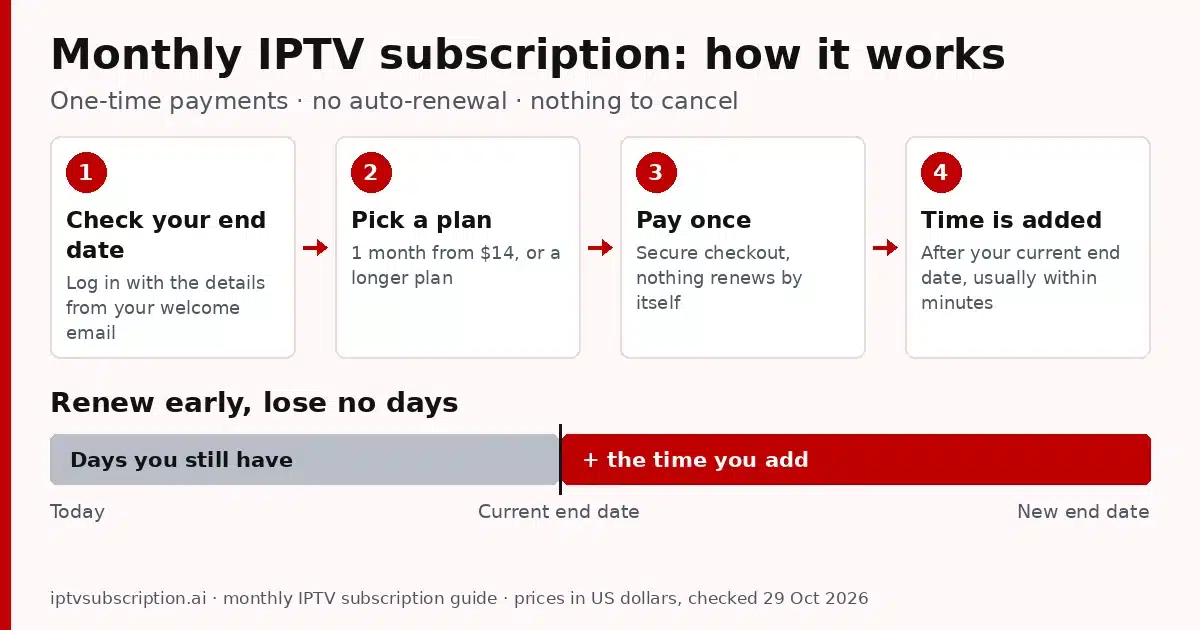
Yes. You can keep a monthly IPTV subscription going for as long as you like by adding time whenever you need it. Because nothing renews on its own, each renewal is a small decision you make: keep watching, switch to a longer plan, or take a break. Here is how to add time to the same account:
- Check your end date. Open check my IPTV account and type the username and password from your welcome email. You see your end date and the days you have left. Orange (14 to 29 days left) is a good time to renew.
- Pick a plan. On extend your IPTV subscription, choose how much time to add and see your new end date before you pay.
- Pay on the secure checkout. The plan you choose is again a one-time payment.
- Keep watching. The new time is usually added within minutes after payment is confirmed.
Prefer to renew with your username and email instead of your password? Use the IPTV renewal page. Either way, your username, apps and channels stay the same, so there is nothing to set up again.
One honest note: plans and prices can change. When you renew, the plan length and price are the ones shown on the day you pay, so check them on the extend page or the IPTV subscription pricing page first.
Renew early and keep every day you paid for
You don’t have to wait for the last evening. The time you add starts after your current end date, not on the day you pay. If you have ten days left and add a plan, you keep those ten days and the new time comes after them.
That makes it easy to renew a monthly IPTV subscription on payday, or a week before a trip, without losing anything. Paying month to month does not mean paying on one fixed date: you choose the day, and the days you already paid for stay yours.
And if you let the time run out? Then the account simply stops at its end date, and nothing is charged. You can come back later and extend the same account on the check page, with the same username.
Who a monthly IPTV subscription suits
Month to month IPTV is not the cheapest way to watch per month, but it is the most flexible. It fits you well if one of these sounds like you:
- You want to try the service first. A monthly IPTV subscription lets you test it on your own TV, apps and internet before you pay for a long plan. Not sure what you need? Read how to get IPTV and the setup guide.
- You watch for part of the year. Some people watch a lot in the colder months or during a season they follow, and very little the rest of the year. Pay for the months you use and skip the others.
- You are away from home for a while. Staying somewhere for a few weeks? Pay for that stretch only, and stop when you are back. Every plan has 1 connection, so one screen plays at a time.
- You keep a tight budget. $14 now is easier than $70 at once, and you never tie up money in months you may not use.
A monthly IPTV subscription suits you less if you already know you will watch all year. Then a longer plan gives you the same service for less per month, as the next section shows. Still deciding whether IPTV fits your home at all? Start with is IPTV worth it.
When a longer plan saves money
Here is the price per month of each plan, using only our current prices and the months each plan includes, compared with the monthly IPTV subscription (the 1-month plan):
| Plan | You pay | Months | Per month | Compared with 1 month |
|---|---|---|---|---|
| 1 Month + 1 Free | $14 | 2 | $7.00 | — |
| 3 Months | $30 | 3 | $10.00 | $3.00 more a month |
| 6 Months + 2 Free | $50 | 8 | $6.25 | $0.75 less a month |
| 12 Months + 2 Free | $70 | 14 | $5.00 | $2.00 less a month |
Two things stand out. First, the 3 Months plan costs more per month than the 1-month plan today, because it has no bonus months. Second, the 12 Months + 2 Free plan is the lowest per month, at $5.00, but it asks for $70 up front.
A simple rule: start monthly while you are testing or unsure, and move to a long plan once you know you will stay. The extend and renewal pages let you add a longer plan to the same account at any time. For the full cost picture, including devices and apps, read our IPTV cost guide, or answer two questions in the IPTV plan finder.
How to pay and what you get
When you click Buy on a plan, you pay on the secure checkout at gotoiptv.com. You can pay with Cash App, Apple Pay, Google Pay, PayPal, Chime or crypto, and with Interac e-Transfer in Canada. Check the total before you confirm: whether you buy a monthly IPTV subscription or a longer plan, it is a one-time payment, with nothing charged again later.
Watching from Canada? Our IPTV subscription Canada guide covers the English and French sections and paying with Interac e-Transfer.
After payment is confirmed, your username, password, server URL and M3U link arrive by email, usually within minutes. They work in Xtream Codes, M3U and MAC-based apps; our best IPTV player guide helps you pick one. Want a specific channel, or two screens at the same time? Ask us on WhatsApp before you buy.

More guides on choosing, setting up and fixing IPTV are in our IPTV service guide.
Monthly IPTV subscription FAQ
Does a monthly IPTV subscription renew automatically?
No. Every plan is a one-time payment with no auto-renewal. Nothing is charged unless you choose to renew, so there is nothing to cancel.
How much is a 1 month IPTV subscription?
$14 for the 1 Month + 1 Free plan, checked on 29 October 2026. The 1-month plan currently comes with 1 free month. Prices can change, and the pricing page always shows the current ones.
How do I renew my IPTV every month?
To keep a monthly IPTV subscription going, check your end date on the check my IPTV account page, then add time on the extend page or the renewal page and pay on the secure checkout. Your username, apps and channels stay the same.
Do I lose days if I renew before my plan ends?
No. The time you add starts after your current end date, so renewing early never costs you days.
What happens if I don’t renew?
Your monthly IPTV subscription simply stops at its end date and nothing is charged. You can extend the same account later if you want to watch again.
Is a longer plan cheaper than paying monthly?
Per month, yes, except the 3 Months plan. The 1 Month + 1 Free plan works out to $7.00 a month, 6 Months + 2 Free to $6.25 and 12 Months + 2 Free to $5.00, while 3 Months is $10.00 a month.