
Blog
Best IPTV Box: 6 Simple Checks Before You Buy

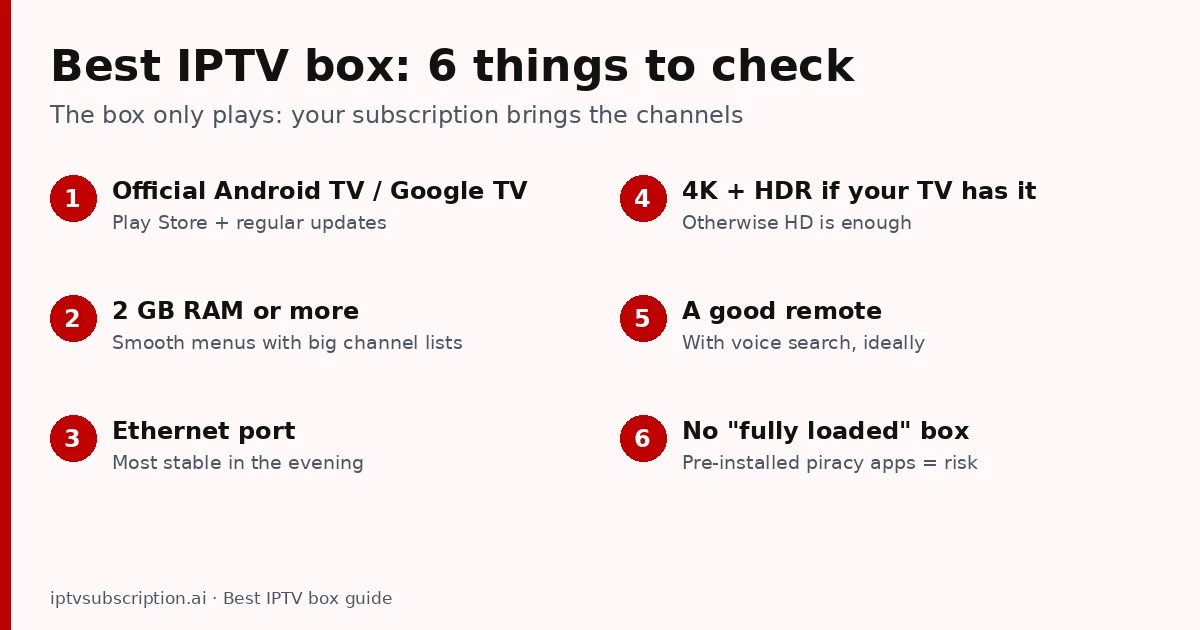
Quick answer: the best IPTV box for most homes is a certified Android TV or Google TV box (or a Fire TV Stick 4K) with at least 2 GB of RAM, an Ethernet port or fast Wi-Fi, and 4K if your TV supports it. The box only plays your channels: you still need an IPTV subscription and a player app. Avoid “fully loaded” boxes sold with pre-installed apps for free channels.
Note: we sell IPTV subscriptions, not boxes, and we don’t earn anything from the devices mentioned here.
Table of Contents
What is an IPTV box?
An IPTV box is a small device that connects to your TV by HDMI and to your internet by cable or Wi-Fi. It runs a player app that shows your IPTV channels, the TV guide and the movie library. It is useful when your TV has no apps, when its built-in apps are slow, or when you want one familiar remote and menu on every TV in the house.
The box itself has no channels. That is why people search for an “IPTV box and subscription”: the box is the player, the subscription is the content. Our guide on what IPTV is and how it works explains the difference.
Best IPTV box: 6 things to check
- Official Android TV or Google TV. Certified boxes get the Google Play Store and regular security updates. Cheap uncertified boxes often run a basic Android build with old software and no updates.
- 2 GB of RAM or more. Large channel lists and TV guides need memory; with less, menus lag.
- An Ethernet port (or Wi-Fi 5/6). A network cable is the most stable option in the evening.
- 4K and HDR only if your TV supports them; otherwise an HD box is enough.
- A good remote, ideally with voice search, because you will use it every day.
- No “fully loaded” box. Boxes sold with apps for free premium channels usually carry pirated content and can carry malware. Buy a normal box and install apps yourself from official stores.
Types of IPTV box
Streaming sticks (Fire TV Stick)
Small, cheap and easy: a Fire TV Stick plugs straight into the TV. The 4K models are the best choice for IPTV. Most IPTV players are installed with the Downloader app; see our best IPTV for Firestick checklist.
Android TV and Google TV boxes
The most flexible option: any player from Google Play, including TiviMate and Hot Player, plus a network port on most models. This is usually the best Android TV box for IPTV if you watch every day. Premium boxes such as the NVIDIA Shield TV are fast and get long software support.
Apple TV
Apple TV runs IPTV player apps from the App Store. It is smooth and well built, but the choice of IPTV apps is smaller than on Android TV.
Portal (MAC) set-top boxes
Some Linux set-top boxes are made only for IPTV. They log in with a portal address and the box’s MAC address. They are simple to use, but they run fewer apps, so check with your provider that it supports portal logins before you buy one.
Do you need an IPTV box at all?
Often not. If you have a recent Samsung, LG, Android TV or Roku TV, a player app on the TV itself may be enough. Hot Player, for example, is in the Samsung, LG and Roku stores (Samsung & LG guide). Buy a box when:
- your TV has no app store or very old apps;
- the TV’s apps are slow with a big channel list;
- you want a network cable connection and your TV is far from the router’s Wi-Fi;
- you want the same app and remote on every TV.

How to set up an IPTV box
- Connect the box to the TV by HDMI and to the router by cable if you can.
- Sign in to the box’s app store and install a player app (see our best IPTV player guide).
- Add your IPTV login: an Xtream Codes login, an M3U link, or a MAC activation for apps like Hot Player.
- Open Live TV and the guide. If something doesn’t load, follow the IPTV not working checklist.
For the full walk-through from zero, see how to get IPTV.
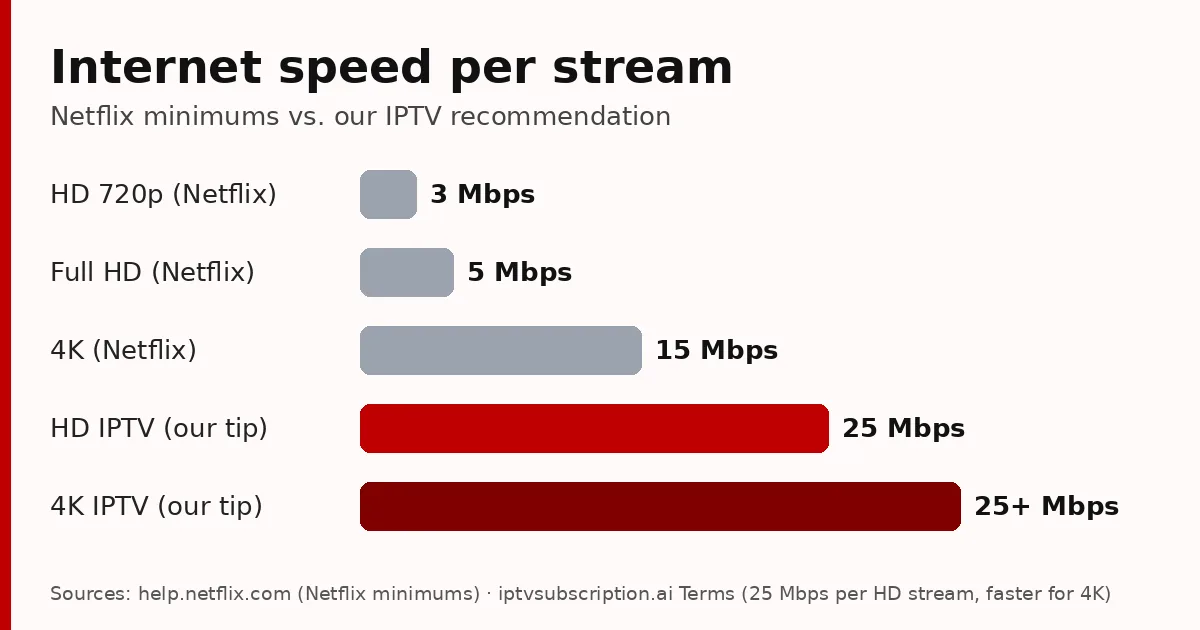
Whatever box you choose, it can only show what your internet delivers. We recommend at least 25 Mbps per HD stream.
An IPTV subscription for your box
Our subscription works on Android TV and Google TV boxes, Fire TV and Smart TVs, with Xtream Codes, M3U and MAC activation. Test it on your own box with the 24-hour trial ($2), then choose a plan from $13.95 (one-time payments, no automatic renewal).
Background on Android TV devices: Android TV on Wikipedia.
Best IPTV box: FAQ
What is the best IPTV box?
For most homes, a certified Android TV or Google TV box, or a Fire TV Stick 4K, with 2 GB of RAM or more, Ethernet or fast Wi-Fi and 4K if your TV supports it.
What is an IPTV box?
A small device connected to your TV by HDMI that runs an IPTV player app. It shows your channels and TV guide, but the channels come from your IPTV subscription.
Does an IPTV box include channels?
No. You need an IPTV subscription and a player app. Boxes sold “fully loaded” with free channels usually carry pirated content and malware risks.
Is an Android TV box better than a Fire TV Stick for IPTV?
A good Android TV box is usually faster, has a network port and installs apps from Google Play. A Fire TV Stick 4K is cheaper and works well for most people.
Do I need a box if I have a Smart TV?
Often not. Samsung, LG, Android TV and Roku TVs can run IPTV player apps such as Hot Player directly.