
Blog
Best IPTV for Firestick: 6 Simple Checks

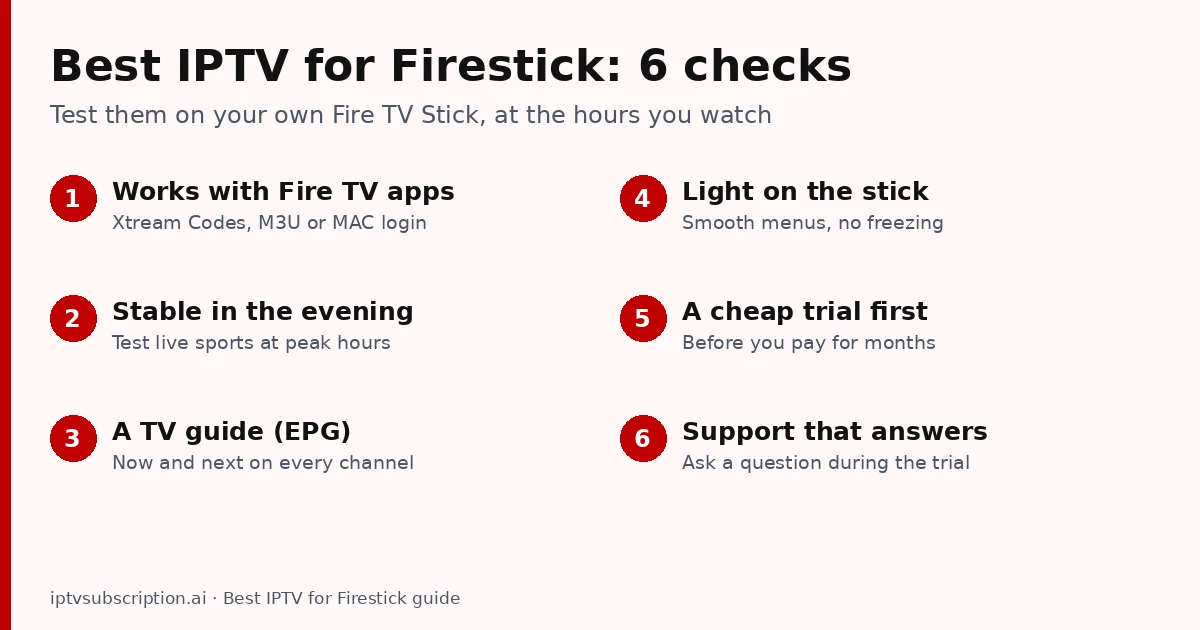
Quick answer: the best IPTV for Firestick is a service that works with Fire TV player apps (Xtream Codes, M3U or MAC login), stays stable in the evening and during live sports, includes a TV guide and lets you test it with a cheap trial first. Pair it with a light player app and a good connection, and a Fire TV Stick becomes a full live-TV box.
Full disclosure: we sell an IPTV subscription and recommend the Hot Player app. This guide gives you the checks to judge any provider, us included, on your own Fire TV Stick.
Table of Contents
What makes the best IPTV for Firestick?
A Fire TV Stick is small and affordable, but it has less memory and power than a big Android box. So the best IPTV for Firestick is not simply the one with the longest channel list. Check these six things:
- It works with Fire TV apps. The service should give you an Xtream Codes login (server, username, password), an M3U link or a MAC-based activation. Those work in the common Fire TV player apps.
- It is stable in the evening. Most freezing happens at peak hours and during big matches, when many people watch at once. Test then, not at noon.
- It has a TV guide (EPG). A Firestick remote is slow for scrolling through hundreds of channels; a guide with “now and next” makes it usable.
- It is light on the stick. Menus and channel changes should feel quick. A heavy channel list with thousands of entries can make a small stick lag.
- It offers a cheap trial. Test on the same Fire TV Stick, the same Wi-Fi and the same hours you normally watch before paying for months.
- Support answers. Send a question during the trial and see how fast someone replies.
Which Firestick works best for IPTV?
Any recent Fire TV Stick can play IPTV, but the experience differs:
- 4K models (Fire TV Stick 4K and 4K Max) are the best choice: more power for smooth menus, and the only way to watch 4K channels on a 4K TV.
- HD models (Fire TV Stick and Fire TV Stick Lite) work well for HD channels. Keep fewer apps installed so they stay fast.
- Fire TV Cube and Fire TV smart TVs run the same apps and are usually faster still.
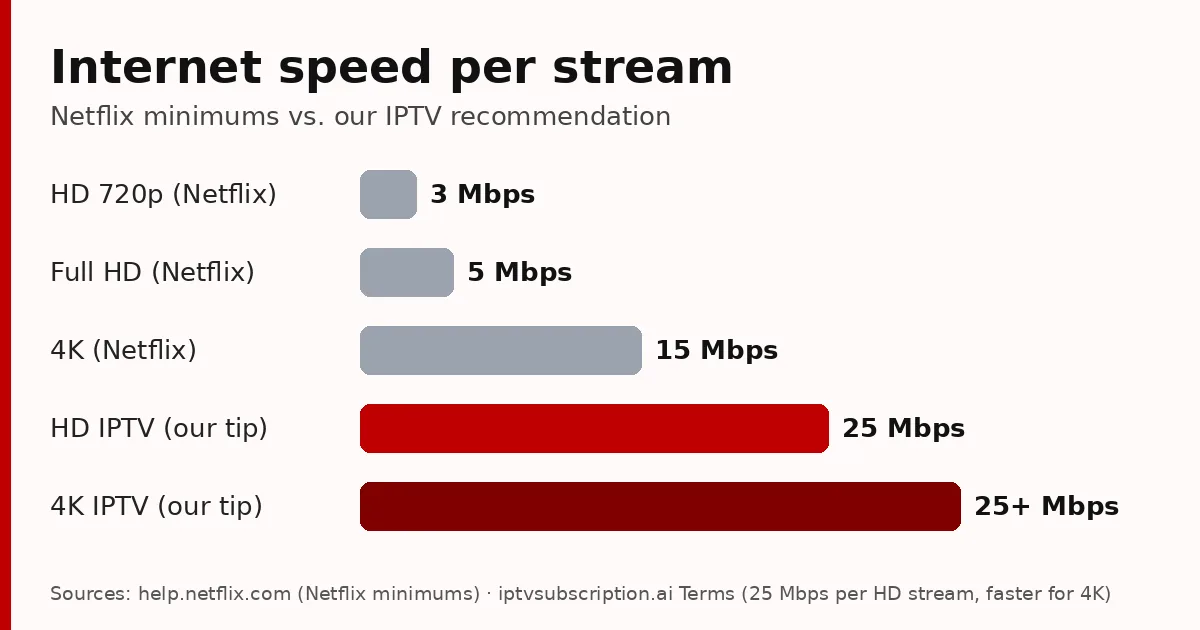
Whatever the model, the stick only shows what your internet delivers. We recommend at least 25 Mbps per stream for HD and more for 4K.
Best IPTV app for Firestick: how to choose
The service gives you the channels; the app is what you see and use every day. When people search for the best IPTV app for Firestick, these are the features that matter most:
- Login type: the app must support the login your service gives you (Xtream Codes, M3U or MAC).
- TV guide (EPG): a grid you can scroll with the remote.
- Favourites and search: so you reach your channels in two clicks.
- Catch-up and time shift, if your service and channels support them.
- A safe source: install apps only from the official app store or the developer’s own site. Never install modified “free” versions.
Popular IPTV players for Fire TV include TiviMate, IPTV Smarters and Hot Player (compared in our best IPTV player guide). We recommend Hot Player (formerly Hot IPTV): it is simple with a remote, it uses MAC activation so there is nothing to type, and it has a 30-day free trial. With us, its lifetime activation costs $20 for one device and includes 1 month of IPTV.

How to install IPTV on a Firestick
Most IPTV player apps are installed on a Fire TV Stick with the free Downloader app. In short:
- Install Downloader from the Amazon Appstore (search “Downloader”).
- Go to Settings → My Fire TV → Developer options → Install unknown apps and switch it on for Downloader. Don’t see Developer options? Open About and click your device name 7 times.
- Open Downloader and enter the app’s address or code. For Hot Player the code is 395800.
- Open the app, enter your login (or send us your MAC ID for Hot Player) and load your channels.
Our Hot Player Firestick guide shows every step with screenshots, and our IPTV setup guide covers other devices.
Tips for smooth IPTV on a Firestick
- Use 5 GHz Wi-Fi or a network cable. An Ethernet adapter for Fire TV is cheap and fixes most evening buffering.
- Restart the stick once a week (Settings → My Fire TV → Restart) to clear its memory.
- Remove apps you don’t use, so the IPTV app has more memory.
- Turn off “auto-play” previews on the Fire TV home screen if menus feel slow.
- Freezing on one channel only? Try another channel; if all freeze, run a speed test and tell support the time and channel.
Still buffering? Our 7 checks for a stable IPTV server help you find out whether the cause is the server or your connection.
Our IPTV on Firestick
If you want to try us on your Fire TV Stick, start with the 1 month + 1 free plan for $14. Plans then cost $14 for 1 month + 1 month free, $30 for 3 months, $50 for 6 months + 2 free and $70 for 12 months + 2 free, one-time payments with no automatic renewal (see all prices). New to IPTV? Read what IPTV is and how it works first.
More about the Downloader app: AFTVnews, the developer of Downloader.
Best IPTV for Firestick: FAQ
What is the best IPTV for Firestick?
A service that works with Fire TV player apps (Xtream Codes, M3U or MAC), stays stable at peak hours, has a TV guide and offers a cheap trial so you can test it on your own stick first.
What is the best IPTV app for Firestick?
One that supports your service’s login type, has a TV guide you can use with the remote and comes from an official source. We recommend Hot Player; TiviMate and IPTV Smarters are other popular players.
Which Firestick is best for IPTV?
A 4K model (Fire TV Stick 4K or 4K Max): smoother menus and 4K channels on a 4K TV. HD models are fine for HD channels.
Do I need a VPN for IPTV on Firestick?
Only if your internet provider slows down streaming. A VPN adds a small delay, so test with and without it.
Why does IPTV buffer on my Firestick?
Usually busy Wi-Fi in the evening or a busy server. Try 5 GHz Wi-Fi or a network cable, restart the stick, then test another channel.