
The Reseller IPTV Panel, Explained One Screen at a Time
Want to see the reseller IPTV panel before you buy credits? This page walks you through the panel that every IPTV Subscription AI reseller uses. Each screenshot has green numbered circles, and under each picture you find what every number does.
To keep things private, we blurred usernames, customer names, passwords, links and sales figures.
 6screens, all numberedAnyphone or computer browser1 minfor a new customer
In This Guide
What a Reseller IPTV Panel Does
Picture a cash desk for your IPTV shop. Each sale, each renewal and each customer is kept in one place.
A reseller IPTV panel is a members-only web page where you manage the people who buy from you. After you sign in, you see how many credits you have. A few clicks later you have made a new account, extended an old one, or checked which customers are online.
Every action in the IPTV panel is paid with credits, and 1 credit = 1 month of IPTV for one customer. Before you confirm anything, the panel shows you the credit cost and the new end date. You always know what you pay.
So what makes the best IPTV reseller panel? We think it is simple: clear credits, clear end dates, quick renewals and a real person to help you. That is what our reseller IPTV panel gives you, and the tour below shows it screen by screen.
Customers: make new accounts, extend them, change them.
Credits: your balance is on screen, and each month costs one.
End dates: spot quickly who must renew soon.
Control: private notes, line locks and channel groups.
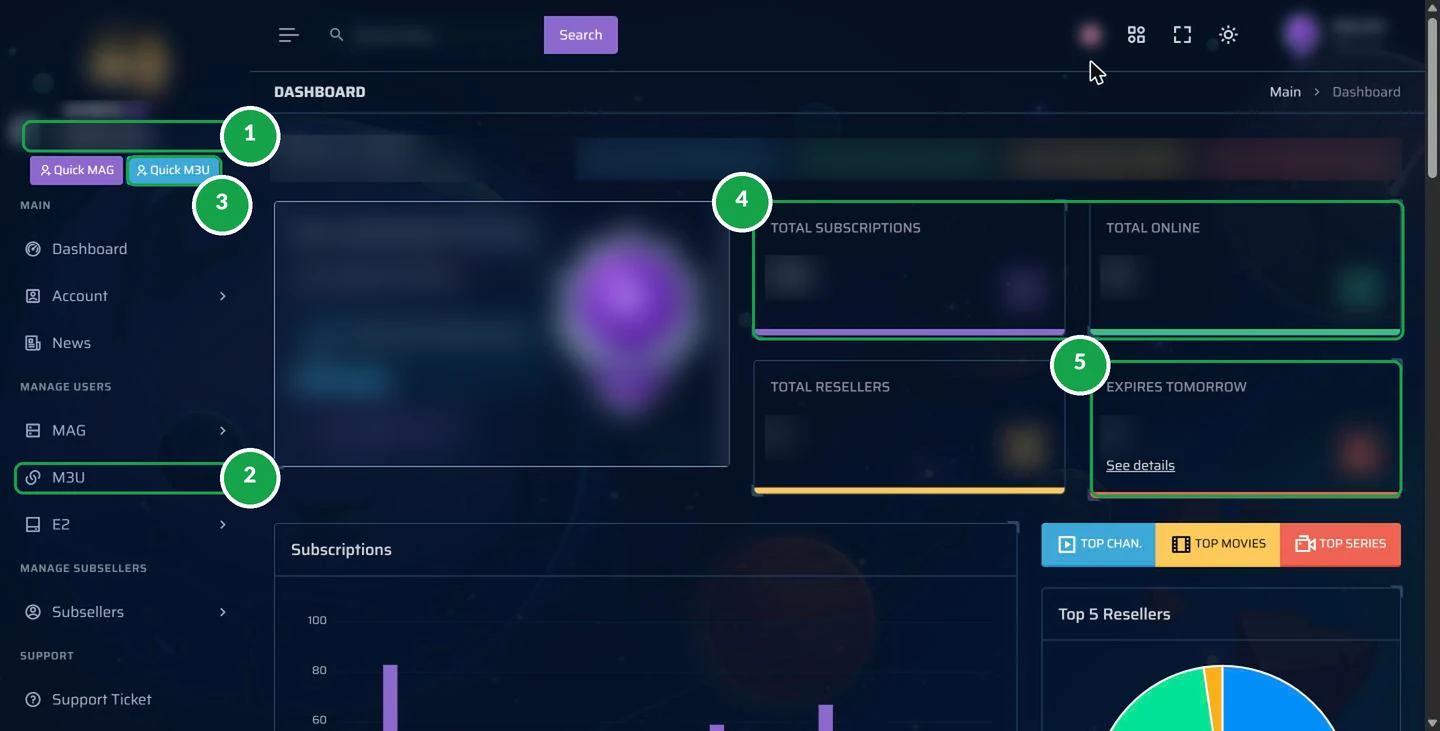
The Dashboard of Your Reseller IPTV Panel
You land here right after you sign in. In one look you know how your sales are going.
Tap for the full-size view- 1Credits left. How many credits remain in your reseller IPTV panel. The number sits at the top of the menu, so you never lose sight of it.
- 2M3U menu. Open it for the Add New page and your customer list. The MAG and E2 items are for MAG set-top boxes and Enigma2 receivers.
- 3Quick M3U. A fast way to make a customer line in a few seconds.
- 4Totals. The number of customers you have, and how many of them are watching at this moment.
- 5Expires tomorrow. A list of customers whose plan stops tomorrow, plus a “See details” link. This is your to-do list for renewals today.
Tip: open the dashboard first every day. Numbers 4 and 5 tell you most of what you need to know.
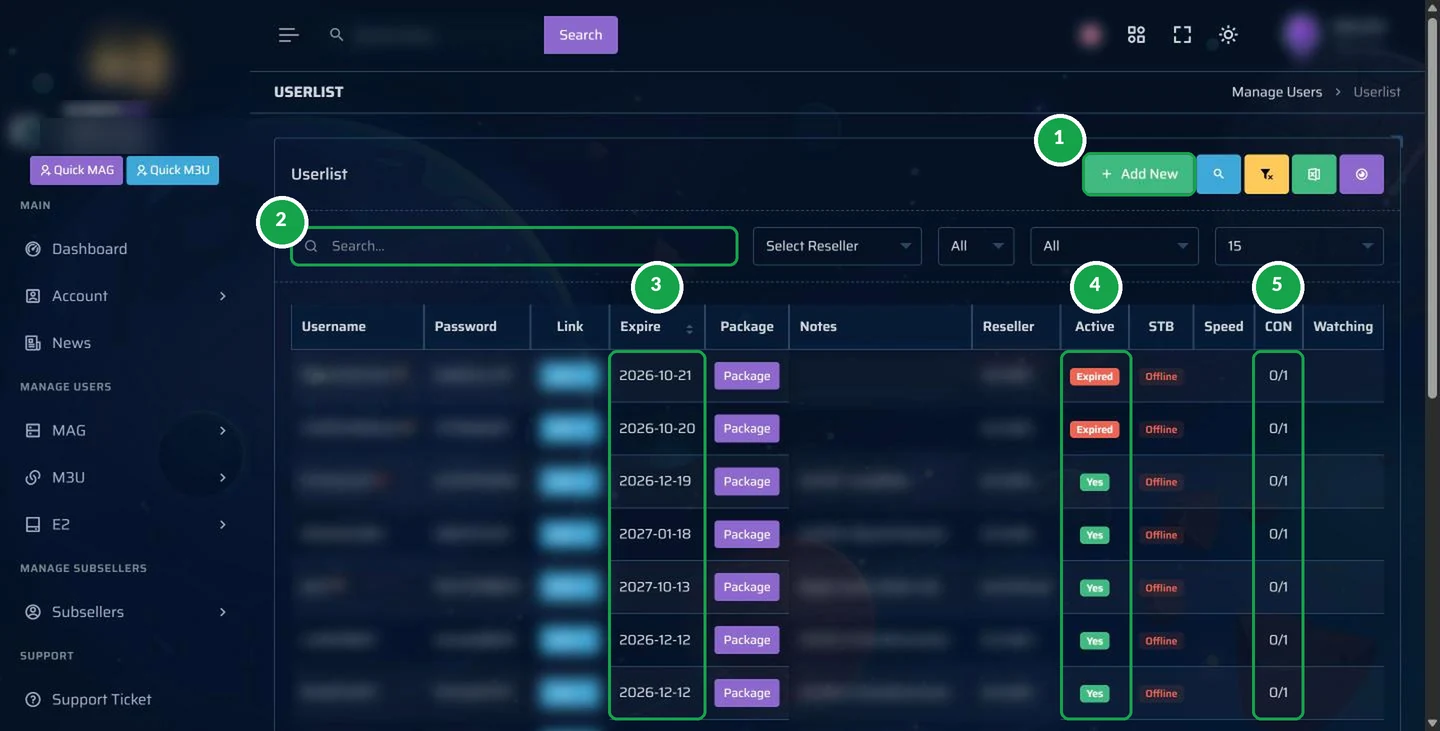
The Customer List: All Your Accounts
Each account you make in the reseller IPTV panel shows up in this list, with its end date and whether it works.
 Tap for the full-size view
- 1Add New. Starts a fresh customer account.
- 2Search. Type a username or a note and the customer appears right away.
- 3Expire. The date each account ends. Sort the list by this column to put the most urgent renewals on top.
- 4Active. A green “Yes” means the line is working. A red “Expired” means it must be renewed.
- 5CON. Screens in use compared with screens allowed. For example, 0/1 means one screen is allowed and none is watching now.
Next to every customer there is an Action button. It holds the tools you will reach for most often: Edit, Renew, disconnect a device, copy the playlist link, and lock settings that keep the line safe.
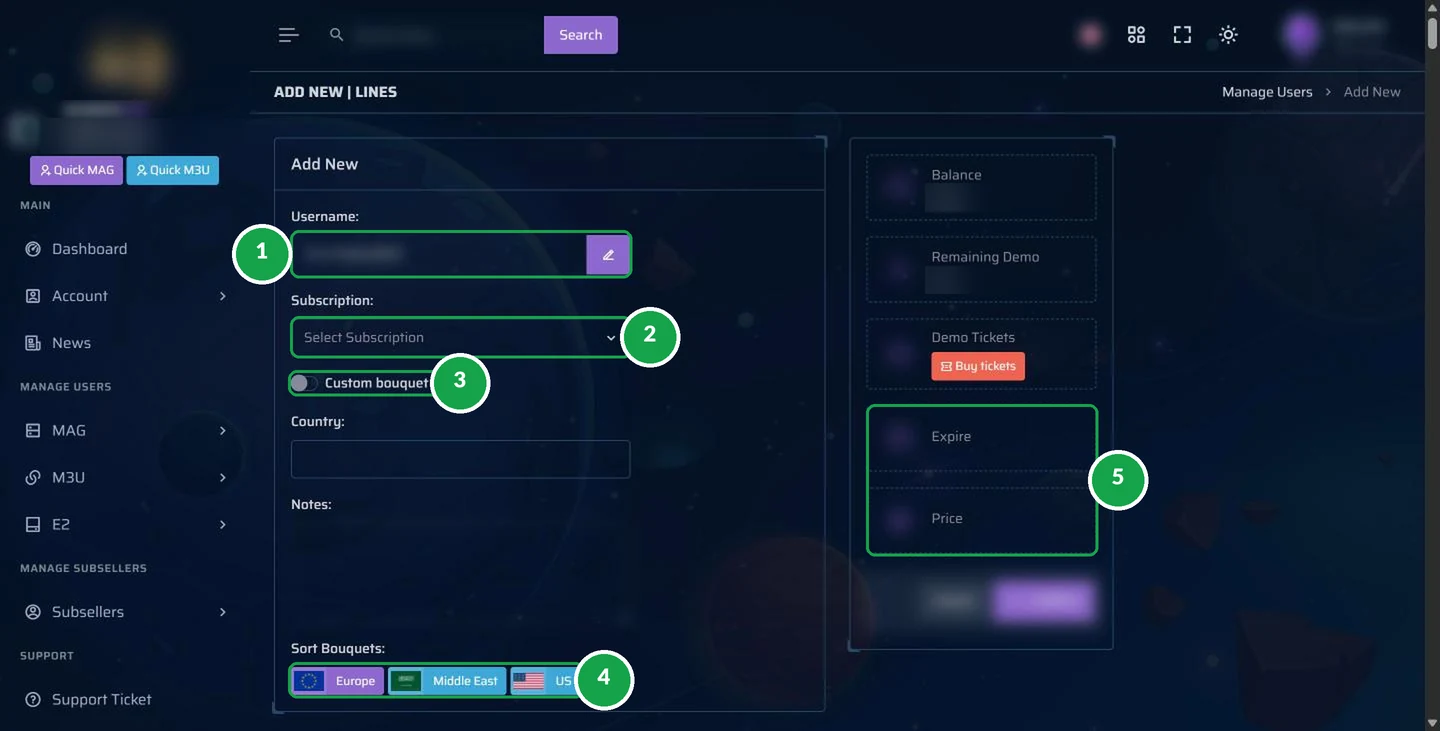
Create a New Customer in About a Minute
Here is where a sale turns into a working account in your reseller IPTV panel.
 Tap for the full-size view
- 1Username. The panel fills it in for you. Tap the pencil if you prefer to type your own.
- 2Subscription. Choose how long the account runs: 1 month, 3 months, 6 months or a full year.
- 3Custom bouquet. Turn this on when you want to pick the channel groups this customer receives.
- 4Sort bouquets. Put the channel groups in order by region, for example US, Europe or the Middle East.
- 5Expire and price. Before you press Confirm, you see the new end date and how many credits it will take.
The Notes box is your memory. Write the customer’s first name, the device they use or how they paid you. Only you can read these notes in your reseller IPTV panel.
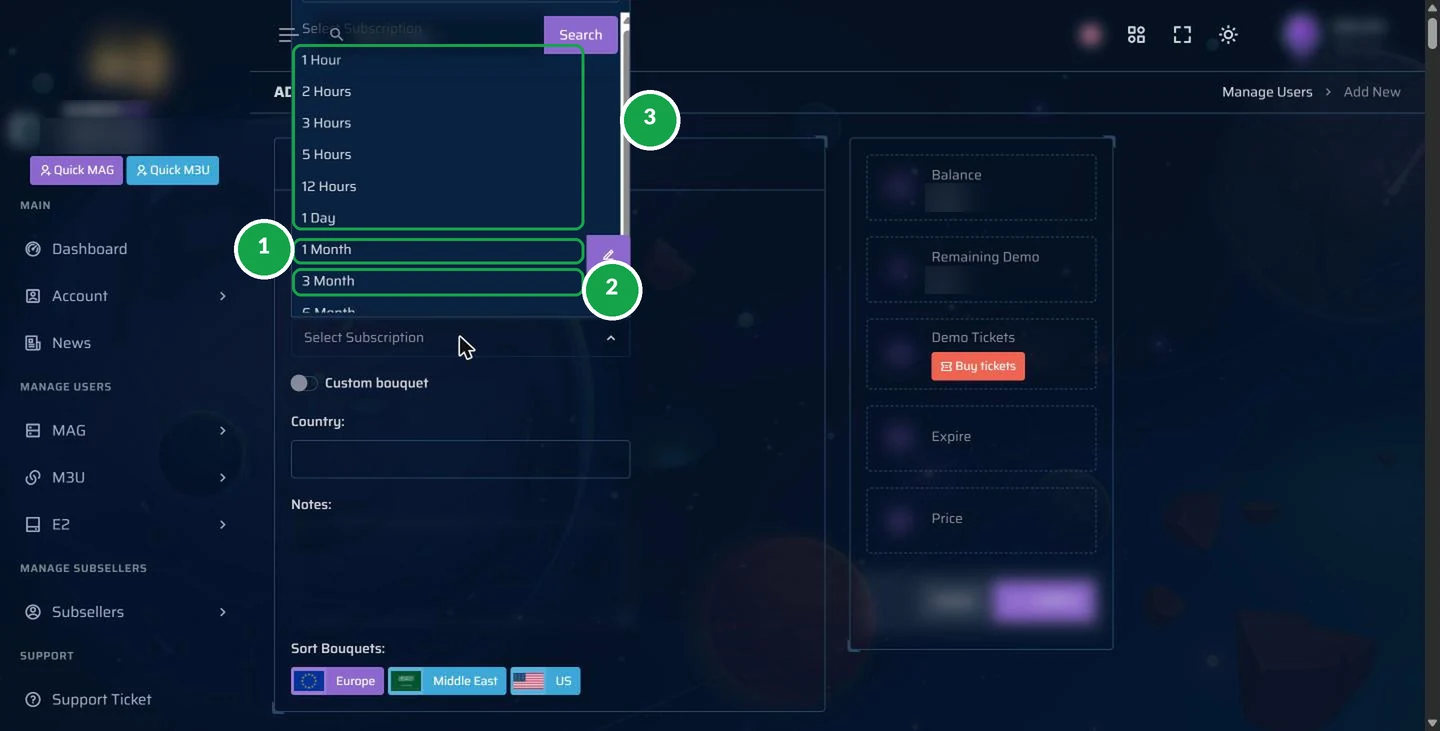
Plan Lengths and the Credits They Use
The length you pick sets how long the account works and how many credits come off your balance.
 Tap for the full-size view
- 11 Month. Takes 1 credit. A good choice for someone buying for the first time.
- 23 Months. Takes 3 credits. Scroll a little lower in the same list for 6 months and 1 year.
- 3Short lengths between 1 hour and 1 day, meant for tests. Our admin will tell you how test lines work on your account.
The table uses the 600-credit price of $2.75 per credit as an example. With 120 credits ($4 each) a 1-year account costs you $48, and with 360 credits ($3 each) it costs $36.
| Plan length | Credits taken | What it costs you at $2.75 |
|---|---|---|
| One month | 1 | $2.75 |
| Three months | 3 | $8.25 |
| Six months | 6 | $16.50 |
| One year | 12 | $33 |
All package prices are on our IPTV credits page.
Renewals: Same Login, More Months
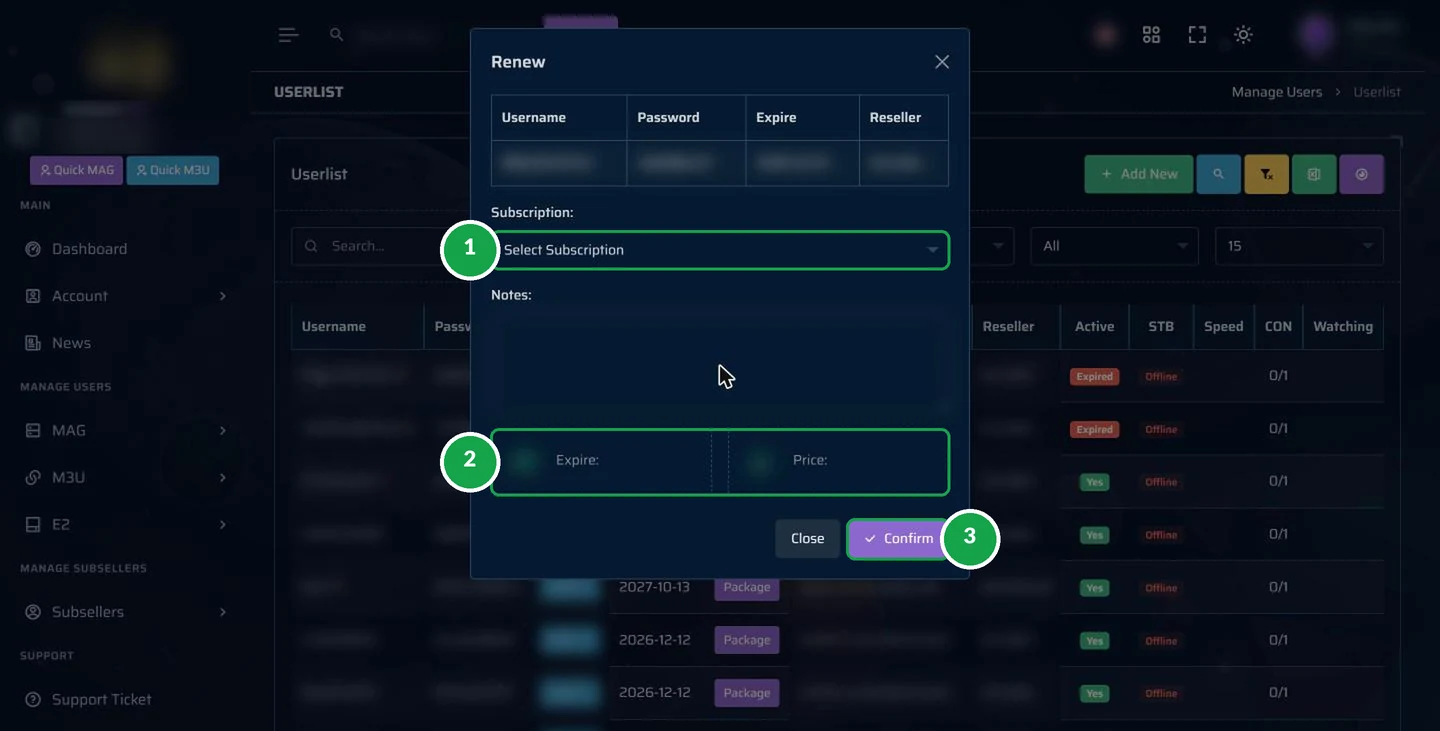
Repeat customers are the simplest income in this work. A renewal takes three clicks in the panel, and your customer does nothing.
 Tap for the full-size view
- 1Subscription. Pick the number of months you want to add.
- 2Expire and price. Look at the new end date and the credits the renewal takes.
- 3Confirm. That is it. The login stays the same, so the customer simply keeps watching.
To get here, go to the customer list, press Action next to the customer and choose Renew. Renew one or two days before the end date and there is no break in service.
Bouquets: Pick the Channel Groups
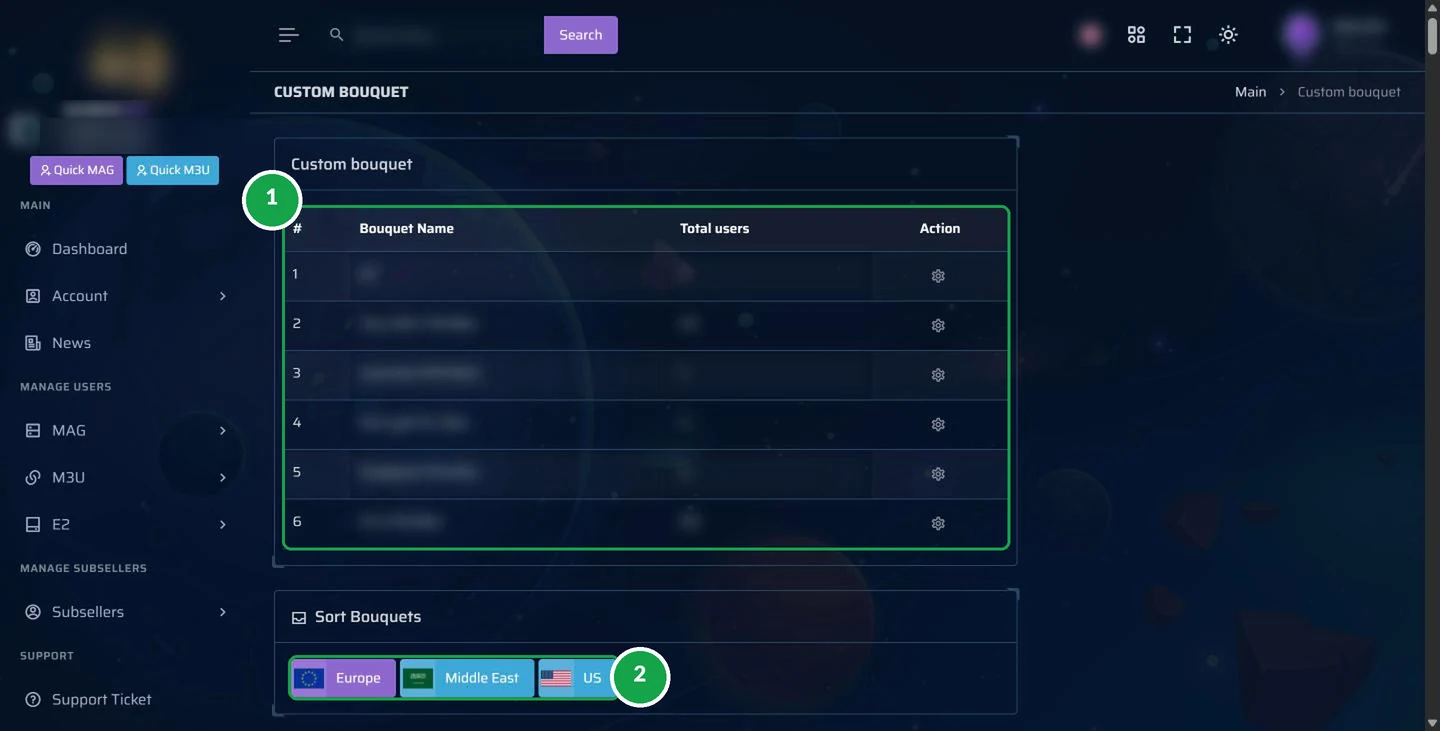
Not every customer wants every channel. Some only care about one region, and bouquets handle that.
 Tap for the full-size view
- 1Your custom bouquets. Channel groups you have saved and can hand out, each with the number of customers using it.
- 2Sort bouquets. Move the regions your buyers want most to the top, such as US, Europe or the Middle East.
Good to know: a shorter channel list opens faster on older devices, and the customer finds favorite channels with less scrolling.
More Menus in the IPTV Panel
The six screens above are your daily tools in the reseller IPTV panel. The menus below are ready for the times you need them:
MAG
Create and look after customers who watch on MAG set-top boxes.
E2
Create and look after customers who watch on Enigma2 receivers.
Account
Change your password and activate two-step login protection.
Support
Write a ticket, or simply message our admin on WhatsApp.
News
Service updates, collected in one spot.
IPTV Panel Terms in Plain English
Just starting out with IPTV? These are the labels you will meet in the reseller IPTV panel, explained simply:
| Term | Meaning |
|---|---|
| Credit | One customer, one month of IPTV. Your balance tells you how many are left. |
| Line | A single customer account with its own username and password. |
| M3U | The account type most people use, for example in apps such as GoTo Player. You copy the playlist link from here. |
| MAG | A kind of set-top box. You add MAG customers from the MAG menu. |
| E2 / Enigma2 | Receivers that work like satellite boxes. They have a menu of their own. |
| Bouquet | A set of channels, often grouped by region. A customer can get only the sets they want. |
| CON | Short for connections: screens watching now compared with screens allowed. |
| Expire | The day the account stops, unless you renew it first. |
| Lock | A safety setting that blocks a line from being used where it should not be. |
| Kick out | Cuts off the device that is watching now. Handy when a customer moves to a new TV. |
Common Customer Issues and the Panel Fix
Most messages from customers can be solved in two minutes inside your reseller IPTV panel:
Something else, or not sure what to do? Send our admin the customer’s username, the device name and a photo of the screen. You get back an answer you can pass on. Our IPTV setup guide also helps customers with the first install.
The First Message for a New Customer
Once the account exists in your reseller IPTV panel, send the customer one clear message. Copy this sample and fill in the brackets:
Hello and welcome! Your IPTV account is active.
1. Get the GoTo Player app. On a Firestick, open the Downloader app and type the code 1129312. For Android TV, phones and Windows, follow the steps on the GoTo Player download page.
2. Sign in with these details: [username] / [password].
3. Your plan runs until [date]. I will send you a reminder before it ends.
Any issue at all? Just reply to this message, day or night.
Keep it short, warm and complete. The customer gets everything in one message, and you get fewer questions later.
A Short Daily Routine in Your Reseller IPTV Panel
For most sellers, a few minutes a day in the reseller IPTV panel is enough:
- 1
Open the dashboard and check the “Expires tomorrow” box.
- 2
Write to those customers with a polite reminder and your renewal price.
- 3
Renew everyone who paid from the customer list (Action, then Renew).
- 4
Add new buyers with Add New, then send them their login and the set-up guide.
- 5
Look at your credit balance and buy more before it gets low.
Your customers use the free GoTo Player app, and our guides show them each step. Stuck on something? Our admin replies 24/7.
Run the Reseller IPTV Panel From Your Phone
A computer is not required to run your IPTV shop.
Our reseller IPTV panel works in the web browser of any phone. Tap the menu icon in the top left corner to show the side menu. You will find every screen from this tour in it: Add New, Renew, the customer list and the dashboard.
Tip: in your browser menu, choose “Add to Home screen”. The panel then opens like an app with one tap, so you can answer a customer within seconds.
Many IPTV reseller panels are hard to use on a small screen. Ours keeps the same buttons and the same steps on a phone as on a computer, so there is nothing new to learn. Whether you are a new IPTV panel reseller or have sold for years, you can work from anywhere.
- Make a new customer while you are out
- Renew an account at night from your sofa
- See who ends tomorrow while you have breakfast
- Copy a login and paste it into WhatsApp
Learn the Panel Step by Step With Our Admin
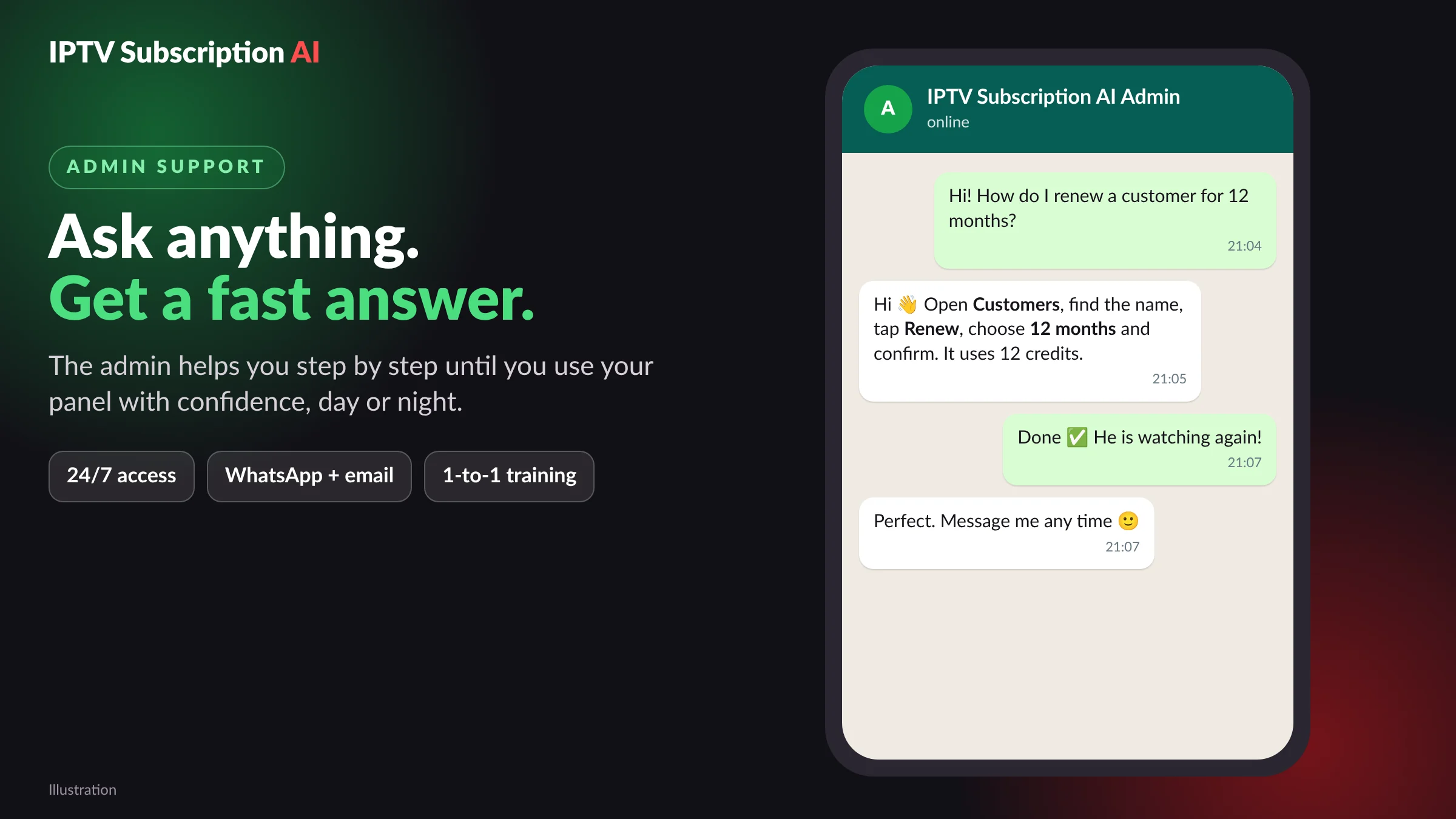
You will not have to work out the panel by yourself.
- 1
A guided walk-through of each screen on this page, on WhatsApp, as slowly as you like.
- 2
Your first customer, made together, while our admin checks every field with you.
- 3
Your first renewal, also done together, so the routine feels easy.
- 4
Questions whenever you want: our admin replies quickly, day and night.
After one short session, most sellers feel comfortable in the reseller IPTV panel. Keep this page as a quick reminder for later.
Reach our admin on WhatsApp at +1 (917) 924-8236 or by e-mail at contact@iptvsubscription.ai. You can also use our support contact page.
Security Tips for Your Reseller IPTV Panel
Your credits and your customers live in the reseller IPTV panel. Guard it the way you guard your banking app:
- Pick a long password that you do not use anywhere else.
- Turn on two-step login under Account.
- Keep your panel login to yourself, never give it to customers or friends.
- Sign out when you use a shared computer.
- Check twice before Confirm: plan length, end date and credit price.
- Tell our admin as soon as something looks strange.
Choose Credits and Get Your Reseller IPTV Panel
Pick a credit package and our admin sets up your reseller IPTV panel with the username you ask for. The $20 set-up fee is free for Christmas until 31 December 2026, and it goes back to $20 on 1 January 2027.
- Example: 1 year for 10 customers
- Your own reseller panel
- Free GoTo Player app for your customers
- Help from our admin 24/7
- Example: 1 year for 30 customers
- Your own reseller panel
- Free GoTo Player app for your customers
- Help from our admin 24/7
- Example: 1 year for 50 customers
- Your own reseller panel
- Free GoTo Player app for your customers
- Help from our admin 24/7
- A price per credit made for you
- Your own reseller panel
- Free GoTo Player app for your customers
- Help from our admin 24/7
Remember: 1 credit = 1 month of IPTV for 1 customer on one screen. A 12-month account takes 12 credits. All prices are in US dollars. Want to compare with our single plans? See our IPTV subscription prices.
Open my reseller panel
More IPTV Reseller Guides
Want to know the technology behind it? Read how Internet Protocol television works.
Reseller IPTV Panel: Questions and Answers
What is a reseller IPTV panel?
A reseller IPTV panel is a private web page where a seller makes, renews and manages customer accounts with credits. It shows your credit balance, your customers, their end dates and who is watching right now.
Does the panel work on a phone?
Yes. It opens in any web browser, so a phone, a tablet or a computer all work. Many sellers make and renew accounts from their phone only.
How do I add a new customer?
Go to M3U, then Add New. Keep the username or type your own, pick the plan length, choose channel groups if you like, look at the end date and credit price, then press Confirm.
How do I renew an account?
In the customer list, press Action next to the customer and choose Renew. Select how many months, look at the new end date and the price, then confirm. The login does not change.
What do the green numbers on the screenshots mean?
Every green number marks one part of the reseller IPTV panel. The numbered list under each picture explains that part in simple words.
Can a customer get only some channels?
Yes. When you create the account, turn on a custom bouquet and pick the channel groups, for example by region.
Can I see when an account ends?
Yes. The customer list shows each end date, and the dashboard counts the accounts that end tomorrow, so you can send reminders on time.
Are short test lines possible?
The panel lists short lengths from 1 hour to 1 day for tests. Ask our admin how test lines work on your account.
How do I keep my panel safe?
Your panel has a private login. Choose a strong password, turn on two-step login under Account, and never give your login to customers.
Can I change a customer’s channels later?
Yes. Find the customer in the list, choose Edit and pick another bouquet. The customer refreshes the app to see the new channel list.
What happens when a plan runs out?
The account turns red with the word Expired and stops working. Use Renew in the Action menu and the customer can watch again, login unchanged.
Is a renewal priced like a new account?
Yes. It costs exactly the same: one credit for every month you add, whether the account is new or old.
Who teaches me to use the panel?
Our admin. You get a one-to-one walk-through on WhatsApp, and you can ask questions 24/7.
Do my customers need a special app?
They can use the free GoTo Player app. It works on Firestick, Android TV, Android phones and Windows. Offline downloads work on Android phones and tablets and on Windows; the iPhone version is coming soon.
Ready to Open Your Reseller IPTV Panel?
Choose a package, fill in the short form, and our admin shows you around your new panel one to one.