
How to Pay for IPTV with Remitly
Quick answer: to pay for IPTV with Remitly, choose Pay with Remitly at checkout and pick Bank Transfer (CIH Bank) or Phone Transfer (Orange Money). In the Remitly app, send the amount shown at checkout to Morocco using the details shown at checkout, paying by debit or credit card (Apple Pay is also offered to senders in the UK and EU). Then paste your Remitly reference (it starts with R) and a screenshot at checkout. We confirm your payment and email your login details.
What you need
- The Remitly app (iPhone or Android) or the Remitly website. Signing up is free.
- A debit or credit card (or Apple Pay in the UK and EU).
- About 5 minutes.
Step-by-step: pay with Remitly
- At checkout, choose Pay with Remitly, then Bank Transfer (CIH Bank) or Phone Transfer (Orange Money). Keep the checkout page open: it shows the amount and the recipient details, with copy buttons.
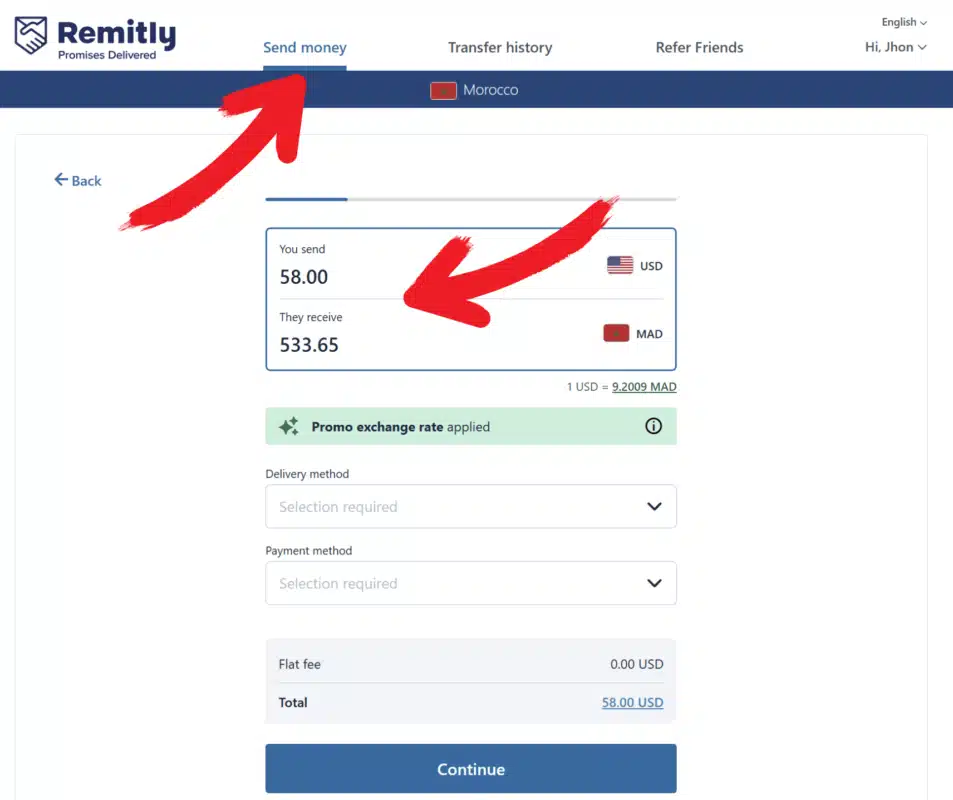
- Open Remitly and choose Morocco as the country you send to (our payment partner is based there).
- Enter the amount shown at checkout. Remitly shows how much arrives in Moroccan dirhams.

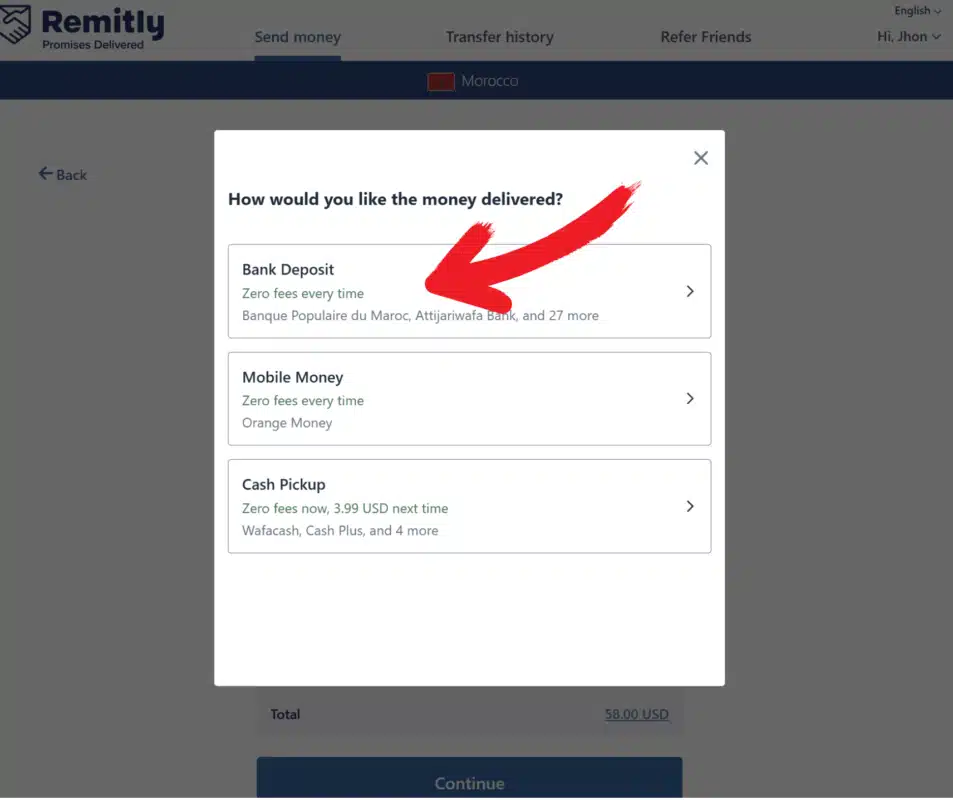
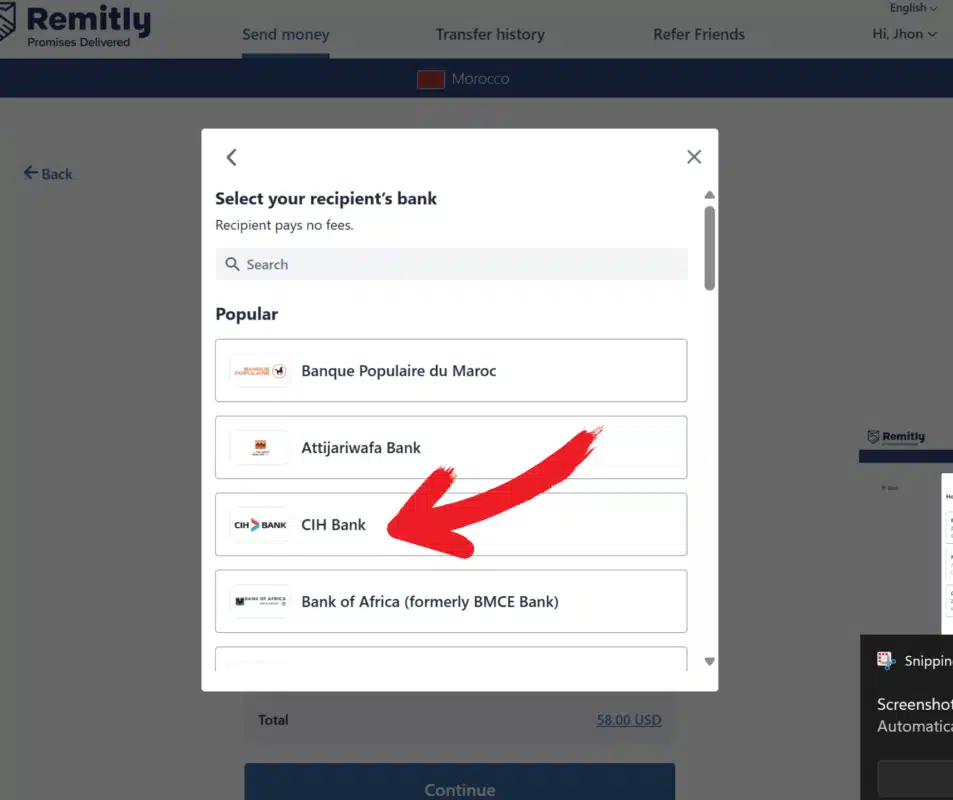
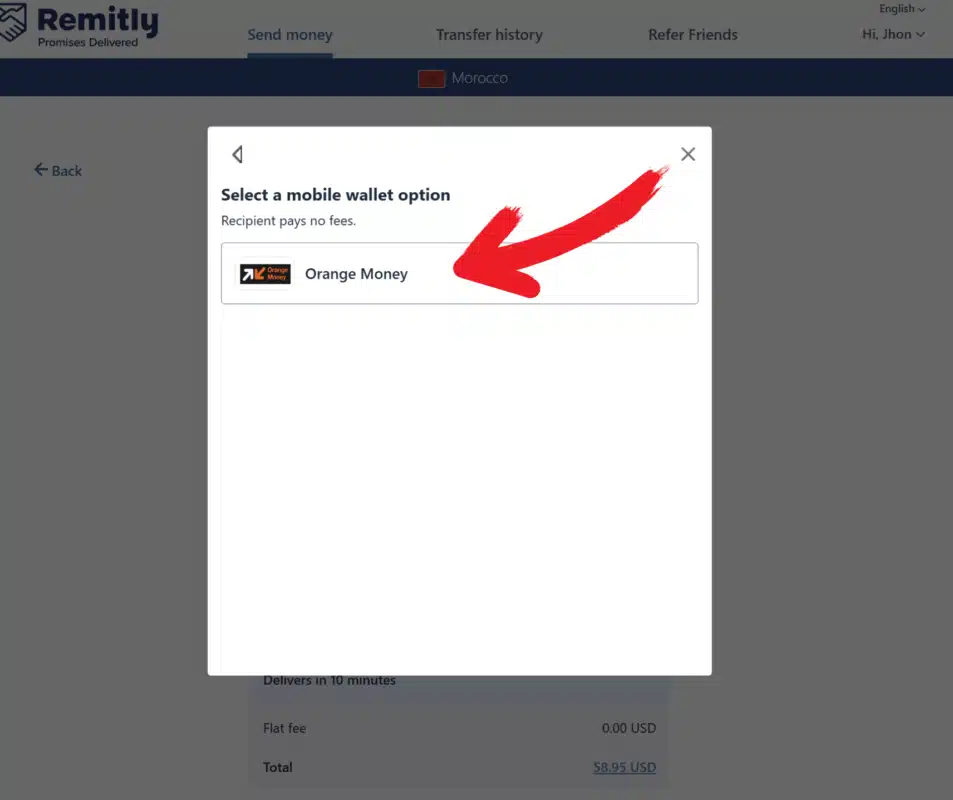
- Choose the delivery method: Bank deposit → CIH Bank (paste the RIB from checkout) or Mobile money → Orange Money (paste the phone number from checkout).
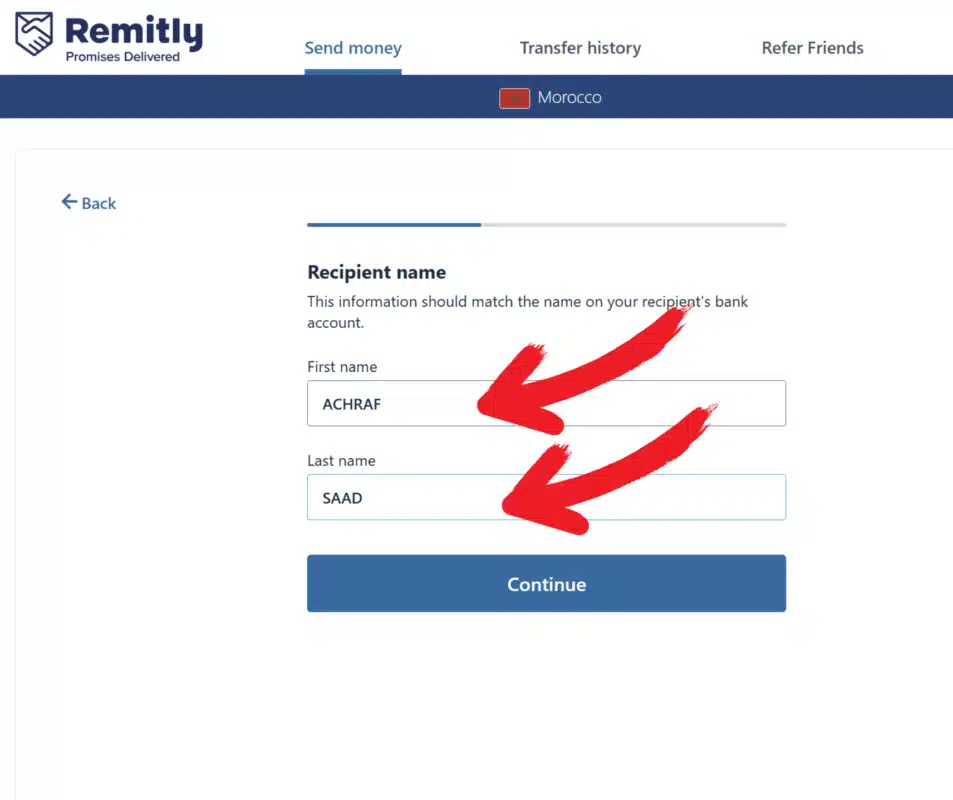
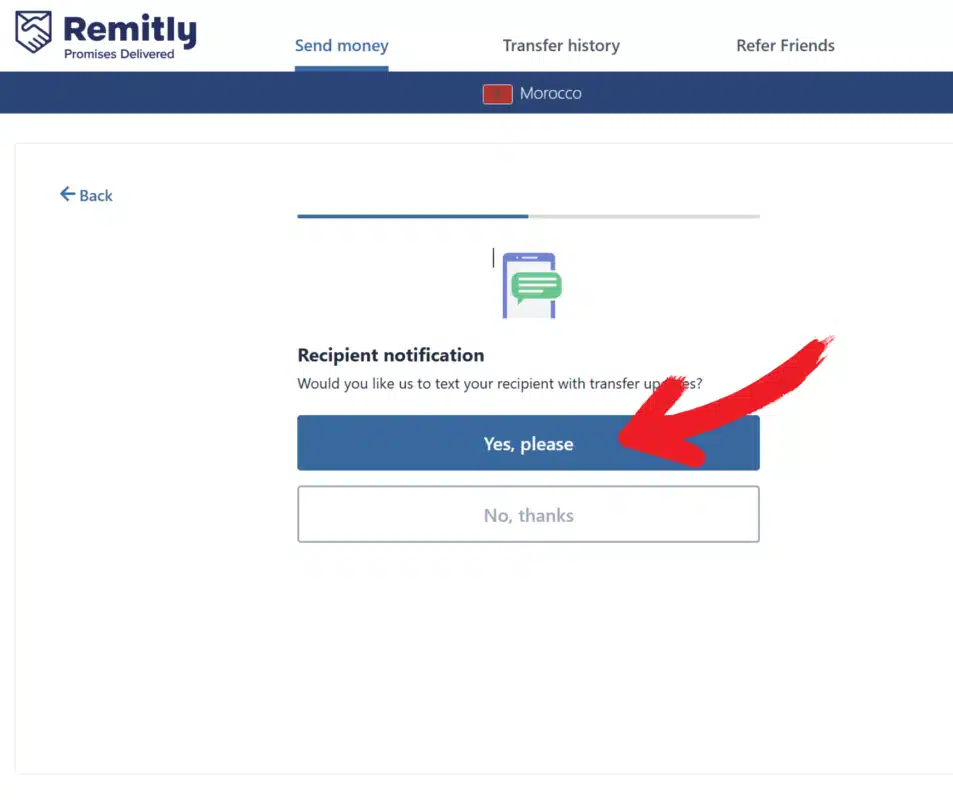
- Add the recipient: first and last name exactly as shown at checkout. Turn on Recipient notification.
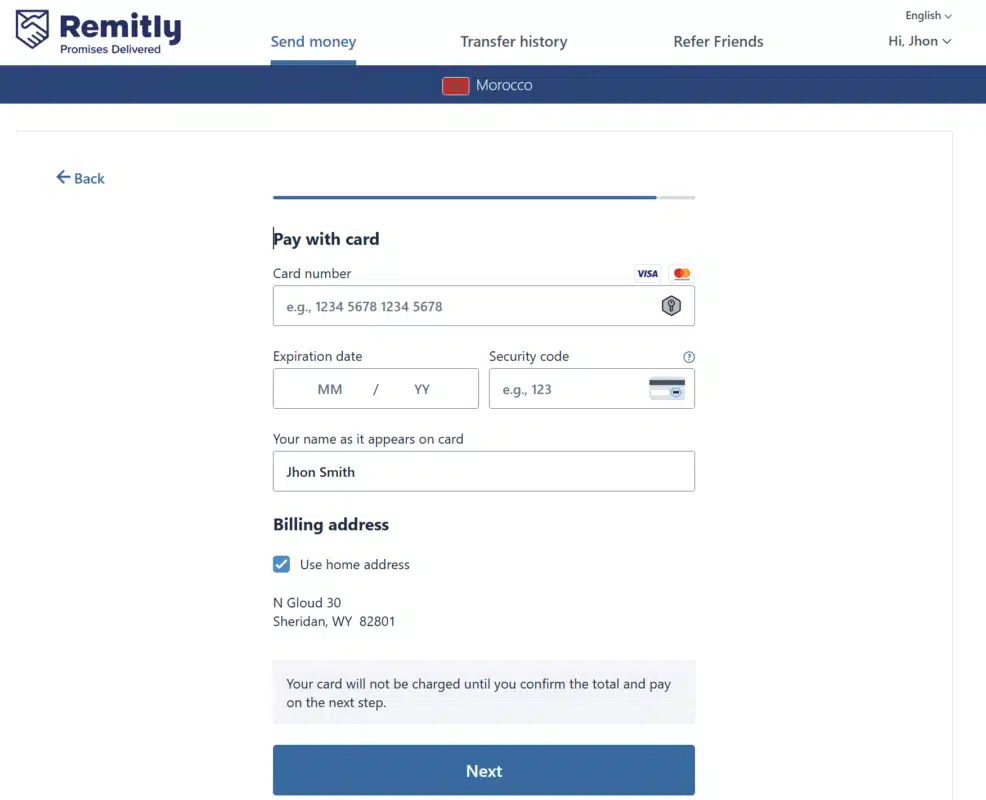
- Pay with a debit or credit card (Apple Pay in the UK and EU), then confirm the transfer.

- Copy your Remitly reference (it starts with R, for example R1234567890) and take a screenshot of the confirmation screen.
- Back at checkout, paste the reference and add the screenshot. Place order unlocks; place your order.
That’s it. We start your order as soon as we confirm your payment, and send your login details by email. Questions at any step? Message us on WhatsApp.
Fees
Remitly shows the exact fee and exchange rate before you confirm, so you always know the total.
- Bank deposit and mobile money: Remitly’s Morocco page says “$0 fees for bank deposit and mobile wallet”. New Remitly customers also get a promotional exchange rate on the first 500 USD they send (Remitly’s terms apply).
- Credit card: it can cost more, and your card issuer may add its own fee. A debit card usually avoids both.
How to pay for IPTV with Remitly from the US, UK or Canada
Remitly’s payment options depend on the country you send from. This is what Remitly lists for transfers to Morocco (checked on 18 October 2026):
| You send from | Debit card | Credit card | Bank account | Apple Pay |
|---|---|---|---|---|
| United States | Yes (Visa, Mastercard) | Yes, may cost more (Discover too) | Yes | No |
| United Kingdom | Yes | Yes, may cost more | Not listed | Yes |
| Canada | Yes | Yes, may cost more | Yes | No |
Remitly shows the total before you confirm, so you can switch to a debit card if the credit-card total is higher. Source: Remitly, Send money to Morocco.
Limits and ID checks
Remitly’s sending limits depend on the country you send from and on whether your identity is verified. If Remitly asks for an ID check, finish it in the app. Your order with us stays open, and we confirm it as soon as your transfer goes through.
FAQ
Where do I find my Remitly reference?
On the Remitly confirmation screen, in the Remitly email and in your transfer history. It starts with R.
Why does Remitly ask me to send to Morocco?
Our payment partner receives Remitly transfers in Morocco. Always copy the recipient details from the checkout page, where they’re always up to date.
Bank deposit or Orange Money: which is better?
Both work with a debit or credit card, and Remitly shows the fee for each before you pay. If one is unavailable, use the other.
Is there a Remitly fee for paying us?
For bank deposit and Orange Money, Remitly says it charges no transfer fee. Your total can still depend on the exchange rate and your card; Remitly shows it before you pay.
My card was declined in Remitly. What now?
Try a debit card instead of a credit card, or a different card. Some banks block international transfers until you approve them in your banking app.
Can I pay with Apple Pay?
Only if you send from the UK, the EU or Singapore. From the US or Canada, use a debit or credit card (or a bank account).
What if my payment hasn’t been confirmed yet?
Send us your order number and Remitly reference on WhatsApp and we’ll check it right away.
Want to compare first? See our prices. Other ways to pay are shown at checkout.